9 CHANNEL 2.4GHz AIRCRAFT COMPUTER RADIO SYSTEM
107
AIL DIFF (ACRO and GLID)
t"WBMVFUIBUFRVBUFTUPiEPXOwBJMFSPOUSBWFMDPNQBSFEUPPGUIFiVQwBJMFSPOUSBWFMJTBHPPEQMBDFUPTUBSU
t6TFUIF"%+645GFBUVSFEFTDSJCFEJOUIFTXJUDITFUVQQSPDFTTUPNBLFöOFJOøJHIUBEKVTUNFOUT
{{
Tip
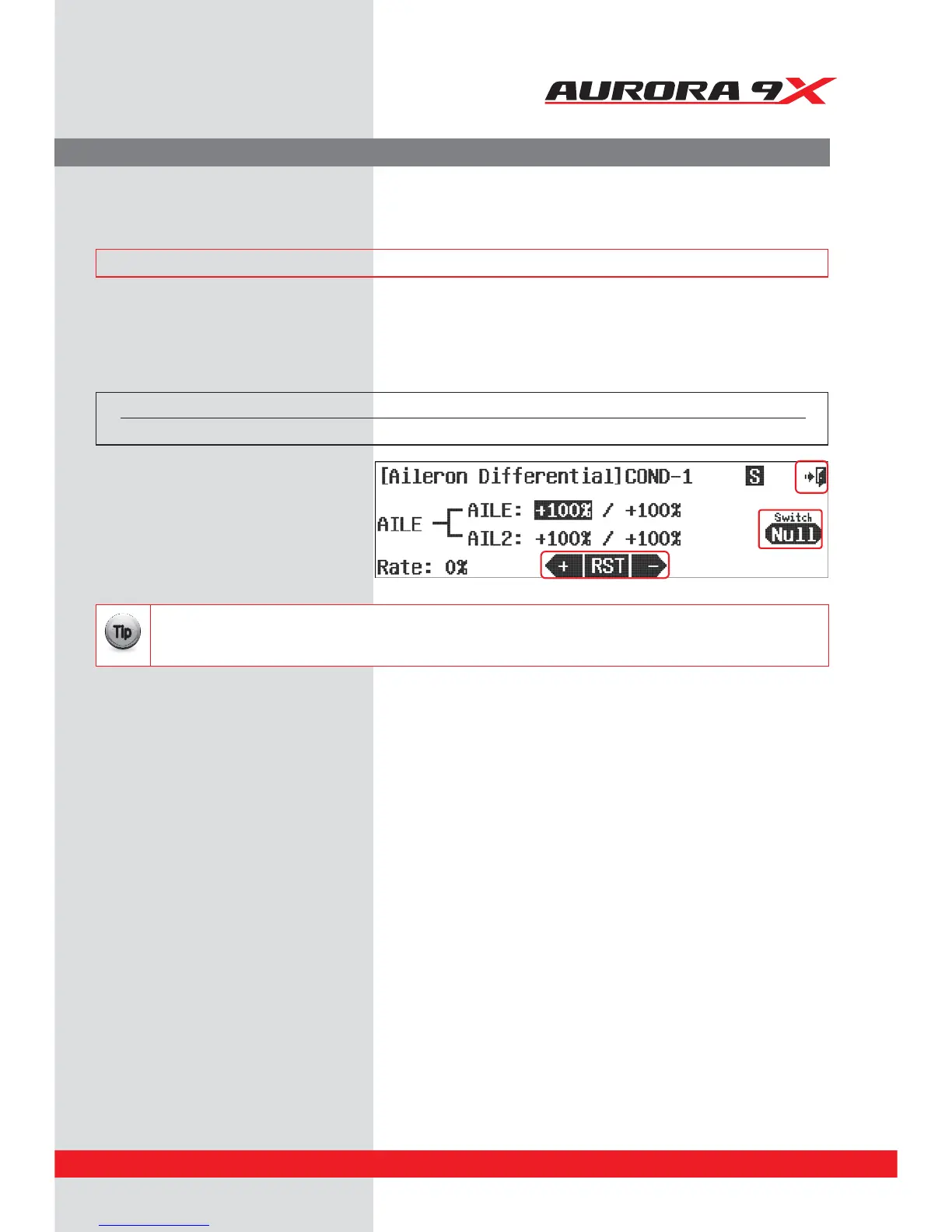
a. Select the AIL DIFF icon from the model menu.
Switch Option and In–Flight Fine Trim Adjustment Switch Function
b. To select a 2 or 3 position switch that will allow multiple dierential values to be used, turn the feature on and o, and to select an
“in-ight” ADJUSTMENT switch, press NULL and follow the switch activation process.
c. Select the aileron and the travel direction limit..
d. Input a value with the +RST- icon.
e. Press th
e Exit icon to return to the model menu.
Switch type Function Trim link
2 position On or O Yes. T.APP
Aileron Dierential.
Aileron dierential is generally used to provide more up aileron, than down aileron travel. This will help prevent
adverse yaw conditions when banking and rolling the aircraft.
### This function can be inuenced by the ight condition feature ###



 To Next Page