9 CHANNEL 2.4GHz AIRCRAFT COMPUTER RADIO SYSTEM
SWH-THR (HELI)
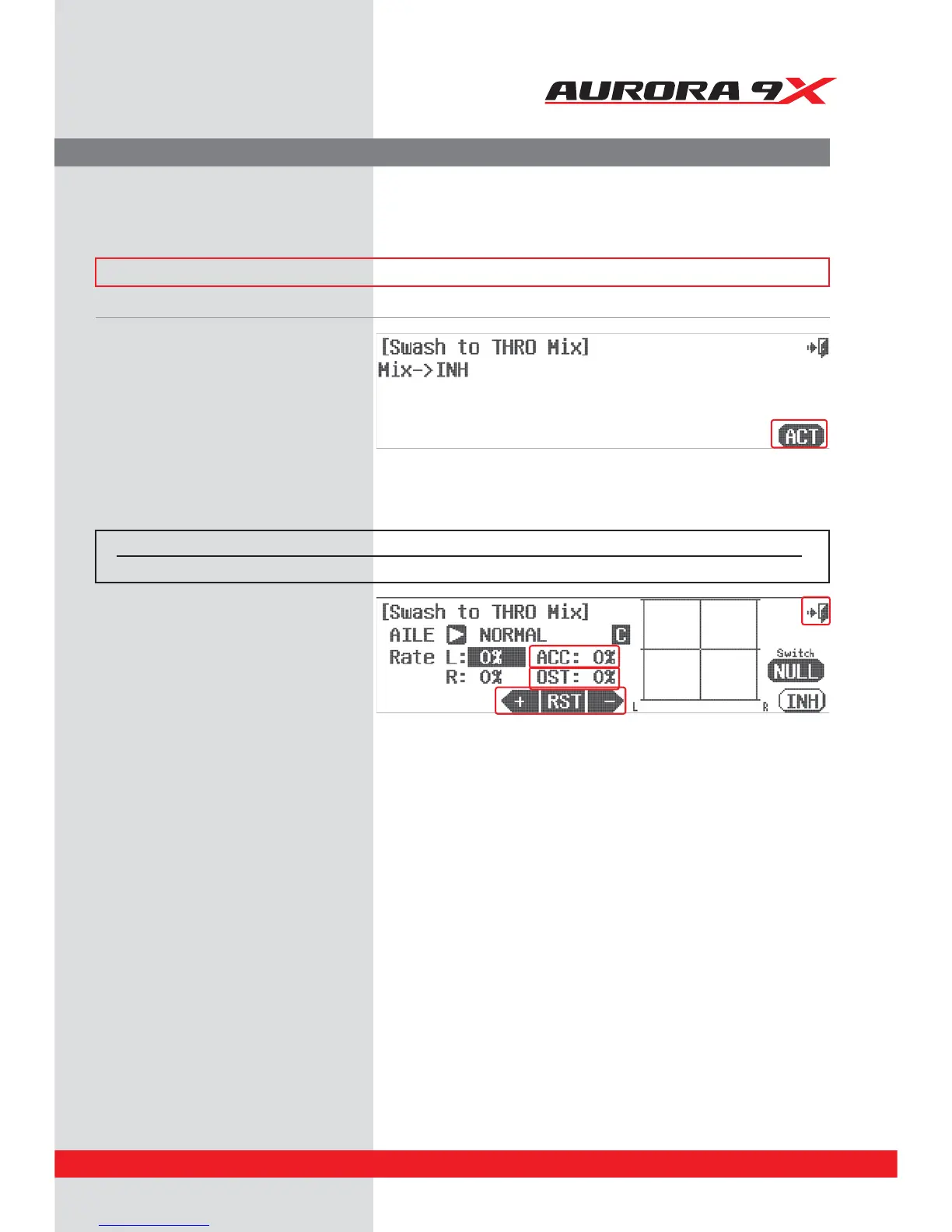
Swash to Throttle Mix.
A swash to throttle mix is typically used to increase the throttle RPM when a swash input is given to the heli. The
increased RPM compensates for loss of rotor disk lift as a result of the rotor disk tilt.
### This function can be inuenced by the ight condition feature ###
a. Select the SWH-THR icon in the model menu.
b. Select ACT to activate the feature.
d. Use the arrow icon to select the swash input,
AILR or ELEV you wish to add throttle
compensation for.
e. Move the control stick and use the +RST- icons
to apply a travel rate for the direction of swash
movement.
f. Use the ACC feature to change the speed of the
mix. Press the ACC : 0% icon. Experiment with
positive and negative values watching the results
on your model.
g. Additional adjustment can be applied to the mix
using the Oset, or OST : 0% value.
h. Repeat this process for all swash movement
directions.
i. Select the Exit icon to return to the model menu.
Switch Option and In–Flight Fine Trim Adjustment Switch Function
c. To select a 2 or 3 position switch that will allow multiple mix values and to select an “in-ight” ADJUSTMENT switch,
press NULL and follow the switch activation process.
Switch type Function VR Adjustment
2 or 3 position Multiple values Fine tuning control choice
133



 To Next Page