9 CHANNEL 2.4GHz AIRCRAFT COMPUTER RADIO SYSTEM
95
FLT.COND (ACRO)
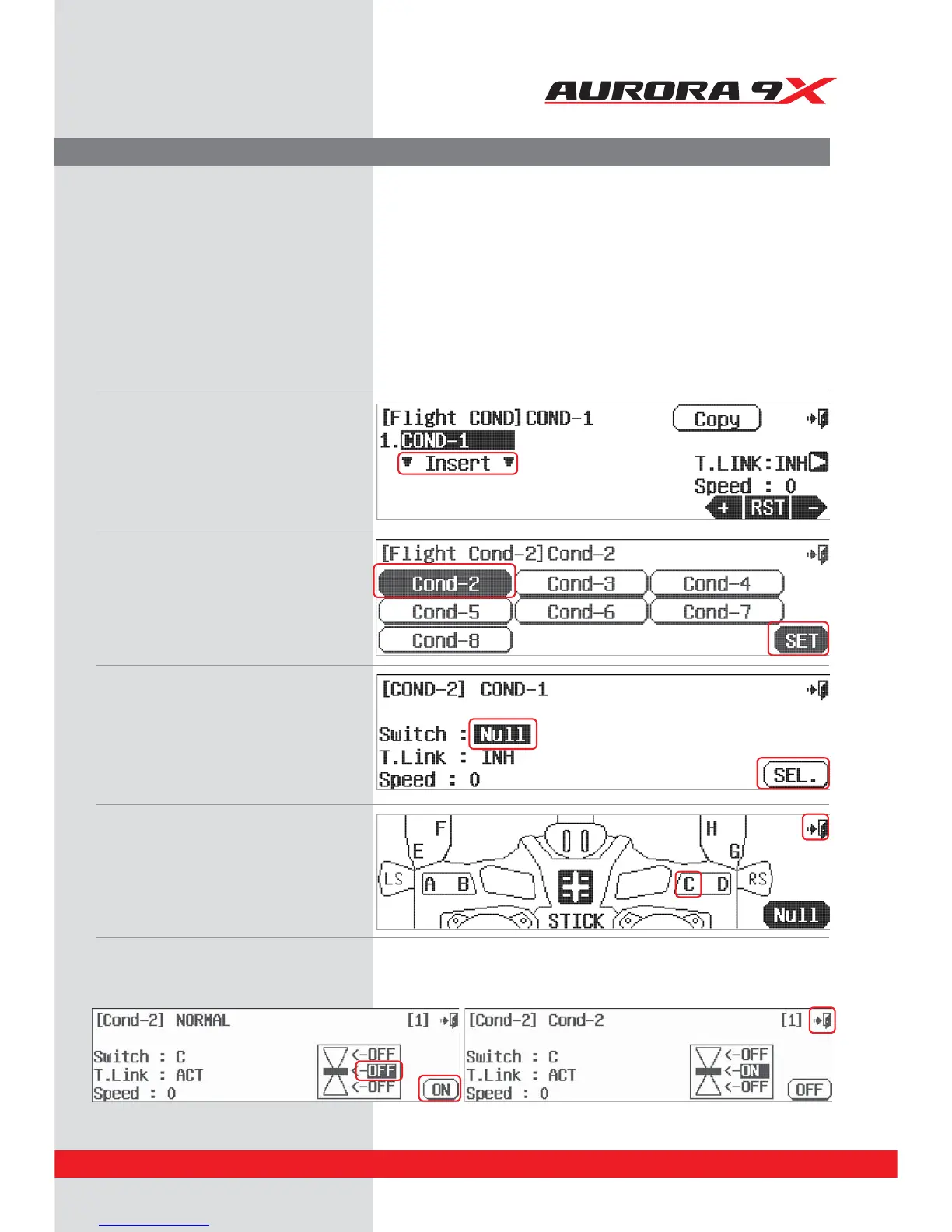
a. Press FLT.COND in the model menu
b. Press Insert
c. Press Cond-2
d. Press SET
e. Press NULL to select a switch
f. Press SEL
g. Press the C icon for the 3 position switch C
h. Press the Exit icon
i. Move switch C and note the changes to the
switch icon. With the switch in the middle position,
press the OFF middle position icon.
j. Press the ON icon.
k. Press the Exit icon.
The ight condition tutorial
To show you how to set-up, and use the Aurora 9X ight condition feature, follow along with this tutorial. You can
change the switch location and other options when you choose to do this on your own later.
We will create two ight conditions, condition 2 and 3. These two new ight conditions are in addition to the
NORMAL condition. When we are done, the NORMAL condition will be with the C switch back, or in the [0] position.
The condition 2 will be active when the switch is in the middle, or [1] position. Condition 3 will be active when the
switch is placed forward, or in the [2] position.



 To Next Page