9 CHANNEL 2.4GHz AIRCRAFT COMPUTER RADIO SYSTEM
EPA (End Point Adjustment)
The following functions are dened in this section:
EPA End Point Adjustment
D/R&EXP Dual Rates and Exponential (expo) Rates
Sub-Trim Servo Sub-Trim Adjustment
Reverse Servo Reversing Function
S. Speed Servo Speed Feature
T.Limit Travel Limit
Monitor Active Model Control Monitor
P. M i x s Programmable Mixing
Gyro Gyro Functions
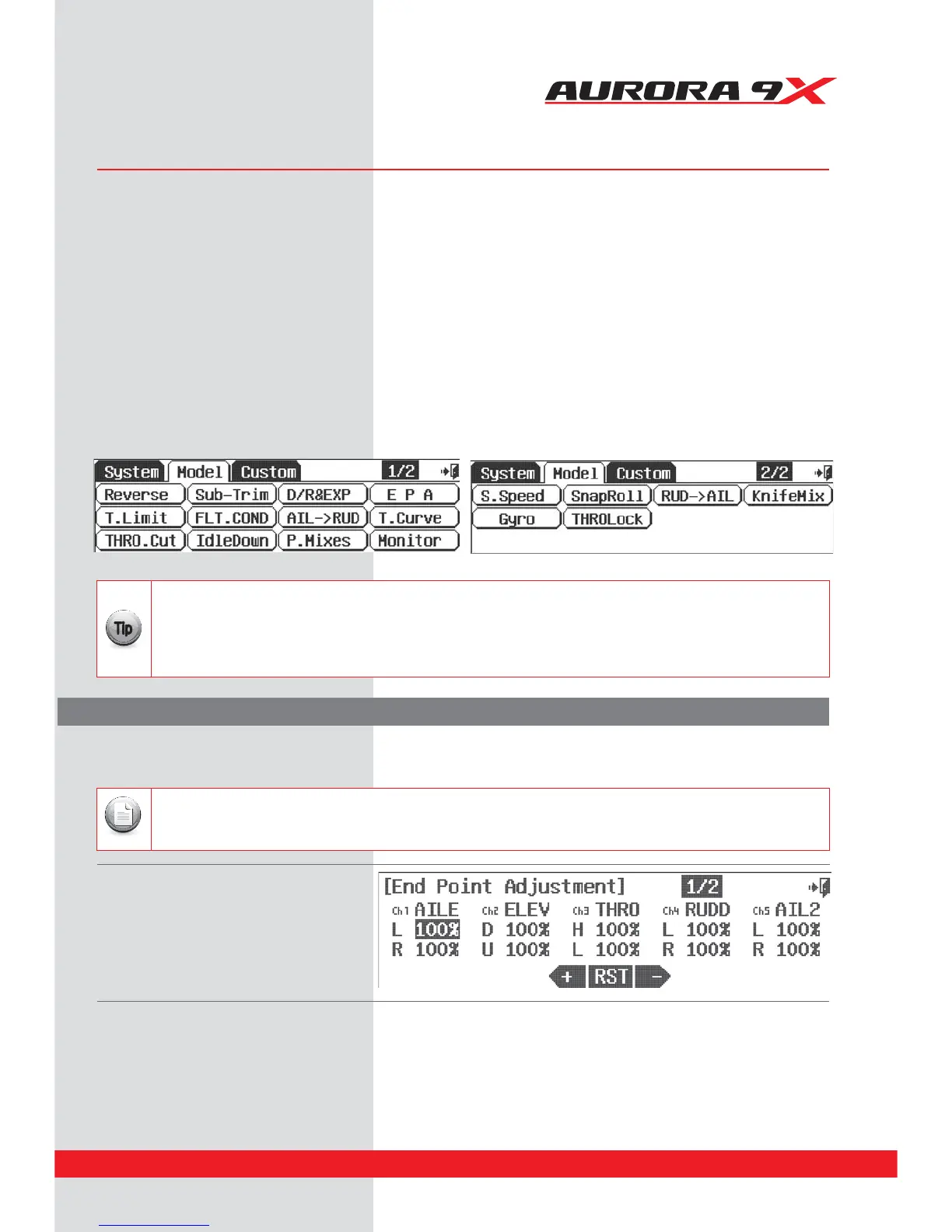
Access the model menu from the home screen by pressing the aircraft icon representing the active model.
Note the ½ icon. There are normally two pages to the model function menu, in very sophisticated airframes there can be three pages.
a. Select EPA from the Model menu.
b. Press the icon of the servo channel you wish to adjust.
c. Move the aileron control stick all the way to the left. The L 100% should be highlighted.
d. Using the + RST – icon to set an appropriate movement value.
e. Now move the stick right and set the travel value for the right aileron function.
f. Repeat these steps for all the channels you wish to set an EPA value.
g. When done, back up to the model menu by selecting the Exit icon.
t5IFSFBSFUXPTDSFFOTUPUIF&1"NFOV/PUFUIFJDPO
t5IF&1"SBOHFJTUP
t4VC5SJNBOE%VBM3BUFBOEGVODUJPOTDBOJNQBDUUIFQSPHSBNNFE&1"WBMVFT
Note
EPA stands for “End Point Adjustment”. With the EPA function, you can set both sides of the servo arm travel at the same
time, or separately. This function can help avoid binding or damaging the aircraft control surfaces.
It is recommended you start the set up of your model using the functions listed in the following order:
1. Servo Reverse
2. Sub-Trim
3. EPA or end point adjustment
After programming these very basic functions, your model will be prepared for more advanced programming.
{{
Tip
Model Menu and More - Menu Functions Common to all ACRO, GLID and HELI models.
The following features are common to the ACRO, GLID and Heli model programs. Depending on the active model
features as you dened them during the model set-up process, these functions may or may not be in the model menu.
85



 To Next Page