9 CHANNEL 2.4GHz AIRCRAFT COMPUTER RADIO SYSTEM
T. HOLD (HELI)
Throttle Hold Position
Throttle hold is used to set the throttle at a programmed position when throttle hold is selected.
This Function is often used to faciliate auto rotation maneuvers.
### This function can be inuenced by the ight condition feature ###
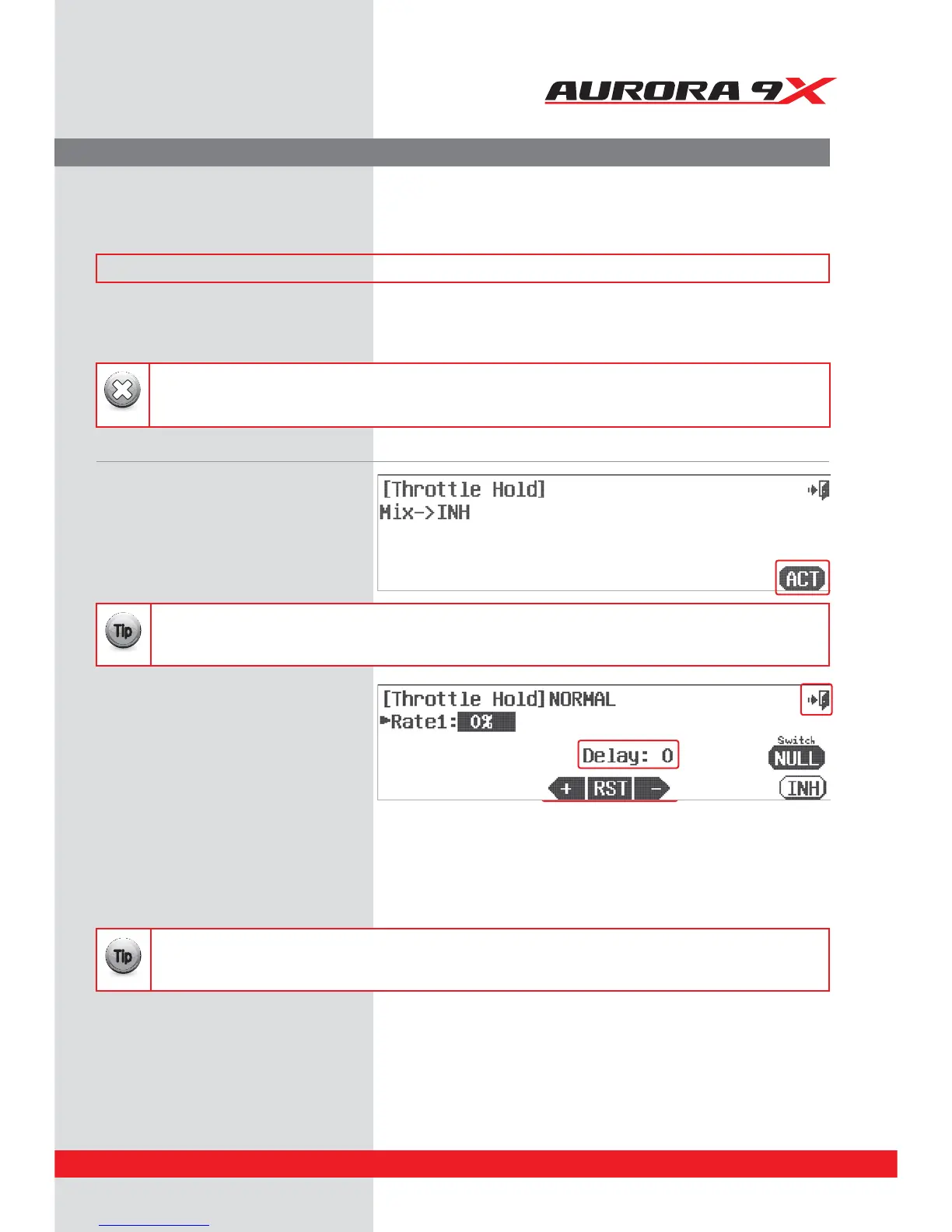
c. Press the Rate1 : 0% icon.
d. Use the +RST- icons to place a rate value for the
hold position you want the throttle to be at
when the hold switch is activated.
e. To set an activation delay, press the Delay: 0
icon and set a value with the +RST- icons.
f. Press the Exit to return to the model menu.
a. Select T.HOLD from the model menu. T.Hold activation screen
b. Press ACT to activate the throttle hold menu.
To use the Auroras throttle hold feature;
In our tutorial, we placed the hold switch on F.
At this point we can select a switch to place multiple hold positions on.
However it is not necessary at this point, this can be done later through the switch menu, if you wish.
{{
Tip
Explore the throttle cut position and the (link to trim) selection as shown previously in this manual.
{{
Tip
The throttle hold feature will not work unless a hold position has been assigned a switch using the ight condition/idle-up
function as was done on page 118 and 119.
Warning
135



 To Next Page