9 CHANNEL 2.4GHz AIRCRAFT COMPUTER RADIO SYSTEM
104
AIL-RUD (ACRO and GLID)
Aileron to Rudder Mix.
Provide your large scale aircraft or sailplane with an aileron to rudder mix for smooth, coordinated turns.
### This function can be inuenced by the ight condition feature ###
Switch type Function Trim link VR adjustment
2 position On or O Yes, T.APP Fine tuning control choice
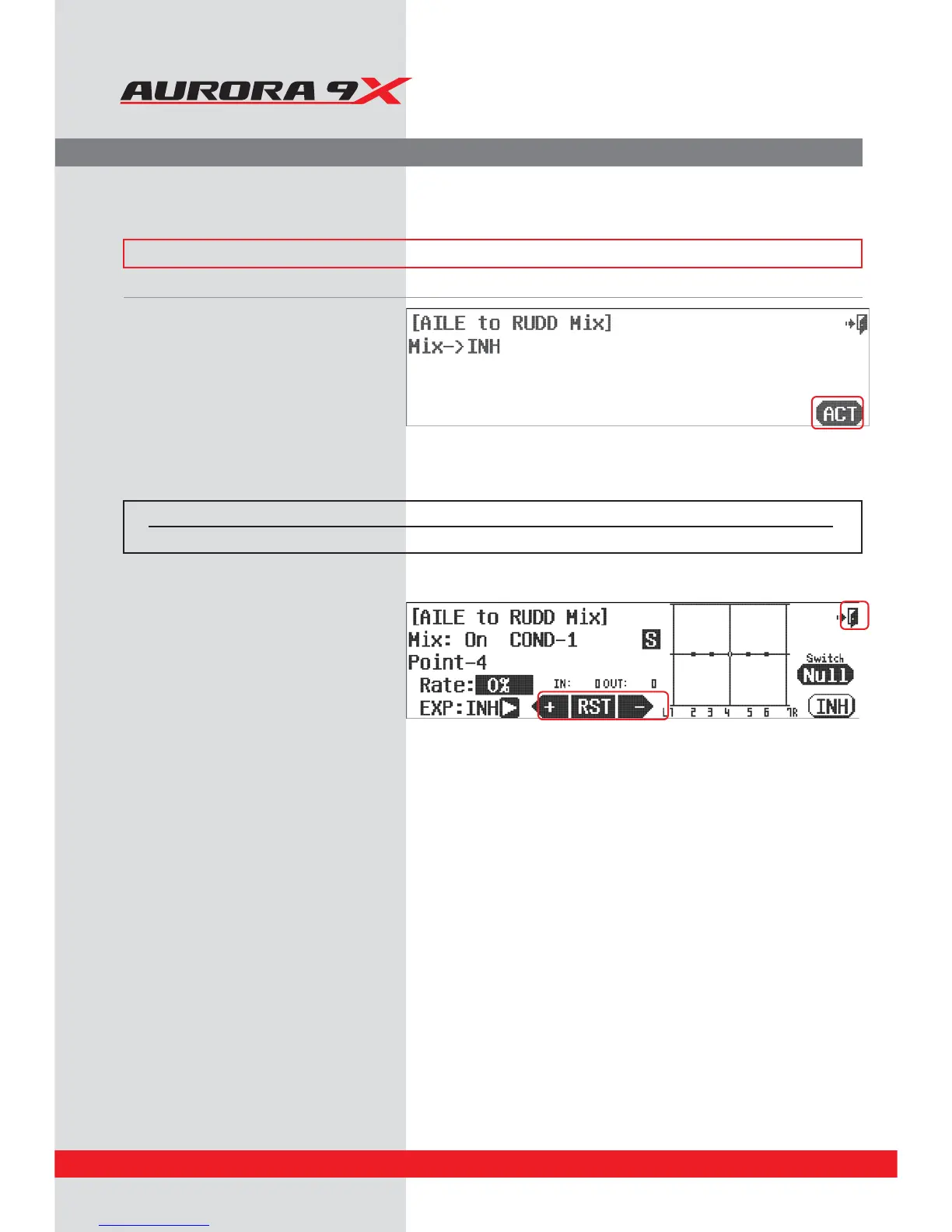
d. The Aurora 9X oers a 7 point curve on many of
our adjustable mix menu items. To adjust the
travel values, move the corresponding control
stick or slider to align the moving line with the
point you wish to adjust. Press the + or - icon to
adjust to the desired curve points. If you wish to
inhibit any curve points, Press the RST icon. It is
necessary to inhibit the #2, 3, 5 and 6 points,
and to just adjust points 1 and 7 equally to
achieve a linear curve.
e. Press the Exit icon to return to the model menu.
Switch Option and In–Flight Fine Trim Adjustment Switch Function
c. To select a 2 position switch that will turn the mix on and o, select an “in-ight” ADJUSTMENT switch, and choose to activate the trim
link feature, press NULL and follow the switch activation process.
a. Select the AIL-RUD icon from the model menu.
b. Press ACT to access the mix menu screen.



 To Next Page