9 CHANNEL 2.4GHz AIRCRAFT COMPUTER RADIO SYSTEM
Launch (GLID)
The “Cut” function for the launch mode is dierent than any other cut function in the Aurora 9X.
{{
Tip
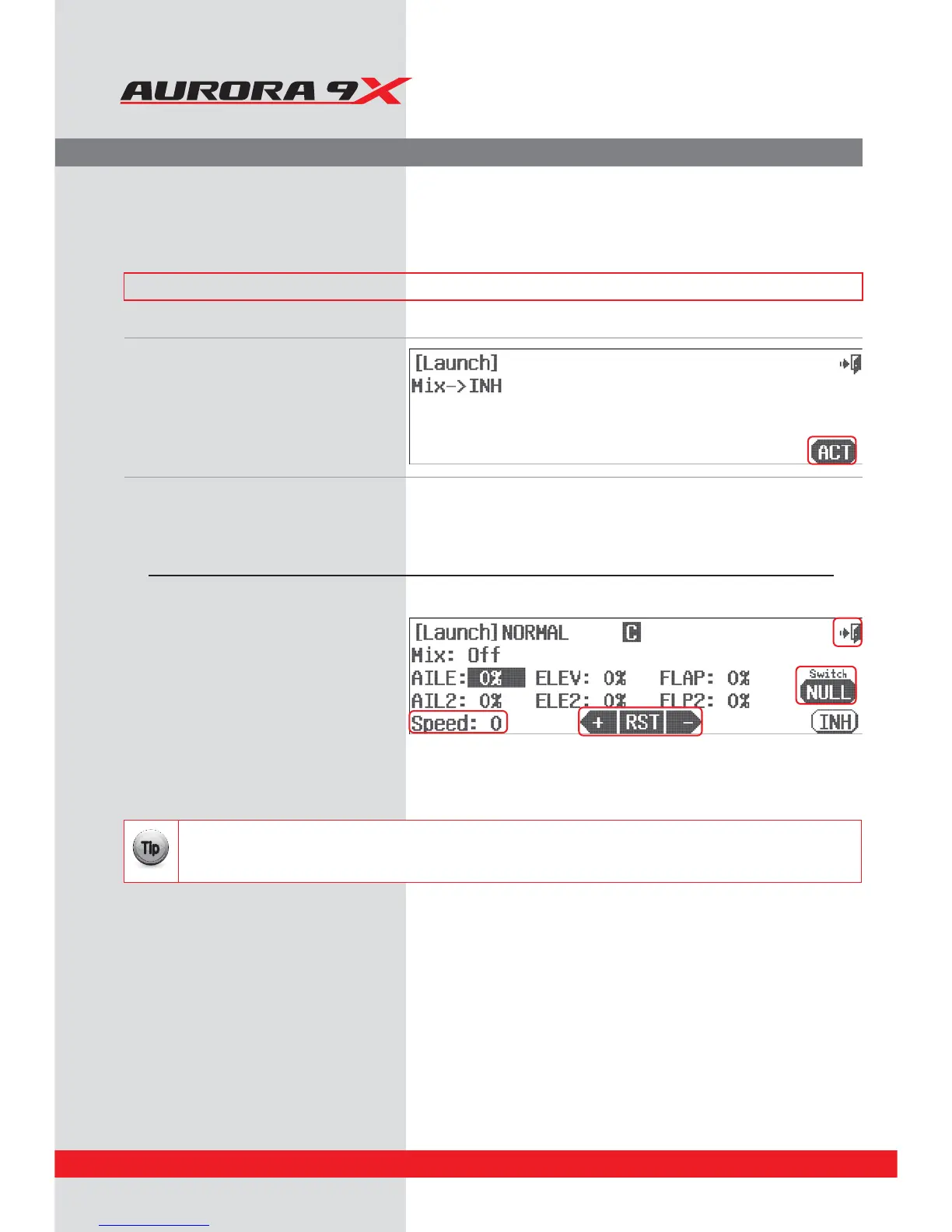
Glider Launch Menu.
The Launch mix allows the aileron, ap and elevator functions to be mixed and deployed by selecting a switch. As the
name implies, it is used to optimize the entire trailing edge of the wing for a launch mode. Try to drop the trailing edge
a couple of degrees and add up elevator compensation on gliders for a better zoom launch conguration.
### This function can be inuenced by the ight condition feature ###
a. Select Launch from the model menu.
b. Press ACT to activate the Launch feature menu.
Switch Option
c. Select a 2 position switch that will activate the launch mix, create a “cut” point,
and apply an in ight adjustment switch. Press NULL.
d. Use the +RST- icon to set a movement value for
the aileron, elevator and aps.
e. Select Speed: 0, and change the time value with
the + icon to set a delayed control deployment
speed.
f. Check the On/O by SW C set as initial value in the
glider
g. Select the Exit icon and return to the model menu
Switch type Function Cut Function VR adjustment
2 position On or O Cut control choice Fine tuning control choice
124



 To Next Page