9 CHANNEL 2.4GHz AIRCRAFT COMPUTER RADIO SYSTEM
Helicopter throttle and pitch curve adjust functions, hover trim and more
Trim Link Activation
Adjust to Trim
You will see the “Adjust to Trim” option in the throttle control menus: throttle cut, idle down and throttle hold.
The goal of activating the “Adjust to Trim” feature is to link the rate values we programmed for throttle positions,
so they can be adjusted with the throttle trim.
0VSFYBNQMFXJMMCFUIF*EMFEPXOGVODUJPO
a. At the idle down function switch menu screen
press the Adjust to Trim :*/).
b. Select ACT to activate the trim link.
(this screen not shown)
c. Reverse this process to inhibit,
or turn o the trim link.
Modern computer radios use a digital trim system. The Aurora 9X features four trim controls for the throttle and the three main axis of
øJHIUQJUDIFMFWBUPSSPMMBJMFSPOBOEZBXSVEEFS
There are occasions when you may want to link the trim of one control to another control. The Aurora 9X oers two dierent trim link
features; the “Adjust to Trim” and the “T.APP” (trim apply). Both are explained in the following text.
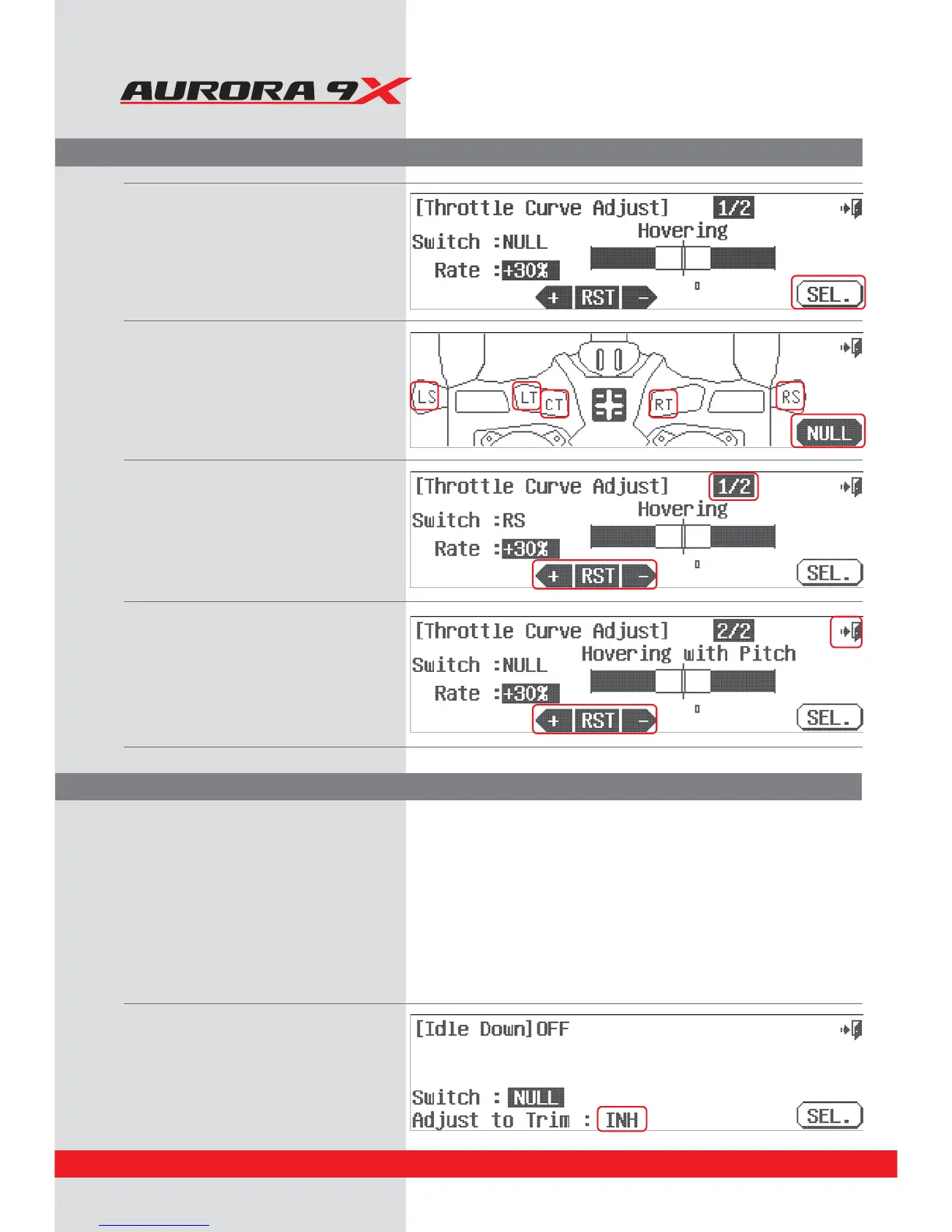
d. Here at the Throttle Hovering
adjustment screen we can select to
place the throttle hover trim on a control,
press SEL.
e. Select the LT, CT, RT or right slider(RS) to
control the throttle hover adjustment.
f. Press the Exit when done selecting a controller.
g. Adjust the rate value with the +RST- icon
if you want to expand or decrease the
adjustment size capability of the selected
controller.
h. At this time you can select page two of the
adjust menu, by pressing the 1/2 fraction icon.
J*GZPVXBOUUPTFUBOBEKVTUNFOUTXJUDIGPSUIF
throttle hovering with pitch option,
do so as described in this section, d through g
j. Press the Exit to return to the throttle
curve menu.
82



 To Next Page