9 CHANNEL 2.4GHz AIRCRAFT COMPUTER RADIO SYSTEM
Adjust Function switch set-up
Additional camber and launch mode adjust function menu (GLID)
The Camber Mix and Launch features have several screens in the adjustment menu allowing you to set adjustment travel
rate values for the control surfaces used in the Launch and Camber functions when the function is active. Select a control
surface value to change, and change the value with the +RST- icon.
This is the Camber mix screen.
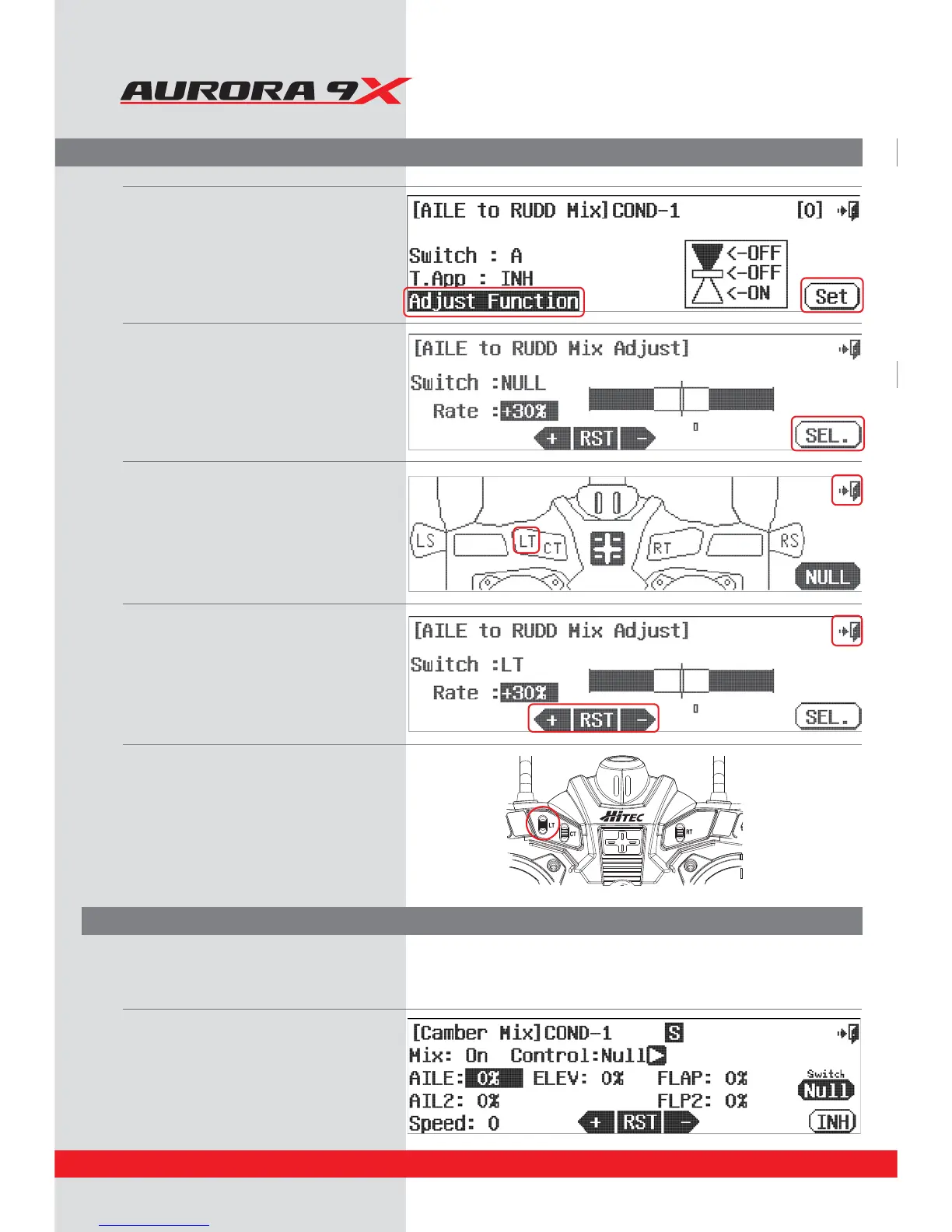
c. Press the A
djust Function icon.
d. Select SET.
e. Press SEL.
f. Let’s choose the LT switch to
adjust the aileron to rudder mix.
g. Press the Exit icon to go back to the
"*-&UP36%%.JY"EKVTUTDSFFO
I*GXFXBOUUPFYQBOEPSDPOUSBDUUIF
adjustment range the LT switch is capable of,
press the + RST- icon and note the eects.
i. Press the Exit icon repeatedly until
you have backed out to the home screen.
j. Use the LT switch and apply a value to the
aileron to rudder mix.
Note its eect on the model.
80



 To Next Page