9 CHANNEL 2.4GHz AIRCRAFT COMPUTER RADIO SYSTEM
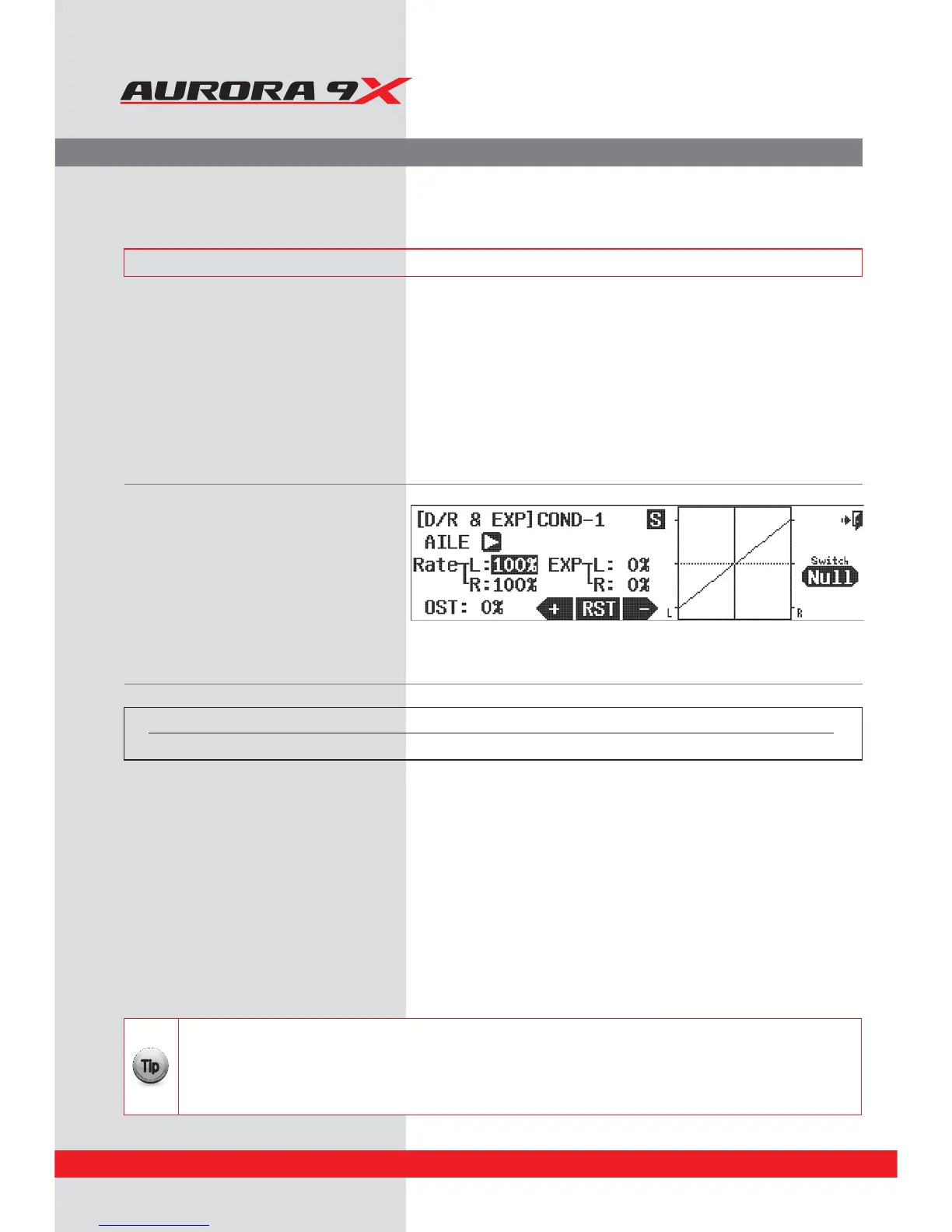
D/R & EXP (Dual Rates and Exponential Rates)
a. Select %3&91 from the Model menu.
Switch Option
b. Press NULL to apply the dual rate function to a two or three positions switch.
You can have a dierent rate on each switch position. See page 68 for the switch selection process.
This menu contains three valuable features. We will rst discuss and show a dual rate set-up, then discuss and
demonstrate exponential, or “expo”. The OST (Oset) feature can be applied to any channels “movement graph” as
required. It will be discussed last.
Dual Rates, Exponential Rates and Curve Oset Features
Dual rates allow the user to set two or three servo throw “rates” for a control surface, or channel.
These movement rates are then selected during ight with a switch.
Exponetial rates (expo) is a gem of a feature, often overlooked; expo can make a poor pilot look great. We bet you will
want to use a negative expo value on all your aircrafts aileron and elevator controls.
While not as widely used as Dual rates and Expo, the Oset curve feature allows you another way to change the
normally linear servo movement and “skew” it.
### This function can be inuenced by the ight condition feature ###
Switch type Function
2 or 3 position switch Multiple values
t5IFSFBSFIVOESFETPGDPNCJOBUJPOTPGFYQPBOEEVBMSBUFWBMVFTUIBUDBOCFDSFBUFEXJUIJOUIF"VSPSBTNPEFM
programming menu. Experiment to see what works best for you.
t1VUUIFEVBMSBUFTGPSTFWFSBMEJòFSFOUDPOUSPMTPOUIFTBNFTXJUDIPSIBWFUIFNCFBDUJWBUFECZBEJòFSFOUTXJUDI
t.BLFTVSFZPVBSFBEEJOHWBMVFTUPDIBOOFMTXJUIUIFTXJUDIJOUIFDPSSFDUQPTJUJPO
t"EEZPVSFYQPWBMVFTXIFOZPVTFUVQUIFEVBMSBUFWBMVFTBTZPVHFUNPSFFYQFSJFODFXJUIZPVS"VSPSB
{{
Tip
c. Cycle through the active model controls using the arrow icon. Select the control you want to program a dual rate setting for.
d. Move the control stick for that channel and hold it at the extreme throw position. Select a value for that stick positions low rates using
the +RST- icons.
e. Move the control stick to opposite extreme position, hold it there and set a value for that stick positions low travel value rate.
f. This low travel rate is now active in current position of the switch you selected in section b. Flip the switch to the next position and the
values should be at 100%. The 100% value is your high rate for that control.
g. At this point, we suggest you press the EXP: 0% icon. Adding a negative value here will skew the movement curve from linier to
exponential. We suggest a -50% value be used on your high and low rate switch position.
h. Press the OST: % icon. Note the eect of the – and + JOQVUTGSPNUIF345JDPO.PEJGZUIFDVSWFTPGUIFøJHIUDPOUSPMTTVSGBDFT
BTSFRVJSFE
i. Set a dual, exponential and oset curve value rate for any other channels, or servos by pressing the arrow icon to cycle through the
active models controls and following these directions.
j. Press the Exit icon to exit back to the model menu.
86



 To Next Page