9 CHANNEL 2.4GHz AIRCRAFT COMPUTER RADIO SYSTEM
/PXUVSOPOUIFQPXFSUPZPVSNPEFM8JUIJOBNPNFOUZPVTIPVMEIBWFDPOUSPMPWFSZPVSNPEFMXJUIUIFUSBOTNJUUFS
8FBSFHPJOHUPVTFUIFGPMMPXJOHGVODUJPOTUPTFUVQPVSNPEFM
Reverse 5PDPSSFDUBOZTFSWPUSBWFMEJSFDUJPOJTTVFT
Sub-Trim 5PUSJNPVUBOZTNBMMDPOUSPMTVSGBDFEFøFDUJPOJTTVFT
EPA 5IJTXJMMTFUBOFOEQPJOUUPUIFTFSWPTUISPXJOCPUIEJSFDUJPOT
Gyro 1SPHSBNUIFHZSPTFOTJUJWJUZBOEPUIFSGVODUJPOT
Pitch Curve 'JOFUVOFUIFDPMMFDUJWFDVSWFGPSUIFCFTUQFSGPSNBODF
Throttle Curve 'JOFUVOFUIFUISPUUMFDVSWFGPSUIFCFTUQFSGPSNBODF
D/R&EXP 4FUBEVBMSBUFBOEPSFYQPOFOUJBMGVODUJPO
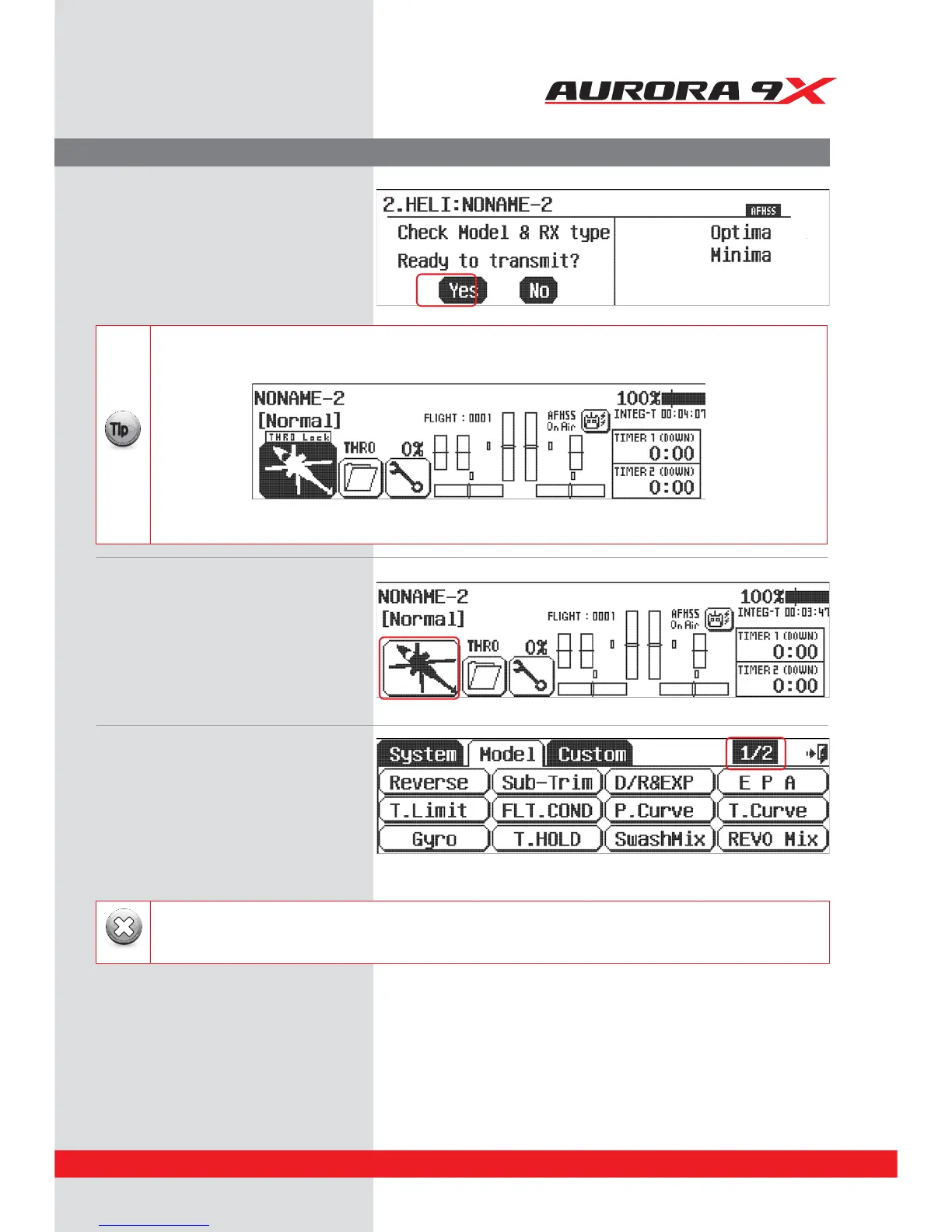
1. Now turn on the transmitter,
select Ye s to transmit.
2. At the home page, let’s select some model
functions by pressing the heli icon at the
lower left of the screen.
3. The Model menu is one of those “two page”
screens, note the
1/2
icon. Here are all the
functions the Aurora 9X can apply to our rather
simple selected model.
If any of your model’s controls bind and stall the servo, turn o the model and correct the situation.
Take the control horns o and reposition them with the model turned back on, then adjust the linkage accordingly.
Warning
Model Programming Menu
Throttle Lock
The Aurora 9X features a "throttle lock" function that can be activated when the transmitter is transmitting a signal.
We encourage you to apply the throttle lock as a safety precaution against "accidental throttle application".
{{
Tip
B5VSOUIFUISPUUMFMPDLPOBOEPòGSPNUIFIPNFQBHFCZQSFTTJOHUIF.PEFMJDPOGPSUXPTFDPOET
5ISPUUMFMPDLJTDPOöSNFEXIFOUIFi5)30-PDLwJDPOJTEJTQMBZFE
45



 To Next Page