9 CHANNEL 2.4GHz AIRCRAFT COMPUTER RADIO SYSTEM
5PIFMQZPVHFUUIFNBYJNVNCFOFöUGSPNZPVS"VSPSB9XFXJMMHVJEFZPVUISPVHIBTJNQMFTFUVQPGBTUBOEBSETQPSUQMBOF
5IFPQFSBUJPOTTIPXOEVSJOHUIJTFYFSDJTFXJMMIFMQZPVMFBSONBOZPGUIFCBTJDQSPHSBNNJOHTUFQTSFRVJSFECZNPTUPGUIF"VSPSB9TGFBUVSFT
3FDFJWFSDIBOOFMBTTJHONFOUTBSF
Simple Powered Plane with one or two aileron servos.
"JMFSPO
&MFWBUPS
5ISPUUMF
3VEEFS
4FDPOE"JMFSPOJGVTFE
Simple two channel un-powered glider.
"JMFSPOQMVHZPVSSVEEFSPSBJMFSPOTFSWPJODI
&MFWBUPS
"GUFSJOTUBMMJOHUIFTFSWPTBOEBDDFTTPSJFTJOZPVSBJSDSBGUGPMMPXUIFTFTUFQTUPTFUVQZPVSöSTUBJSQMBOF
For safety reasons during this set-up exercise on an electric powered plane,
remove the propeller.
Warning
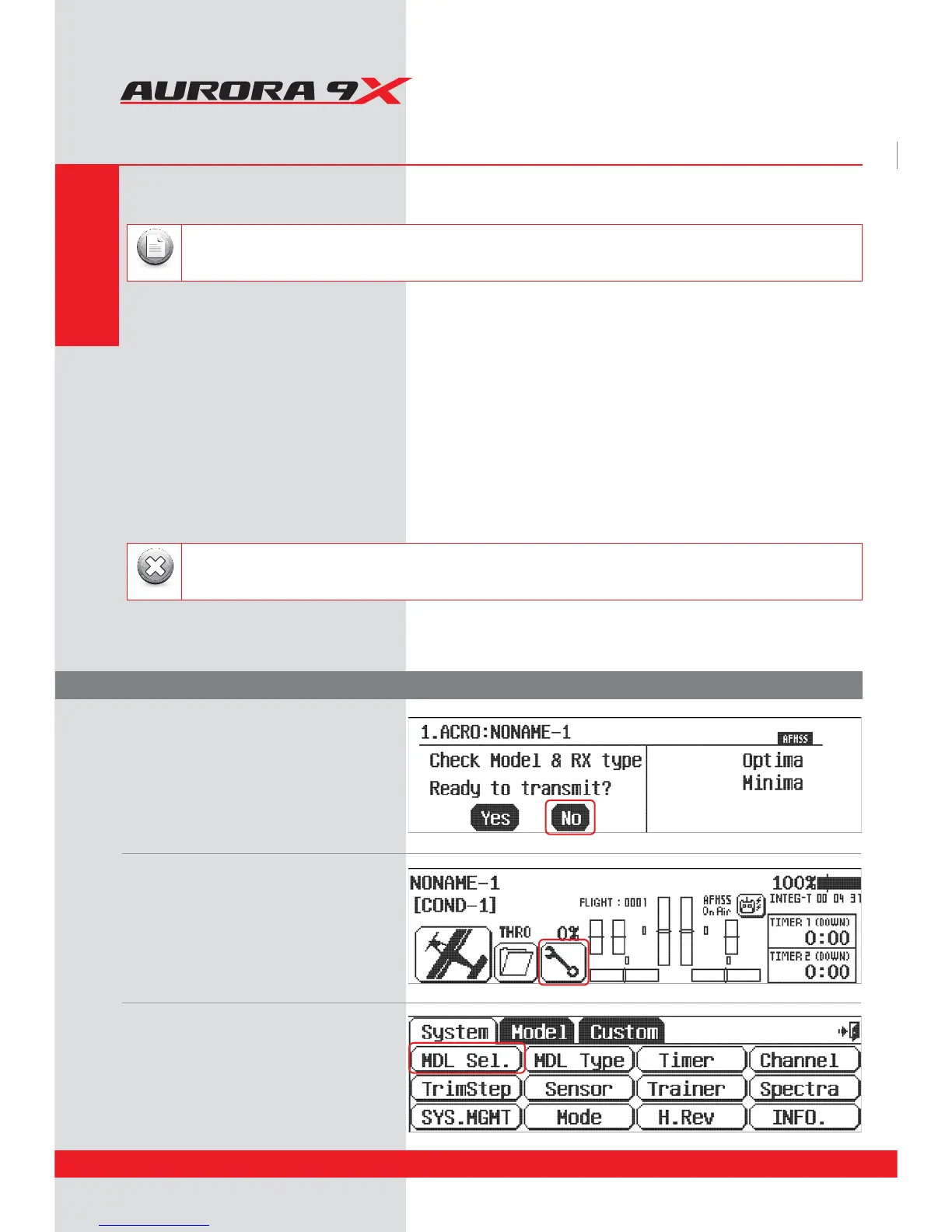
2. The rst screen is the transmit option,
select No.
1. Turn on the transmitter;
do not turn on the airplane.
3. This is the home screen rst;
select the wrench icon for the System menu.
4. Note the system menu function choices,
select, MDL Sel .
If you are setting up a powered or un-powered glider, we will be programming your plane into the ACRO menu for
our demonstration. Later you can explore the functions found in the GLID menus.
Note
System Programming Menu
Quick Start Guide to Set up a Simple Powered Airplane or Glider
Section Two
34



 To Next Page