9 CHANNEL 2.4GHz AIRCRAFT COMPUTER RADIO SYSTEM
Selecting a Switch
Adjust Function switch set-up
Understand this is a simplied example. You can get as complicated as you nd necessary to control
your model to your satisfaction by using ight conditions in conjunction with the C and S feature.
Note
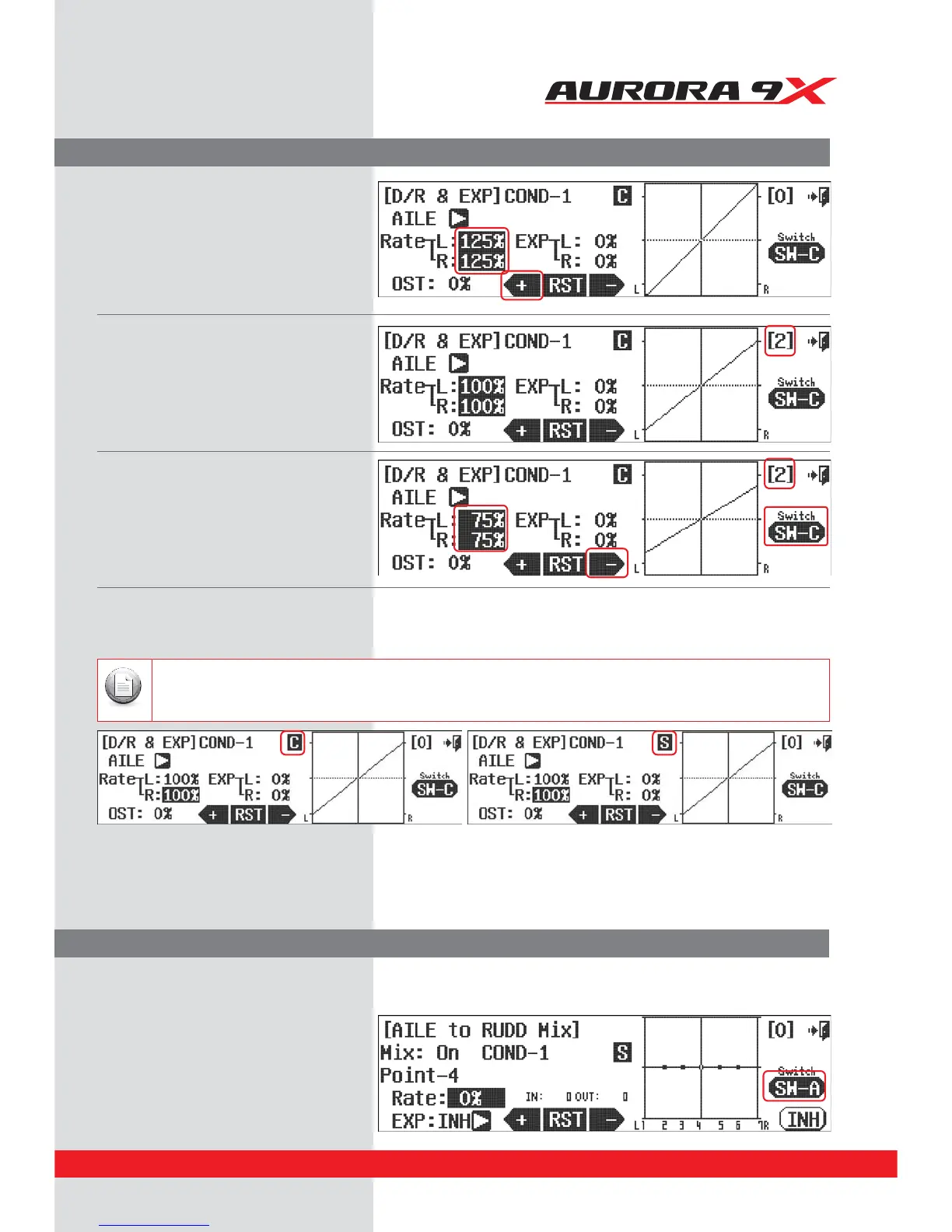
g. Press the + icon to get a 125% value for
both the left and right aileron.
h. Move switch C to the [2] or (all the way
towards you) position, bypassing the
middle position.
i. With the switch C in the [2] position,
use the – icon to place a 75% value for
the aileron movement.
j. Now by moving switch C, we can choose a
125%, 100% or 75% movement rate for our
ailerons.
b. Press SW-A icon
a. Press "*-36%from the Model menu
5IFBEKVTUNFOUGFBUVSFXBTDSFBUFEUPBMMPXUIFöOFUVOJOHPGBGVODUJPOMJLFUIFBJMFSPOUPSVEEFSNJYXIJMFUIFBJSDSBGUJTøZJOH
To show an example of this feature, we will return to the aileron-rudder mix switch screen.
Press C to change it to S (Seperately) Press S to change it to C (Combination)
79



 To Next Page