9 CHANNEL 2.4GHz AIRCRAFT COMPUTER RADIO SYSTEM
92
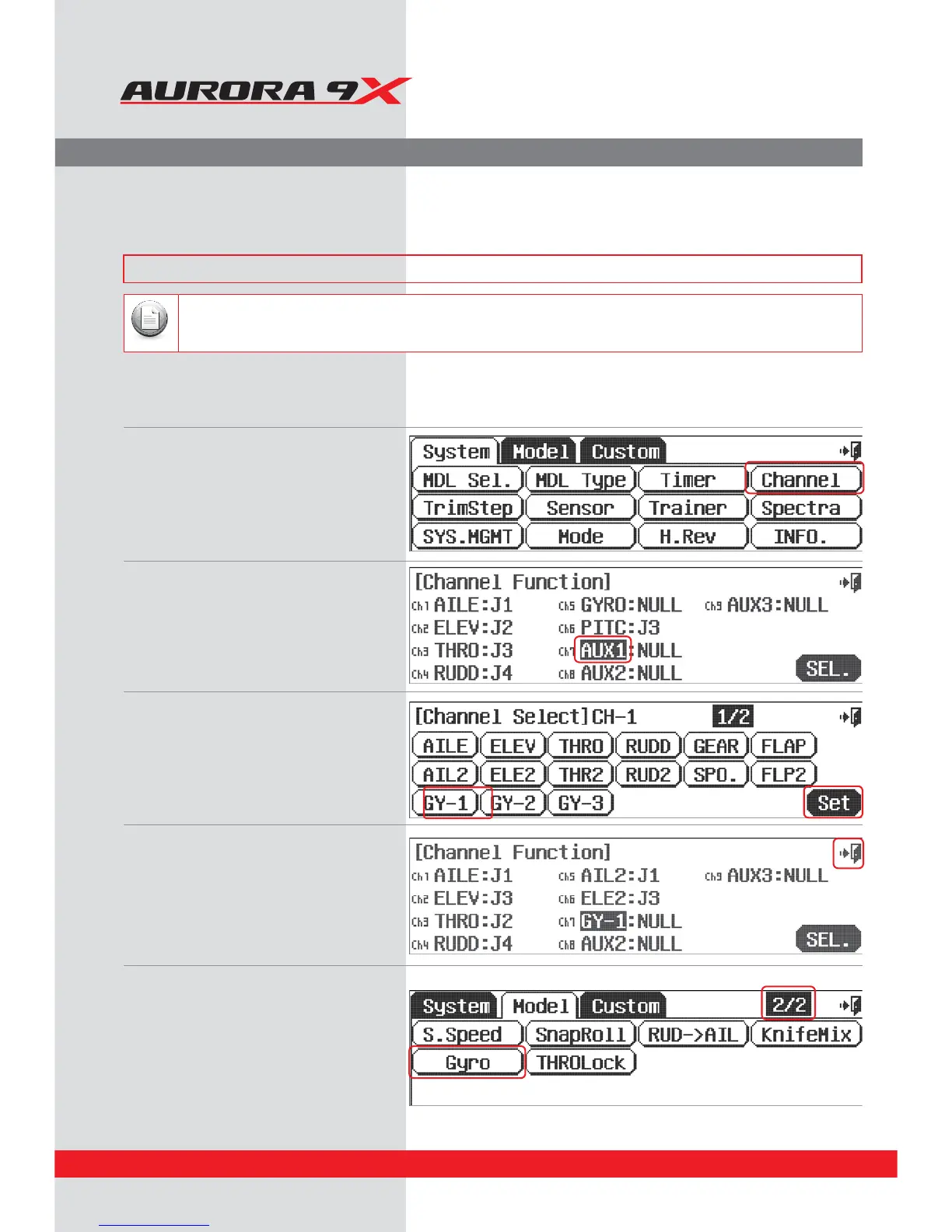
Gyro set-up for xed wing aircraft
a.We rst associate a gyro sensitivity function to
an open channel.
b. In the system menu, select Channel.
c. Add a gyro channel by pressing the AUX1 icon.
d. Press SEL.
e. Choose GY-1.
f. Press SET.
g. Press the Exit icon once.
h.Select the Model menu.
i. Select Gyro from the model menu.
Gyro (on/o and Sensitivity Adjustment)
To eectively set-up the gyro sensitivity function you should have the gyro manufacturer’s instruction manual available to you.
Note
It is often desirable to use a gyro on one or more ight control surfaces of both xed wing aircraft and the on the tail
rotor of helicopters. The Aurora 9X features up to three gyro sensitivity and switch control options per model memory,
GY-1, GY-2 and GY-3.
### This function can be inuenced by the ight condition feature ###



 To Next Page