9 CHANNEL 2.4GHz AIRCRAFT COMPUTER RADIO SYSTEM
System Programming Menu
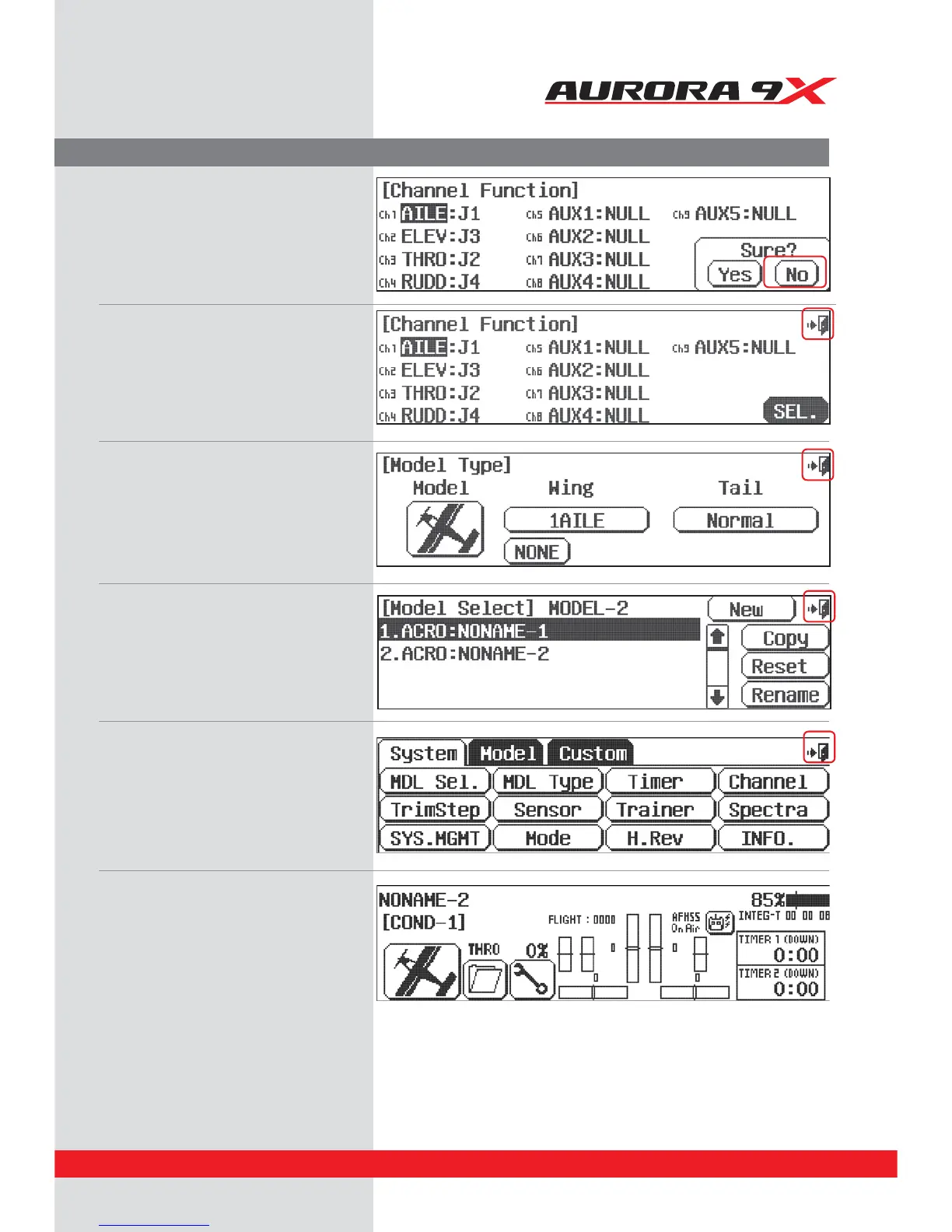
16. The Aurora 9X’s channel can be changed
easily. If you want to change the channel,
select the “No” icon. If there’s no changes,
select the“Yes” icon then it will go to the
main screen.
17. If there are no channel changes, select the
"SEL" icon and once you are done, press the
“EXIT” icon in the upper right corner. If there
is no need to add an extra function, press the
“EXIT” icon, then it will go to the main screen.
18. Once you conrm if there is no correction in step
17, you can check the summary screen which
includes all the features you have chosen.
If there is a correction, select the icon and
change, but if not, press the “EXIT” icon.
19. We are now back to the model select screen.
Back out of it with the Exit icon at the
upper right screen.
20. Back to the system menu page,
and one more time, press the Exit icon.
21. At the Home page, turn o the transmitter
and prepare your model to be set up.
37



 To Next Page