Affinity
2.0
Additional Information Page 128
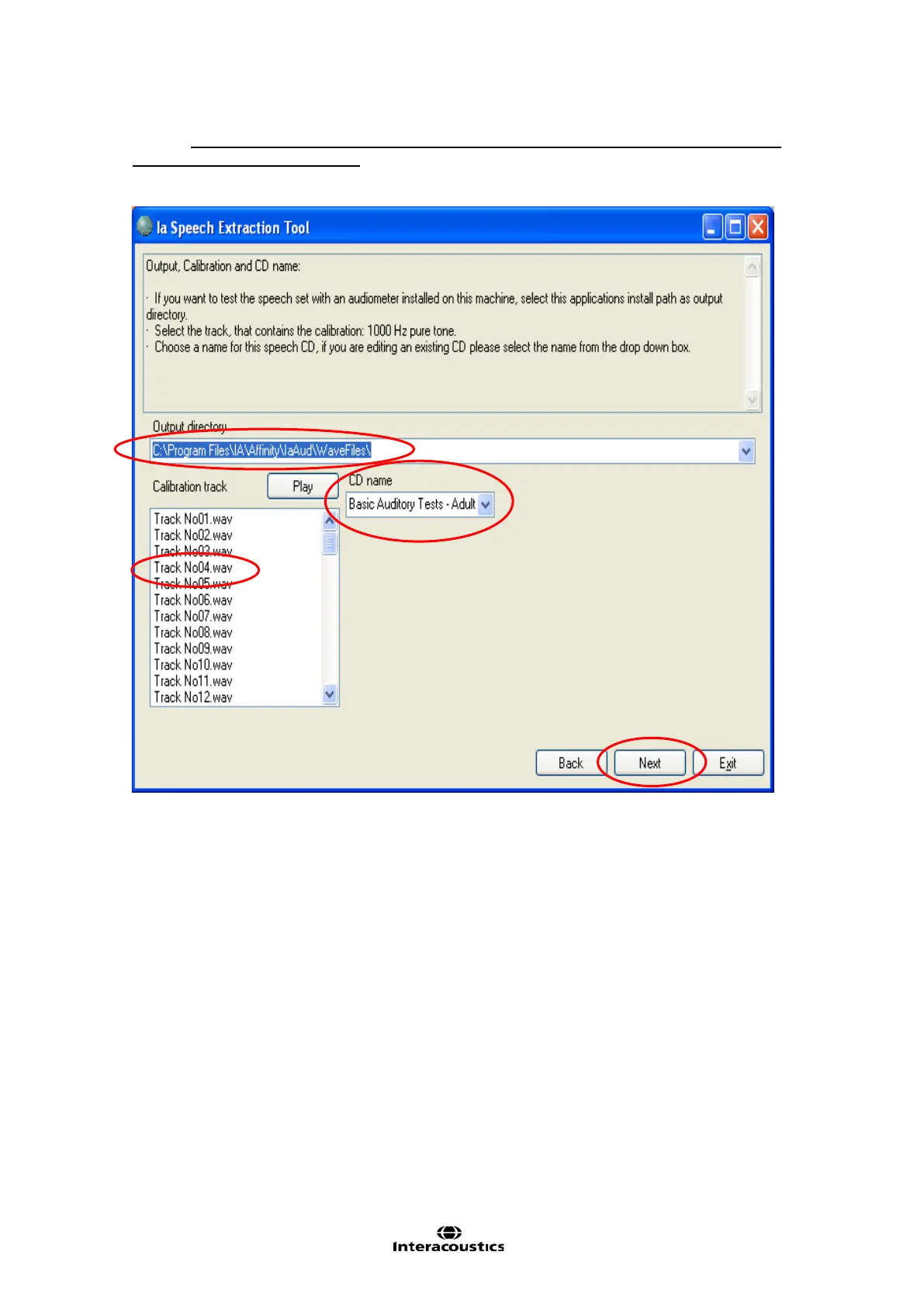
4) Choose C:\Documents and Settings\All Users\Application Data\Interacoustics\Affinity
2
--
Equinox
2
Suite\AUD\WaveFiles in the dropdown. This will make the files selectable in the AC440
Setup (see section 1.7.2.3).
5) Mark the calibration track in the wave file list. If uncertain which one this is, click Play to listen to each
track. For example Track No04.wav as the example below.
6) Give the group of words a name under CD name.
7) When satisfied click Next.
8) Create the desired number of lists by clicking New to create each list. Name the individual lists under
Name (e.g. “New list” or “List 1”).
9) Select the correct Type and Syllables by ticking the circles. When having created the desired number
of lists and named them, mark the first one under Groups and click Next.














 To Next Page