Chapter 8 Advanced 158
Example of configuring remote web management
The CPE is in WISP mode and has connected to the ISP hotspot to provide internet access for
a remote household.
Network requirement
The host needs to troubleshoot the network when he is on business. So he needs to access
the CPE’s web UI on WAN.
You are recommended to use the remote web management function to solve the problem.
Assume that:
− The WAN IP address of the device is 202.105.106.55
− The IP address of the computer which is allowed to access the CPE on WAN is
202.105.88.77
− Port number is 8080
Configuration procedure
1. Choose Advanced > Network Service to enter the configuration page .
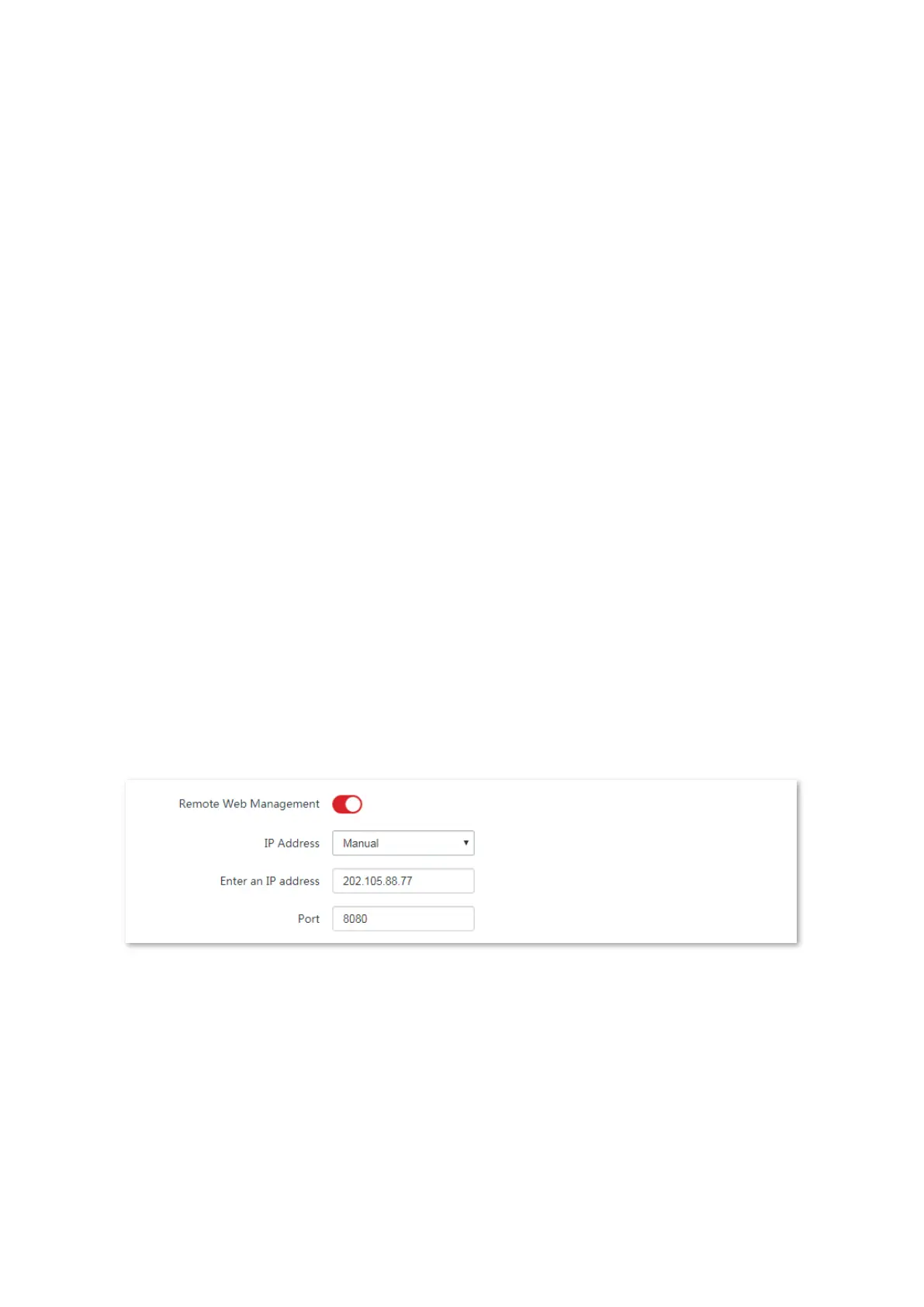
2. Enable the Remote Web Management function.
3. Set IP Address to Manual.
4. Enter the IP address of the computer which is allowed to access the device on WAN, which is
202.105.88.77 in this example.
5. Enter the port number, which is 8080 in this example.
6. Click Save in the bottom of this page.
----End
Verification
The host can use his computer to log in to the web UI of the CPE by access
http://202.105.106.55:8080.



 To Next Page