Chapter 1 Application scenario 4
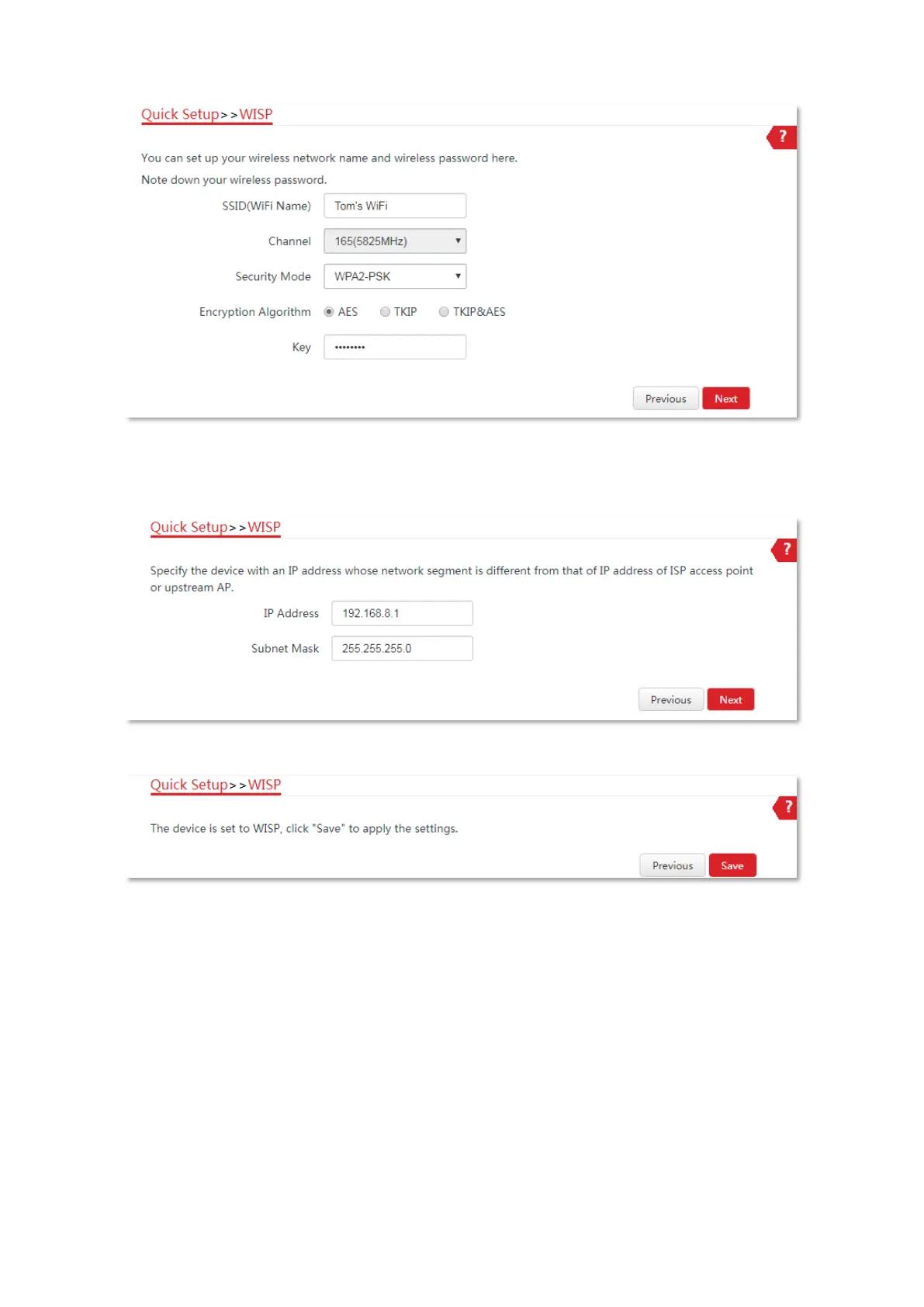
(8) Set an IP address belonging to different network segment as that of your ISP hotspot. For
example, if the IP address of your ISP hotspot is 192.168.2.1, you can set this device’s IP
address to 192.168.X.1 (X ranges from 0 to 254 excluding 2). Then click Next.
(9) Click Save, and wait until the device reboots to activate the settings.
----End
When LED1, LED2, and LED3 indicators of the CPE are blinking, the CPE is connected to your
ISP hotspot successfully.
1.1.3 Install the CPE
1. Place the CPE at an elevated position in the open air.
2. Connect the PoE/LAN port of the CPE to the WAN port of your wireless router. The Power LED
indicator lights up.
3. Adjust the CPE’s direction or location on the selected pole until the LED1, LED2 and LED3
indicators of the CPE light up.



 To Next Page