4-70
IV2 Series User's Manual (Control Panel)
3. Tool Settings (Setting the Judgment Method of the Target of Standard Mode)
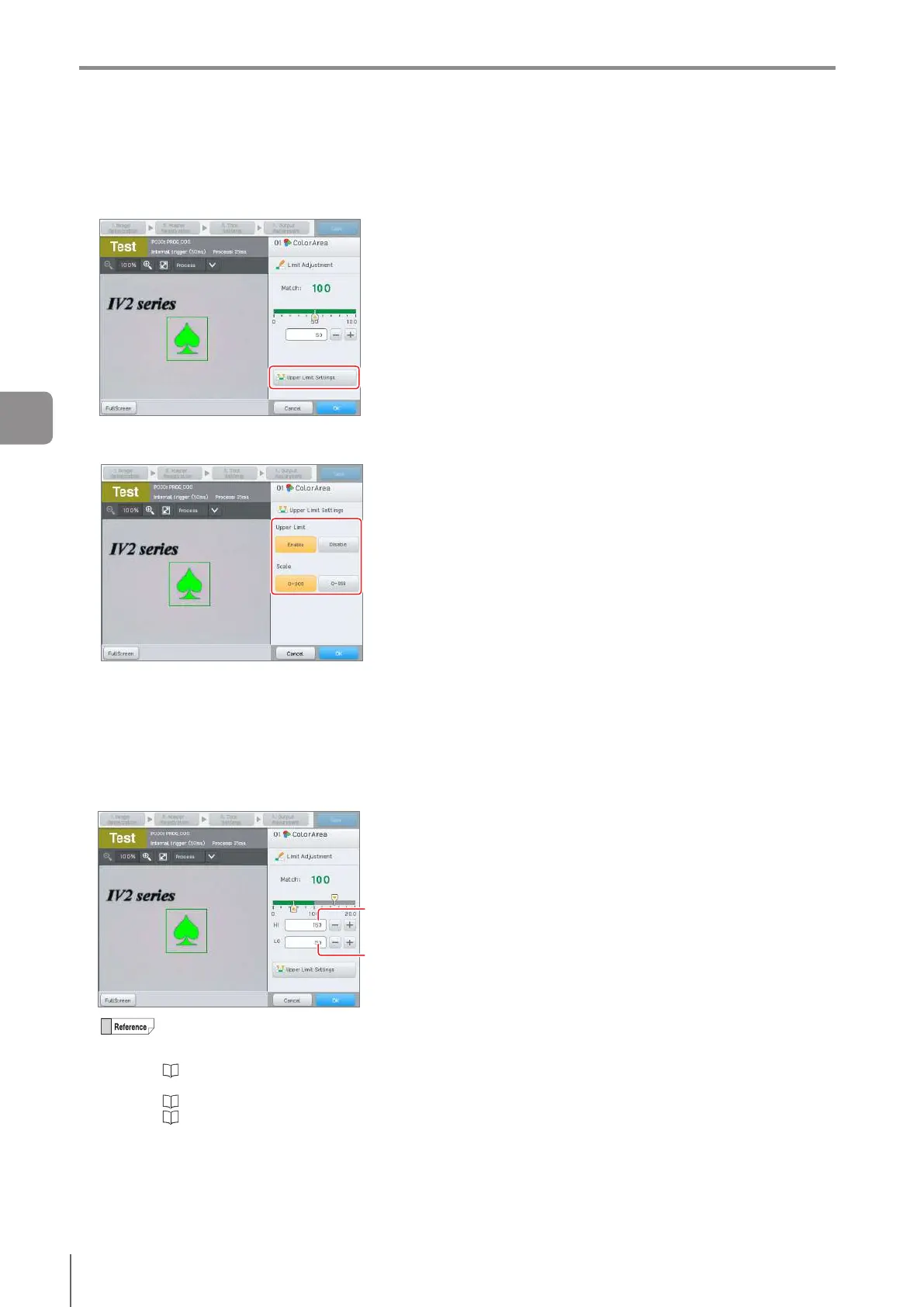
Upper Limit Settings
1
Tap the [Upper Limit Settings] button.
2
Tap the [Enable] button to enable the upper limit
threshold and select the scale.
Select the scale according to the range of the matching
rate required for judgment.
3
When setting is completed, tap the [OK] button.
The slider to set the upper limit and the lower limit of the
threshold will be displayed.
4
Adjust the threshold for anomaly detection by
checking the matching rate.
Threshold
(lower limit)
Threshold
(upper limit)
A target is detected as OK if the matching rate is
greater than the threshold, and detected as NG
if the matching rate is lower than the threshold.
“Selecting the Display Method of the
Detection Window/Tool Window” (Page 5-10)
“Editing Numbers” (Page 3-20)
“Adjusting Thresholds for Judgment” (Page
6-16)
5
After setting is completed, tap the [OK] button.
The system returns to the main screen for [ColorArea]/
[Area].
4
Settings Navigator



 To Next Page