2-9
IV2 Series User's Manual (Control Panel)
Mounting the control panel
2
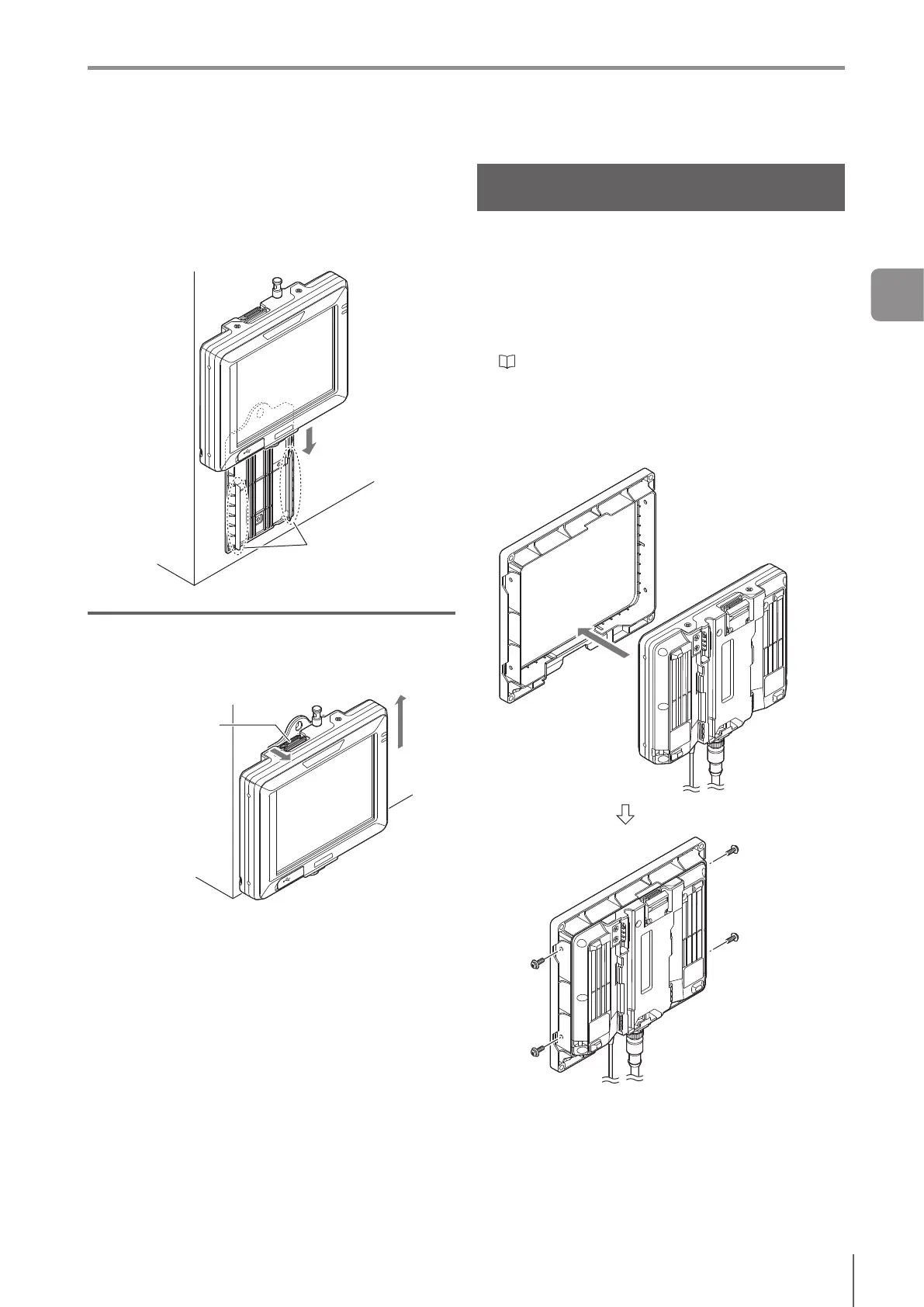
Mount the control panel to the wall mounting
adapter by aligning the stopper of the wall
mounting adapter to the groove on the rear
control panel.
Slidethecontrolpaneldownalltheway,andconrm
that the control panel is locked.
Stopper
Unmounting from the wall mounting adapter
Unlock the control panel from the wall mounting adapter by
pulling toward the unlock button. Then slide up to unmount
the control panel mounted to the adapter.
Unlock
Mounting on the Panel Surface of the
Control Board
Fix the control panel on the board surface of the control
board etc. to operate.
Mount the control board mounting adapter (OP-88350) on
the control panel to be mounted on the board surface.
1
Connect the power cable and Ethernet cable to
the control panel.
“Cables” (Page 2-11)
2
Mount the control board mounting adapter on the
control panel and x it with the attached screws.
Screw : M3, 8 mm long, with 4 washers
Use the attached screws.
Tightening torque : 0.27 to 0.33 N·m
2
Installation and Connection



 To Next Page