3-15
IV2 Series User's Manual (Control Panel)
Switching and Terminating the Sensor to be Connected
Connection and Disconnection with the
Sensor
Disconnecting in the [Sensor Connection
Settings] screen
1
Display the control panel menu, and tap the
[Panel Settings] button.
“Control panel settings” (Page 7-26)
2
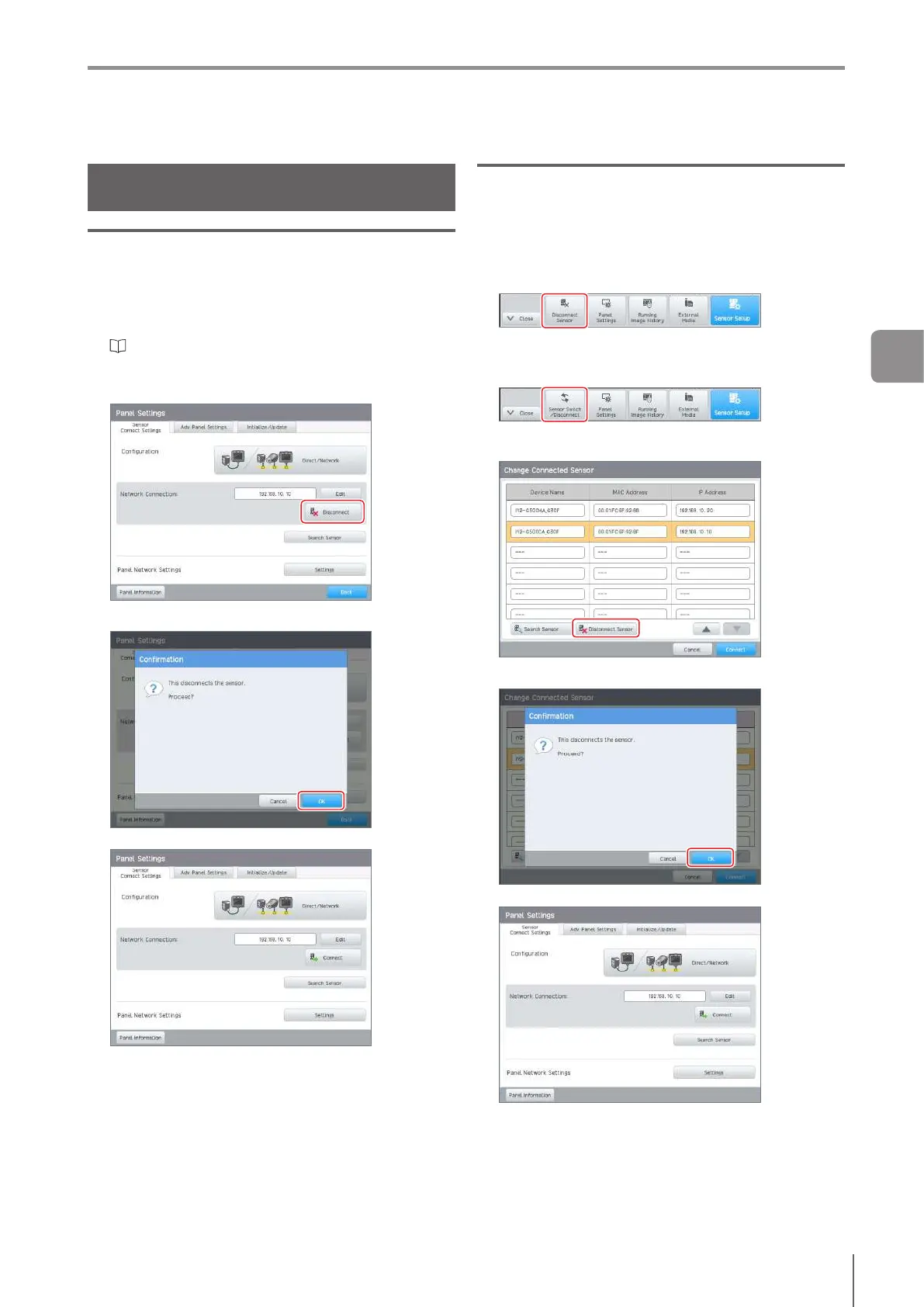
Tap the [Disconnect] button of the [Sensor
Connection Settings] tab.
3
Tap the [OK] button.
The [Sensor Connection Settings] screen opens.
Disconnecting from the [Menu] button
1
Display the control panel menu, and perform the
following.
Direct Connection (1 unit)
Tap the [Disconnect Sensor] button.
Direct Connection (2 units or more)/
Network Connection
Tap the [Sensor Switch/Disconnect] button.
The [Change Connected Sensor] screen opens.
Tap the [Disconnect Sensor] button.
2
Tap the [OK] button.
The [Sensor Connection Settings] screen opens.
3
Basic Operation



 To Next Page