10-12
IV2 Series User's Manual (Control Panel)
Clearing Errors
Clearing Errors
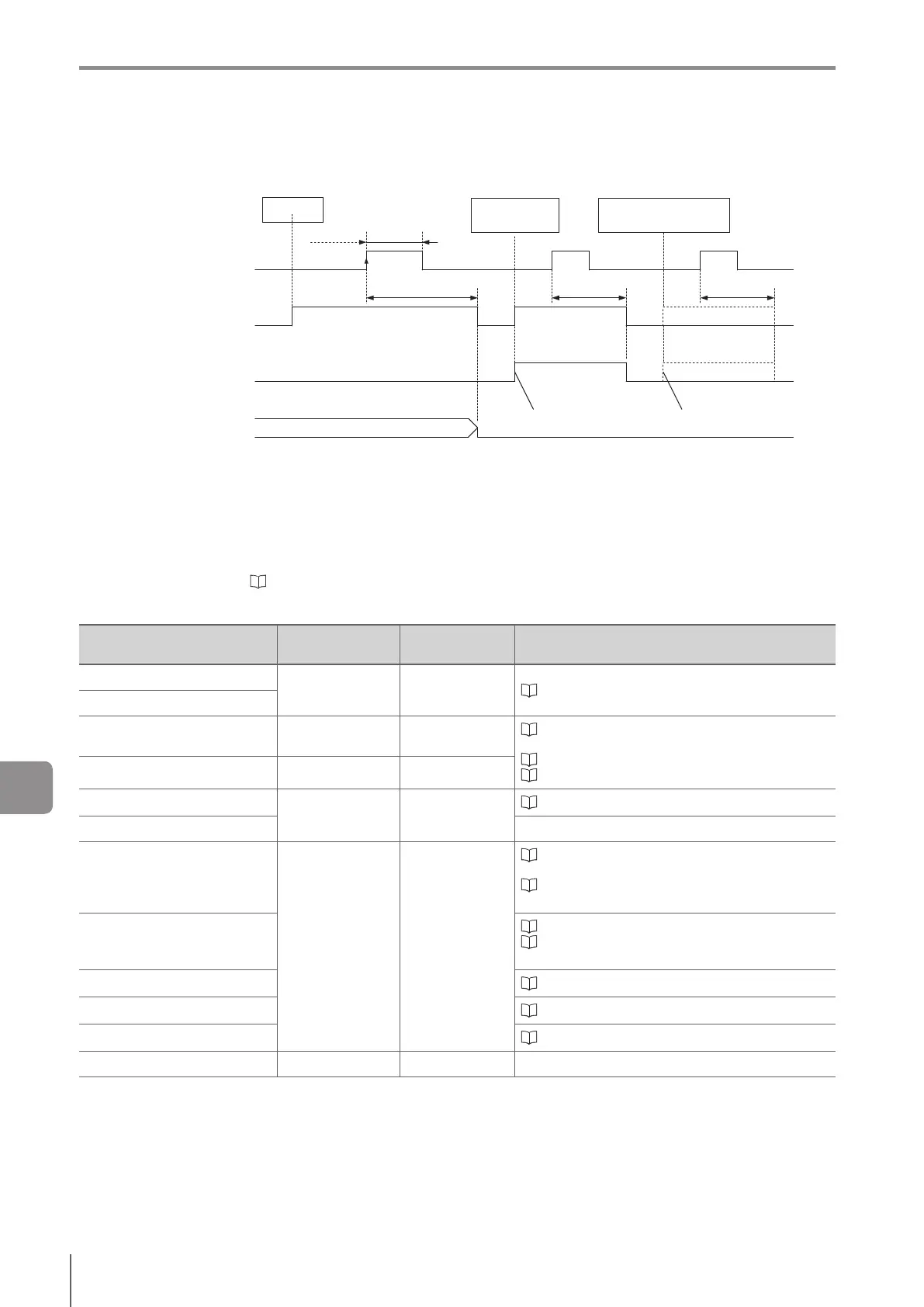
If an error occurs, the error that is output can be turned OFF using the clear error input.
Clear error input
ON
OFF
Error output
ON
OFF
SD card error output
ON
OFF
If reset status output is set to
[Enable], status is output
ON
OFF
Error
occurred
Min 2 ms(Min 2 ms)
T5
Access error
Previous result
If SD card transfer
error is on
T5 T5
(1)
(2)
(3)
(4) (5)
SD card access
error occurs
SD card transfer failure/
transferbuerinsucient
(1) If an error occurred, the error output turns ON.
(2) The error output can be turned OFF by the clear error input. Minimum ON/OFF input time is 2 ms.
(3) When [Reset Status Output on Clear Error Execution] is set to [Yes], the status output is reset.
(4) SD card access errors can be output to error output and SD card error output.
(5) If [SD card transfer error] for the SD card data transfer function is set to [Enable], errors can be output to error output and SD card
erroroutputwhentheSDcardcannotberecognizedorthetransferbuerisinsucient.
For details about T5, refer to “Input Response Time” (Page 10-15).
Error types that can be output
Error type
Error output
ON/OFF
Clear error input Reference
System error
ON Cannot be cleared “Error Messages” (Page A-9)
Startup memory readout error
Program switch error while
running
ON Cannot be cleared
“Changeover for a Target (Program Functions)”
(Page 7-3)
“Changing Over” (Page 10-9)
“SD Card Access” (Page 8-13)
Program switch error at startup OFF -
External master registration error
ON Can be cleared
“Registering the Master Image” (Page 10-10)
SD card access error
Trigger error
OFF (default)/
ON
Can be cleared
“4. Output Assignment (Setting Details of Outputting
to Output Line)” (Page 4-149)
“Controlling Timing of Judgment with Triggers” (Page
10-2)
Strobe error
“Trigger Control Settings” (Page 7-17)
“Controlling Timing of Judgment with Triggers” (Page
10-2)
FTP error “FTP Error” (Page 9-4)
SD card transfer error “SD card transfer error” (Page 8-16)
SNTP sync error “Sync Error Output” (Page 9-11)
Field network warning ON Can be cleared
10
Controlling with Input/Output Line



 To Next Page