9-16
IV2 Series User's Manual (Control Panel)
Web Monitor
Monitoring screen
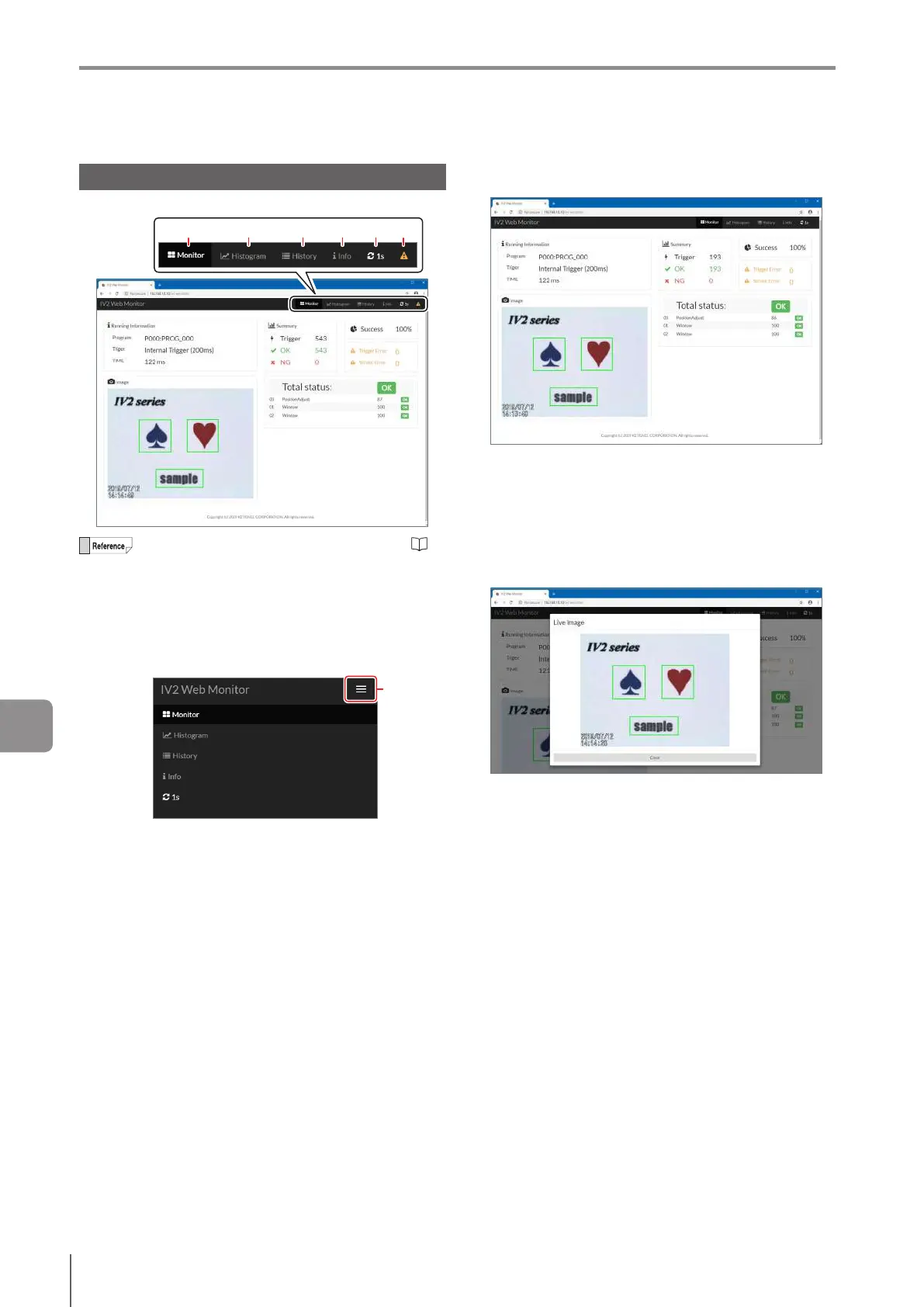
Select a screen to monitor information from the sensor.
(1) (2) (3) (4) (5) (6)
For details of the displayed information, see
“Names and Functions of the Operation Screen”
(Page 5-4).
To reset statistical information, use the IV2-CP50
or IV2-Navigator.
Responsive Web design is supported. The screen
changes in accordance with the displayed device.
Select the screen to be displayed on the menu
button.
Menu
button
(1)
Monitor
Displays the operation information.
Running Information
Displays the program number, trigger type, and
processing time.
Image
Displays the image and the window frame. The
processing screen cannot be displayed. Select the
image to zoom in.
An image cannot be displayed during setup (No Image).
Summary
Displays the number of triggers, judgment count for
OK and NG, number of trigger errors, number of strobe
errors, and OK judgment ratio.
Status result
Displays the total status result and detection window/
tool status result.
9
Connecting to a Network



 To Next Page