4-25
IV2 Series User's Manual (Control Panel)
3. Learning Settings (Setting the Judgment Method of the Target in Learning Mode)
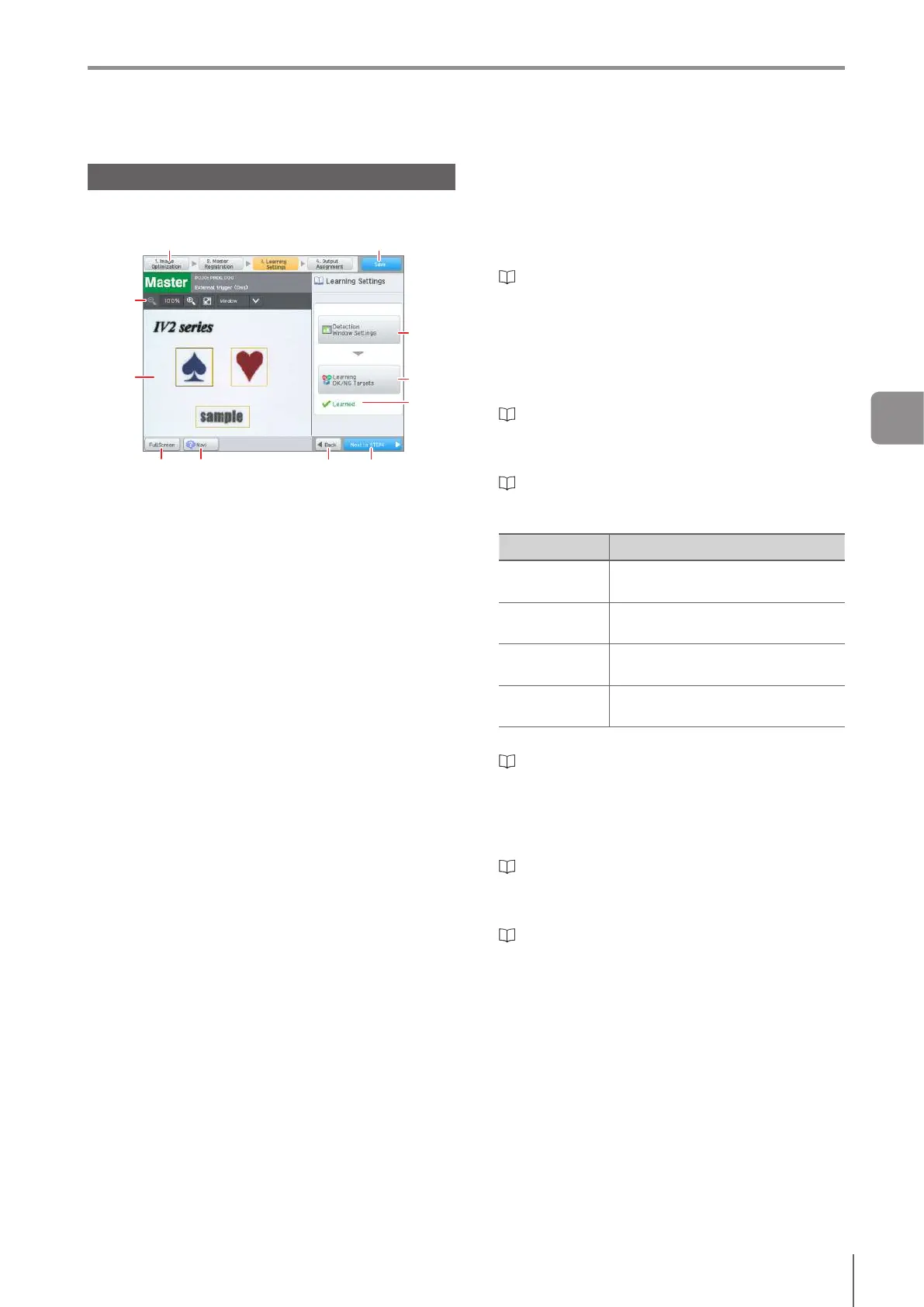
Main Screen for the Learning Settings
This section explains the main screen for the learning
settings.
(1) (2)
(11)(10)(8) (9)
(4)
(3)
(5)
(6)
(7)
(1)
Navigation button
Moves steps in the Settings Navigator.
(2)
[Save] button
Finishes the Settings Navigator and returns to the
[Sensor Setup Menu] screen.
(3)
Image tool bar
“Operation of the Image Tool Bar” (Page 3-18)
(4)
Master Image
Displays the master image and detection window. If a
search range is set, the tool window which indicates the
search range (light blue) will be displayed.
(5)
[Detection Window Settings] button
Adjusts the settings of the detection window and
position adjustment window.
“Detection Window Settings” (Page 4-26)
(6)
[Learning OK/NG Targets] button
Performs the imaging and learning of an OK or NG
target.
“Learning OK/NG Targets” (Page 4-35)
(7)
Condition Display
Displays the current condition of the learning settings.
Show Status
Detection
Window Not Set
The detection window is not set.
Not learned
OK target/NG target learning has not
been completed.
Learned
OK target/NG target learning has
been completed.
Relearning
required
Relearning is needed by setting
changes.
(8)
[Full Screen] button
“Operation with Full Screen Display of Image” (Page
3-18)
(9)
[Navi] button
Displays the Settings Navigator guide.
(10)
[Back] button
Returns to the master registration screen.
“2. Master Registration (Registering an Image as a
Reference)” (Page 4-18)
(11)
[Next to STEP4] button
Proceeds to the Output Assignment settings.
“4. Output Assignment (Setting Details of Outputting
to Output Line)” (Page 4-149)
4
Settings Navigator



 To Next Page