3-6
IV2 Series User's Manual (Control Panel)
Basic Operation Flow
Operation for Initial Startup of the Control
Panel (Direct Connection (1 unit))
1
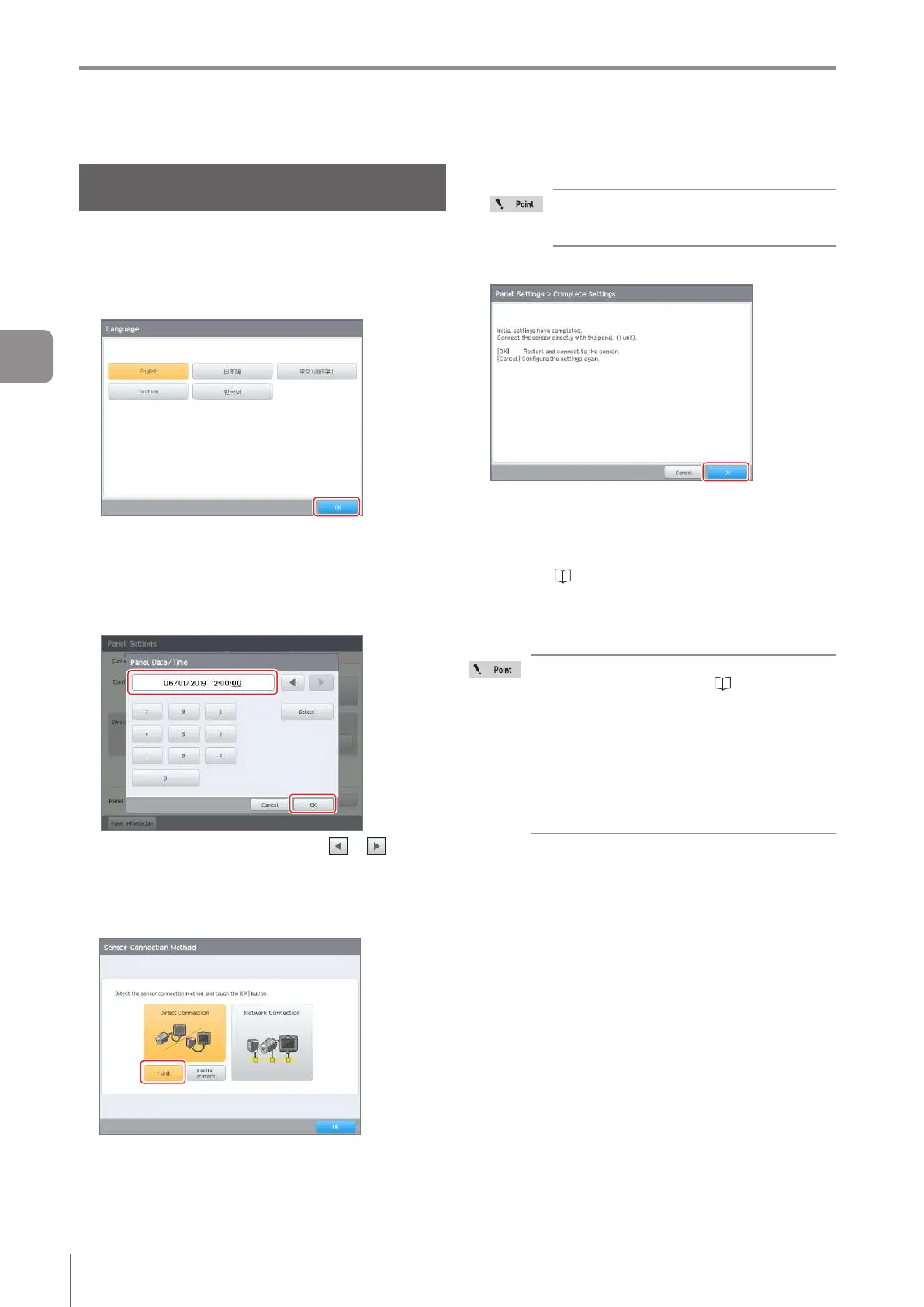
Turn on the power of the control panel.
The screen to select the language opens.
2
Select the language to be displayed on the
control panel and tap the [OK] button.
[English] is selected as the default setting.
If a language other than [English] is selected, the
[Information] screen opens. Tap the [OK] button. The
control panel will restart automatically.
3
Set the current date and time, and tap the [OK]
button.
Move to the item to be set with the or button
and enter the numbers.
Tap the [Delete] button to reset the display of the
selected item.
4
Tap the [1 unit] button and tap the [OK] button.
TheCompleteCongurationscreenopens.
5
Turn on the power of the sensor.
Turn on the power of the sensor before the
control panel is restarted by tapping the [OK]
button in step 6.
6
Tap the [OK] button.
The control panel will be restarted to be connected with
the sensor.
When the control panel is connected with the sensor
forthersttime,performtheInitialSensorSetupand
set the polarity and time of the sensor.
Refer to “Operation for initial startup of the sensor”
(Page 3-12).
For the second time and beyond that the sensor is
connected with the control panel, the operation screen
or [Sensor Setup Menu] screen opens.
When connection is unavailable with a frozen
connection screen, refer to “Remedy when
direct connection (1 unit) is unavailable” (Page
A-17).
For direct connection (1 unit), the IP address
is automatically set.
If direct connection (1 unit) is used while
the PROFINET function is being used, the
PROFINET function will stop. To use the
PROFINET function, change the conguration
to [Network Connection].
3
Basic Operation



 To Next Page