A-25
IV2 Series User’s Manual (Control Panel)
Remedy when data transfer to the SD card is unavailable
Other methods of conrming a network
connection
Conrming the existence of the sensor from
the control panel
Whether or not the sensor is correctly connected can be
conrmedbyperformingtestcommunicationfromthecontrol
panel to the sensor to be connected.
1
Display the [Sensor Connection Settings] screen.
When the control panel starts for the rst time or
after the initialization of the control panel
“Operation for Initial Startup of the Control Panel
(Network Connection)” (Page 3-8)
If not connected with the sensor via network
connection.
After the power turned on, the [Sensor Connection
Settings] screen opens automatically.
If connected with the sensor via network
connection
“When connecting to the sensor via network
connection” (Page 7-30)
When the control panel and the sensor are
connected via network, [Network Connection]
will be displayed and the IP address of the
connected sensor will be displayed.
2
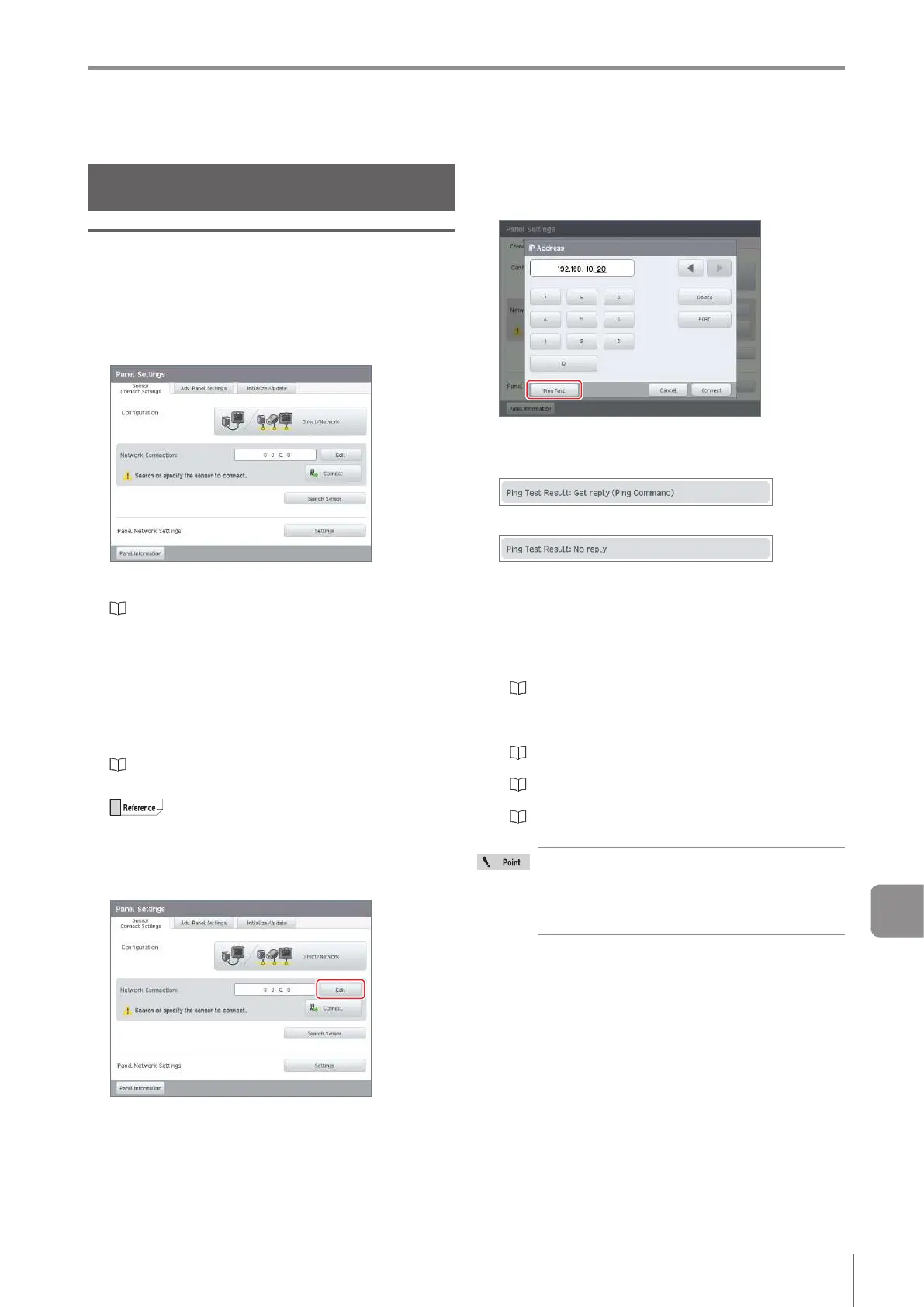
Tap the [Edit] button.
3
Input the IP address of the sensor whose
existence is to be conrmed and tap the [Ping
Test] button.
Theconrmationresultwillbedisplayedonthecontrol
panel.
When the conrmation result is “OK”
When the conrmation result is “NG”
If the displayed conrmation result is “NG”
Conrmthefollowing.
Supply power to the sensor and the network
equipment.
Correctly connect with the sensor and the network
equipment.
“Connecting via Network (Direct Connection (2 units or
more)/Network Connection)” (Page 2-18)
Correctly set the IP address, the subnet mask, and
the default gateway of the control panel and sensor.
“Searching for a sensor to be connected” (Page
3-10)
“Conrming/SettingtheIPaddressofthecontrol
panel” (Page A-26)
“Conrming/SettingtheIPaddressofthesensor”
(Page A-27)
The existence conrmation function utilizes
the ping command. Note that even when this
is executed for devices other than a sensor,
conrmation will succeed if there is a response
to the ping command.
A



 To Next Page