3-2
IV2 Series User's Manual (Control Panel)
Overview of Screen and Operation
Overview of Screen and Operation
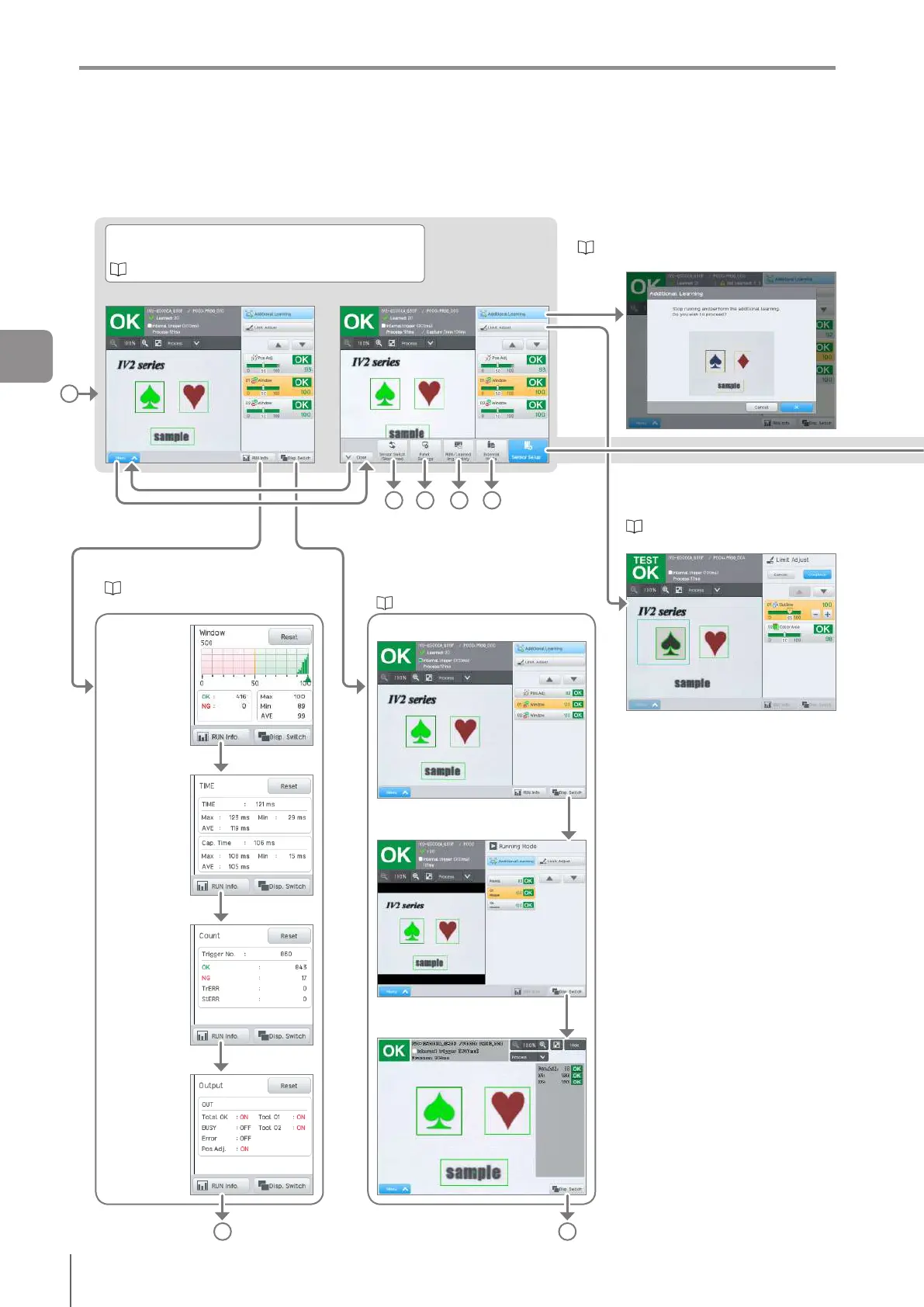
This section explains control panel displays and operation.
For details of what can be set on each screen and its operation, refer to the applicable section.
Additional Learning (learning mode only)
Apply additional images to the learning algorithm.
“Auto Adjustment by the Additional Learning
(Learning Mode Only)” (Page 6-2)
Limit Adjustment
Adjusts the judgment threshold.
“Adjusting Thresholds for
Judgment” (Page 6-16)
A
Display Switch
Switches the display method of the
operation screen.
“Display Method” (Page 5-8)
Simple display
List display
All screen display
A
Show menu
Run screen
Images and judges based on the judgment condition.
“Starting an Operation” (Page 5-2)
Hide menu
B C D E
(Back to hide)(Back to hide)
Operation Information
Displays the operation information.
“Displaying the Operation
Information” (Page 5-6)
Histogram
Processing
time
Count
Output
monitor
A
3
Basic Operation



 To Next Page