3-3
IV2 Series User's Manual (Control Panel)
Overview of Screen and Operation
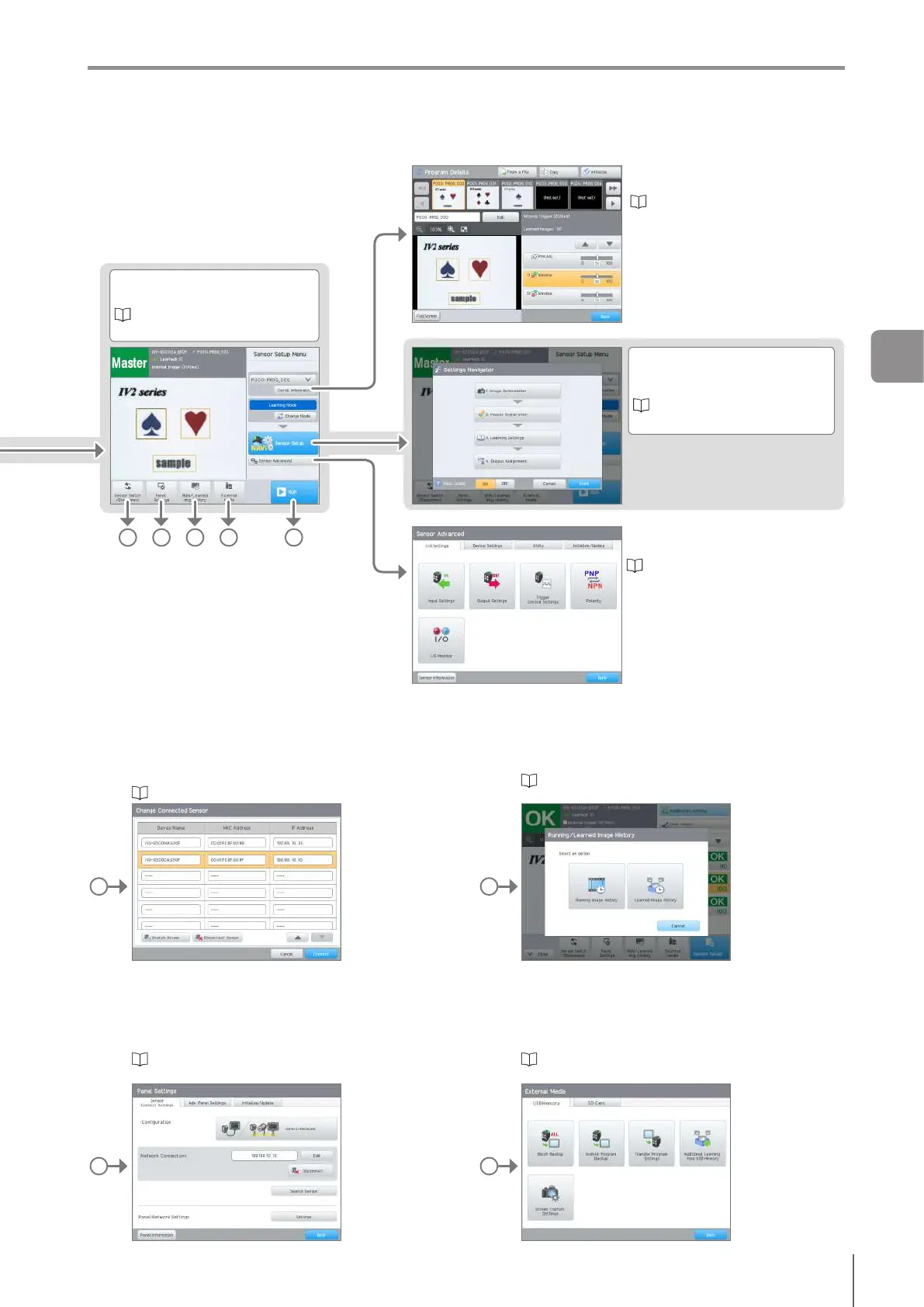
Sensor Setup Menu
Sets condition to judge a target.
“Displaying the Sensor Setup
Menu Screen” (Page 7-2)
Program Details
Checks or initializes the program.
“Operations that can be performed
with the program functions” (Page
7-3)
Settings Navigator
Sets the program to be used for
judgment.
“4 Settings Navigator” (Page
4-1)
Sensor Advanced
Controls the sensor advanced settings.
“Setting the Extended Functions of
the Sensor” (Page 7-11)
Change Connected Sensor
Switches the connected sensor or terminates the sensor
connection.
“Switching the Sensor to be Connected” (Page 3-14)
Image History
Opens the running image and learning image history
(learning mode only) of the sensor.
“ConrmingtheImagesWhoseJudgmentareNG
(Image History)” (Page 5-18)
Panel Settings
Sets each function of the control panel.
“Setting Advanced Control Panel Information” (Page
7-26)
External Media
Controls the operation for using either USB memory or an
SD card.
“Saving the Sensor Settings and Images to a USB
Memory” (Page 8-3)
AB C D E
B D
C E
3
Basic Operation



 To Next Page