3-17
IV2 Series User's Manual (Control Panel)
Setting to the Factory Default
Initialization of the Control Panel
Initializes the information set in the control panel and sets
the control panel to the factory default.
The following settings will not be initialized.
“Language” (Page 7-33)
“Panel Date/Time” (Page 7-34)
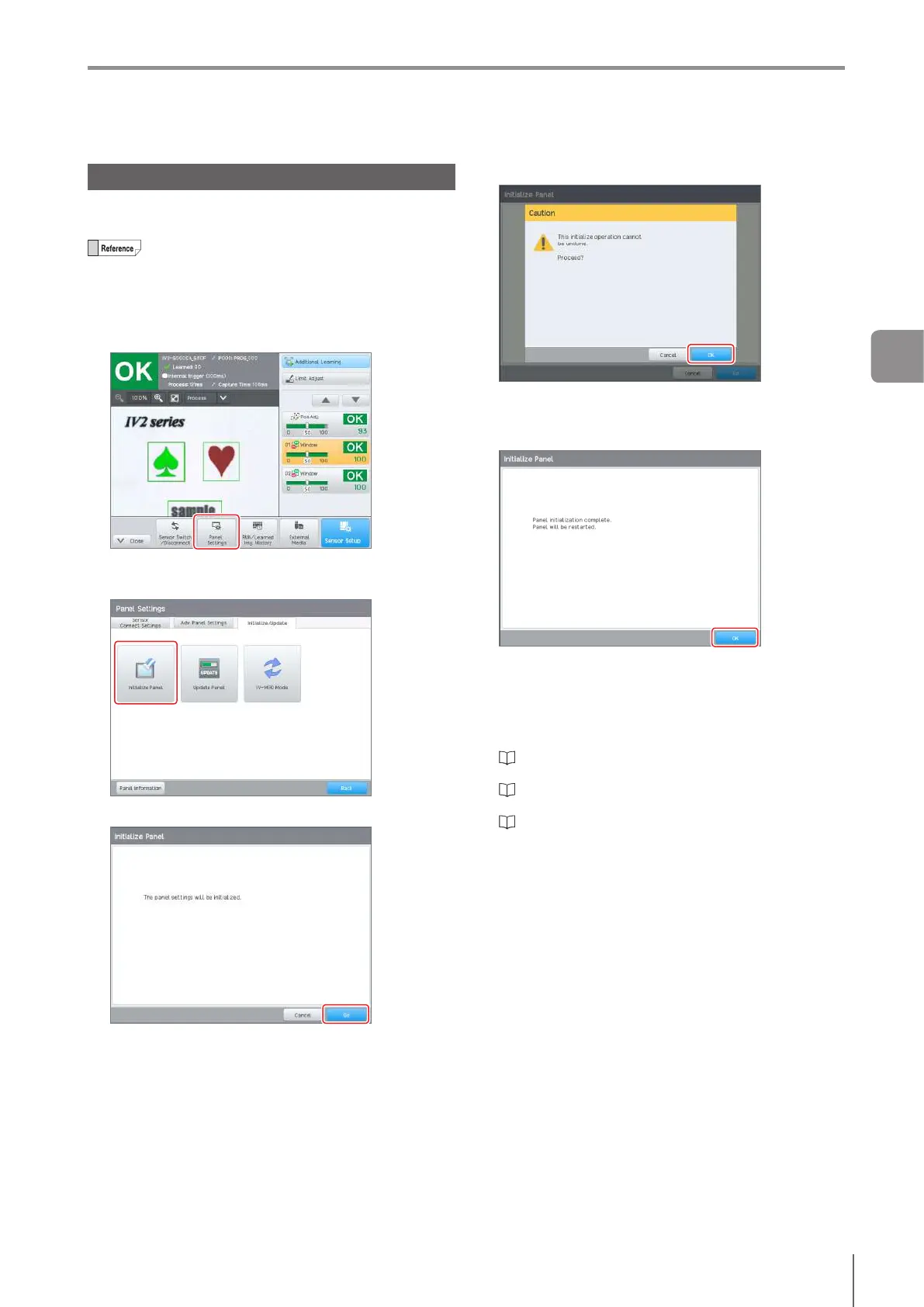
1
Display the control panel menu, and tap the
[Panel Settings] button.
2
Tap the [Initialize Panel] button of the [Initialize/
Update] tab.
3
Tap the [Go] button.
Theconrmationdialogopens.
4
Tap the [OK] button.
Initialization begins. After initialization is completed, the
initialization completion screen opens.
5
Tap the [OK] button.
The control panel will be restarted.
After restarting, set the display language, date and time,
and the connection method with the sensor.
For the connection method with the sensor, there is
Direct Connection (“1 unit” or “2 units or more”) and
Network Connection.
“Operation for Initial Startup of the Control Panel
(Direct Connection (1 unit))” (Page 3-6)
“Operation for Initial Startup of the Control Panel
(Direct Connection (2 units or more))” (Page 3-7)
“Operation for Initial Startup of the Control Panel
(Network Connection)” (Page 3-8)
3
Basic Operation



 To Next Page