10-13
IV2 Series User's Manual (Control Panel)
Behavior When the Sensor Power is Turned On or O
Behavior When the Sensor Power is Turned On or
O
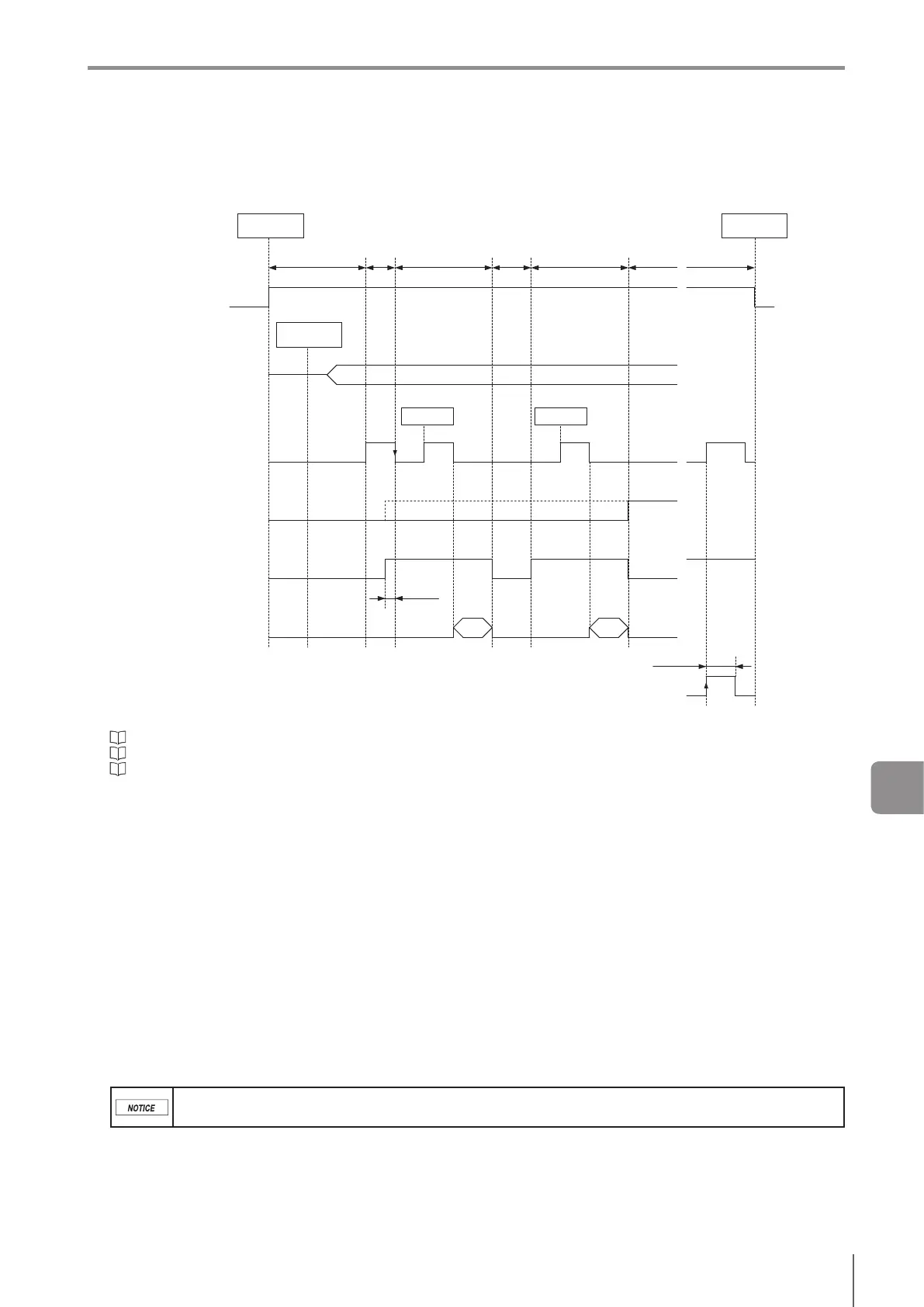
Thedevicebehaviorwhenthepoweristurnedonoroisasfollows.CheckactivationoftheBUSYoutputwhenstarting
operation.
Power (DC24V)
ON
OFF
BUSY output
ON
OFF
Error output
ON
OFF
RUN output
ON
OFF
“SD card save stop” input
ON
OFF
Total status output
Status output of each tool
Position adjustment output
Output of each logic
ON
OFF
Program number
Trigger
Determine the
I/O settings
Power turns
on
Power turns
o
Trigger
Min 0 ms
Min 2 ms
Initializing
2 seconds or longer Running RunningRunning
System
errorSetting
BUSY
20 ms or longer
(1)
(3)
(2)
(5)
(6)
(7)
(4)
(1) After the power is turned ON, the I/O Settings (NPN or PNP and N.O. or N.C.) will be determined.
“Operation for initial startup of the sensor” (Page 3-12)
“Polarity” (Page 7-11)
“Output Settings” (Page 7-11)
(2) The program number will be determined. If [Switch Program by External Input] (Page 7-14) is set to [External Input], the program
number is determined according to the condition of the input lines.
(3) BUSY output turns ON.
In case of N.O. output, the transistor turns from OFF to ON.
In case of N.C. output, the transistor turns from OFF to OFF, so no changes occur.
(4) The BUSY output turns OFF and the system starts to operate.
In case of N.O. output, the transistor turns from ON to OFF.
In case of N.C. output, the transistor turns from OFF to ON.
By checking the activation of the BUSY output, operation in N.O./N.C. can be checked.
(5) If the startup error has occurred, the error output turns ON during the BUSY status.
(6) The RUN output turns ON when the sensor is running with no system error occurring.
(7) Aboutpowerowhenusing[Datatransfer(SDcard)]
Set [BUSY Output Settings] to [Until Data Transfer is Complete].
Inthecaseofthe“Externaltrigger”,turnothepowerafterconrmingthatthebusyoutputis“OFF”bytheinputofthe“SDcard
save stop” input.
Inthecaseofthe“Internaltrigger”,waitapproximately5secondsafterthe“SDcardsavestop”isinput,andthenturnothepower.
Aftertransferoftheimagebeingtransferrediscompleted,transfertotheSDcardisstopped.Imagesinthetransferbuerare
discarded.
The “SD card save stop” input is valid only during operation.
Do not turn o the system power while the SD card is being accessed. Otherwise, all or part of the setting data
may be lost or the memory may be damaged.
The ON status of each output is as follows.
When Output Settings (Page 7-11) are [N.O.]: Status with NPN or PNP open collector ON.
When Output Settings (Page 7-11) are [N.C.]: Status with NPN or PNP open collector OFF.
The RUN output, BUSY output and error output will be output from the output line assigned in output assignment (Page 4-149) for
program numbers determined after the power is turned ON. If the outputs are not being assigned, it will not be output.
10
Controlling with Input/Output Line



 To Next Page