4-14
IV2 Series User's Manual (Control Panel)
1. Image Optimization (Clearly Image a Target)
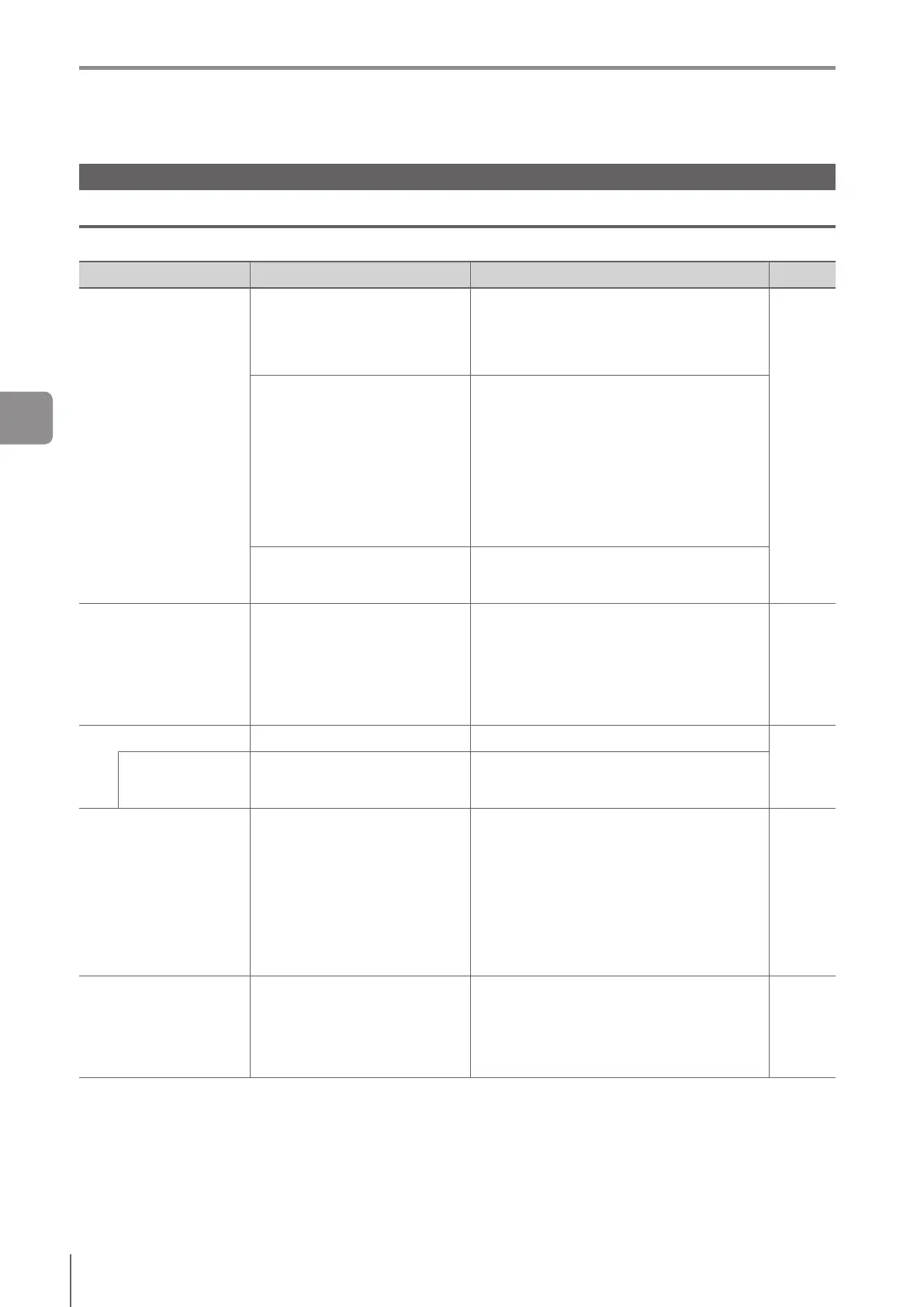
Advanced Settings for Image Optimization
Adjust the image optimization settings using the advanced settings menu.
Advanced Settings for Image Optimization
Items Description Setting range Ref.
Advanced Brightness
Adjustment
Brightness
Adjusts the brightness of the image
manually.
(default: 20)
IV2-G500CA : 1 to 105
IV2-G500MA : 1 to 130
IV2-G150MA : 1 to 115
IV2-G300CA : 1 to 115
IV2-G600MA : 1 to 125
4-15
Imaging Mode
Selects imaging mode for sensor.
Normal (default)
This mode is the basic imaging mode. The
target can be imaged with less noise.
HDR
Select to image a target such as a metal that
reectslightandhashighcontrast.
HighGain
Select to shorten the exposure time and when
the imaging environment is in a dark place.
Lowers imaging quality due to high gain.
Adjusting automatically by
tapping the target
Adjusts automatically the brightness so that the
brightness around the tapped image can be
optimal.
Imaging Area
(standard mode only)
Sets the imaging area (image size
of the sensor). When the imaging
area is reduced, the shutter speed
and judgment process become
faster.
Entire (default)
Setstheeldofviewoftheimagingareafor
the sensor to the entire available area.
Partial
Editatoolwindowandsetauser-denedarea
inthesensor'seldofviewastheimaging
area.
4-15
Digital Zoom Sets the digital zoom.
OFF (default)/2x/4x
4-16
Zoom Area
Specifyanareainthesensor'seld
of view as the zooming area.
Specifyauser-denedarea.
To move the zoom area to the center of the
screen, tap the [To image center] button.
Lighting
Selects lighting mode for built-in
light.
Flash (default)
The built-in light lights within the exposure
when imaging.
Continuous
(other than IV2-G300CA/IV2-G600MA)
The built-in light lights continuously regardless
ofspeciedexposuretimewhenimaginga
target.
OFF
Turns OFF the built-in light.
4-17
Color Filters
Ifitisdiculttoextracttheedge
(outline)oftargetsofdierent
colors,selectalterforacolor
or a complementary color to be
detected.
(Color type only)
OFF (default)/
Red/Green/Blue/Cyan/Magenta/Yellow
4-17
4
Settings Navigator



 To Next Page