A-7
IV2 Series User’s Manual (Control Panel)
Troubleshooting
Troubleshooting
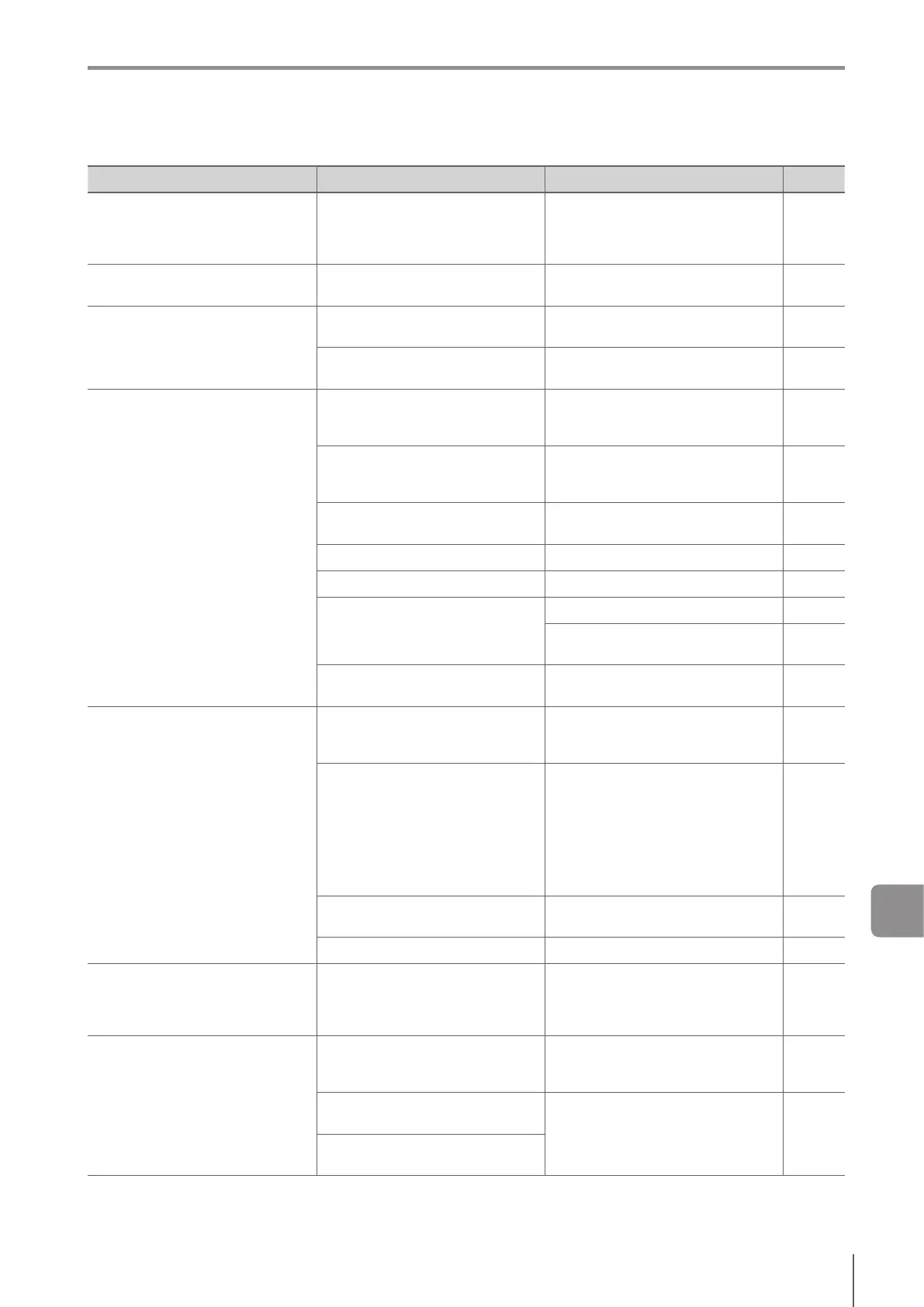
Symptom Check point Remedy Ref.
The PWR/ERR indicator light of
thesensoramplierorthePWR
indicator light of the control panel is
lighting or blinking in red.
An error has occurred. Check the
errors indicated by the lighting or
blinking.
Refer to “Error Message”.
A-9
An error message is displayed on
the control panel.
Check the details of the error
message.
Refer to “Error Message”.
A-9
The power of the sensor or control
panel does not turn on.
Is the power cable correctly
connected?
Connect the power cable correctly.
2-11
Does the voltage or capacity of the
powersourcemeetthespecication?
Use a power source of the correct
rating.
11-2
An image is not displayed on the
monitor, or the image is abnormal.
Is the installed distance of the target
correct?
Place a target at the correct installed
distance. The installed distance
depends on the sensor type.
2-3
Is the sensor view correct?
Place the sensor in such a way that
the sensor view matches the target
size.
2-3
Is the focus adjustment correct?
Adjust the focusing position (focus) of
the sensor.
4-12
Is the brightness adjustment correct? Adjust the brightness of the sensor. 4-12
Is the target or the sensor vibrating?
Implement anti-vibration measures etc.
-
Doesambientlightaecttheimage?
Use brightness correction. 4-22
Implement a shield to prevent the
incident of ambient light.
-
Is the front cover dirty or damaged?
Clean the front cover. If it is damaged,
contactyournearestKEYENCEoce.
-
The image or the status result is not
updated.
Is the system in the setting mode?
Start run mode
Turn on the power of the sensor
again.
5-2
Is the trigger correctly input?
If a target is to be imaged using an
external trigger, input the external
trigger. When the NPN is selected
in the Polarity, the circuit becomes a
non-voltage input circuit. When PNP
is selected in the Polarity, the circuit
becomes a voltage input circuit. Check
the cables.
4-9
All or part of the settings necessary
for running have not been completed.
Complete the settings in Settings
Navigator.
4-1
The NG Hold function is used. Set [NG Hold Function] to [OFF]. 5-17
Image update is slow.
(during operation/setting)
Is the network connected to the in-
plant LAN?
Thenetworkmaybeaectedbythe
tracinthein-plantLAN.Congurea
localnetworkandconrmthenetwork
connection only for the IV2 Series.
-
The monitor cannot be operated using
the touch panel.
Is the input screen for the unlock
password displayed?
The touch screen lock of the control
panel or the security of the sensor is
enabled. Input the unlock password.
7-19
7-34
The password is lost and cannot
unlock.
Contact your nearest KEYENCE
oce.
-
Is there any damage or cracks on
the touch screen?
A



 To Next Page