5-13
IV2 Series User's Manual (Control Panel)
Conrming the NG Occurrence Status of the Sensor Connected (List of NG Sensor Occurrences Function)
Conrming the NG Occurrence Status of the
Sensor Connected
(List of NG Sensor Occurrences Function)
Overview of the List of NG Sensor
Occurrences function
When direct connection (1 unit) is used, this function
cannot be used.
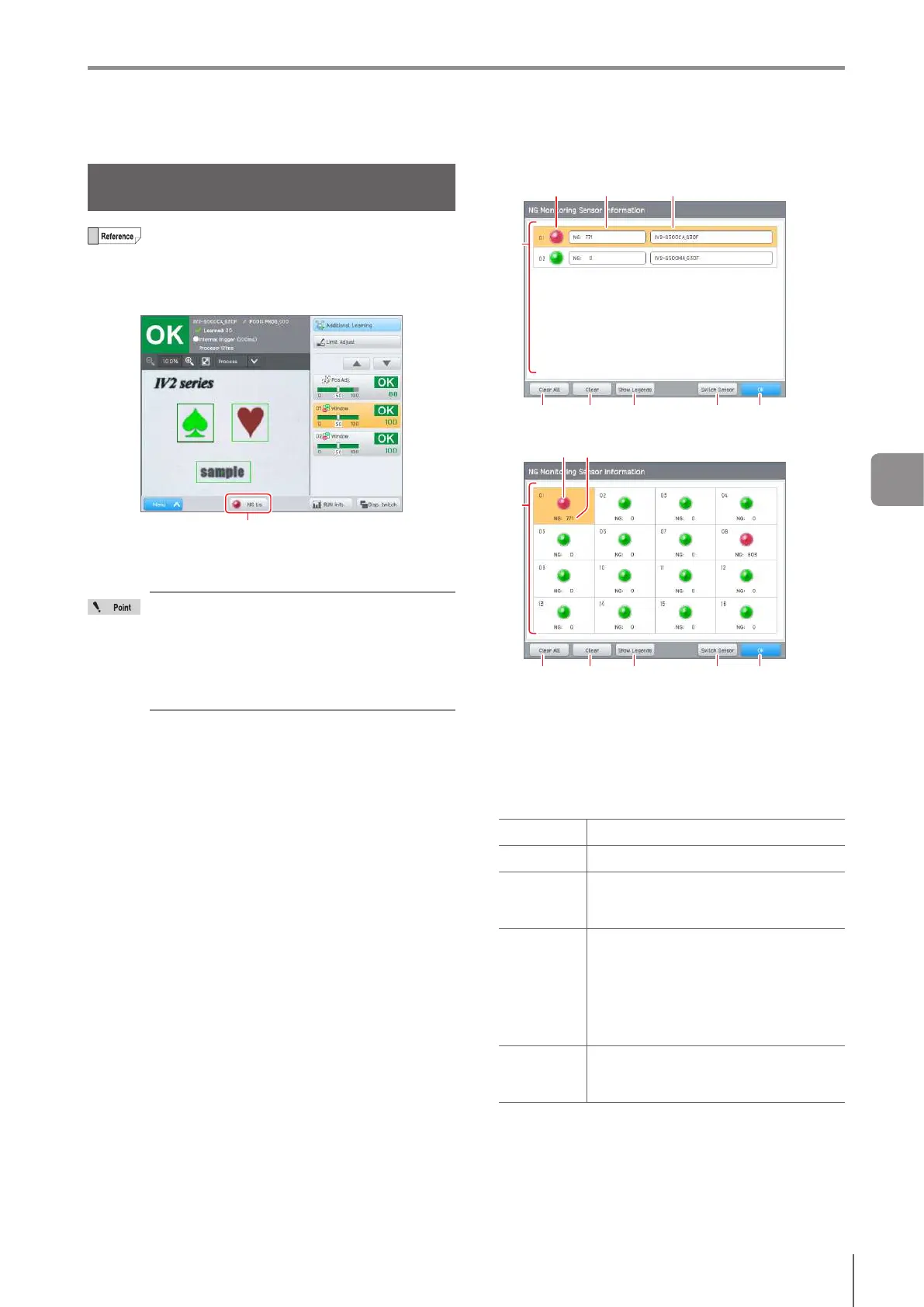
By using the [List of NG Sensor Occurrences] function, the
[NG List] button blinks (red) when a NG occurs on a sensor
connected to the control panel while in Run mode.
[NG List] button
Tapping the [NG List] button displays the list of sensors
connected to the control panel and their NG statuses can
beconrmed.
Of the connected sensors, only sensors
registered as being monitored for an NG
occurrence are shown in the list.
[List of NG Sensor Occurrences] can only be
displayed while the system is running.
The IV2 series and IV series can be mixed and
conrmed on the list.
When 7 or fewer sensors are registered
(2) (3) (4)
(9)(5) (6) (7) (8)
(1)
When 8 or more sensors are registered
(2) (3)
(9)(5) (6) (7) (8)
(1)
(1)
Sensor list
Displays the sensors registered to the control panel
on the [List of NG Sensor Occurrences]. The sensor
displayed on the control panel is highlighted in orange.
(2)
Indicator light
Displays the status of the sensors registered on the
control panel on the [List of NG Sensor Occurrences].
Green (ON) No NG occurred.
Red (ON) A NG has occurred at least once.
Red (Blink)
The number of NG occurrences has
increased after displaying the latest [List
of NG Sensor Occurrences].
Yellow
(lighting)
Yellow
(blinking)
The sensor is not connected due to a
connection error. Check connection with
the sensor.
Blinkswhenconrmingthe[NG
Monitoring Sensor Information] for the
rsttime.Lightsupwhenthestatushas
beenconrmed.
Gray
The sensor has not been registered, or
the information of the sensor is being
acquired.
5
Running



 To Next Page