Transmitting faxes from a computer
4
4-38 Konica Minolta 240f
4.4
8 Select "Simple Mode".
% To transmit with the Advanced Mode, proceed to step 7 of Transmitting with the advanced mode.
(page 4-42)
% "Job Type" and "Show sent documents list" cannot be set when the Simple Mode is selected.
9 Click [OK].
10 Start printing in the application software.
% When using Microsoft Office Word 2007, click [OK].
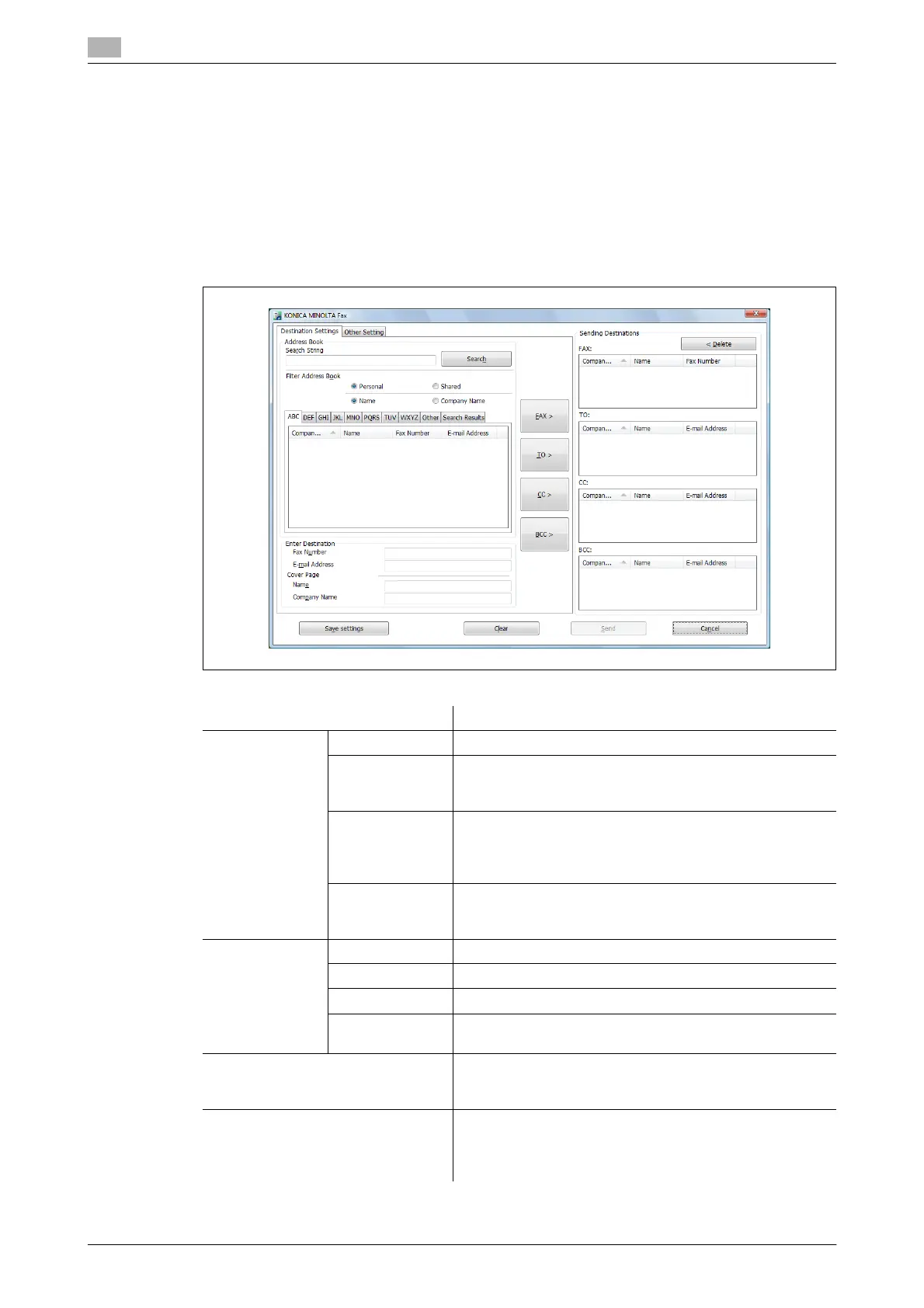
The "Transmission Dialog Application" screen is displayed.
Item Description
Address Book Search String To search the address book, enter a keyword here.
Filter Address
Book
Select whether to display the personal address book or
shared address book, and the address book by company
name or name.
[Search] Click [Search] to search with the keyword entered in
"Search String".
The search results are displayed in the [Search Results]
tab.
Address Book The address book is displayed in alphabetical order ac-
cording to the company name or name, as selected in "Fil-
ter Address Book".
Enter Destina-
tion
Fax Number Enter the fax number of the destination.
E-mail Address Enter the e-mail address of the destination.
Name When attaching a cover page, enter the destination name.
Company Name When attaching a cover page, enter the destination com-
pany name.
[FAX>] button Click [FAX>] after entering a destination in "Enter Destina-
tion" or selecting a destination in "Address Book" to spec-
ify the entered or selected destination as a fax destination.
[TO>] button Click [TO>] after entering a destination in "Enter Destina-
tion" or selecting a destination in "Address Book" to spec-
ify the entered or selected destination as an e-mail
destination.





 To Next Page