Key Operator Mode 11-7
Key Operator Mode
System Initial [1] (continued)
Language [2]
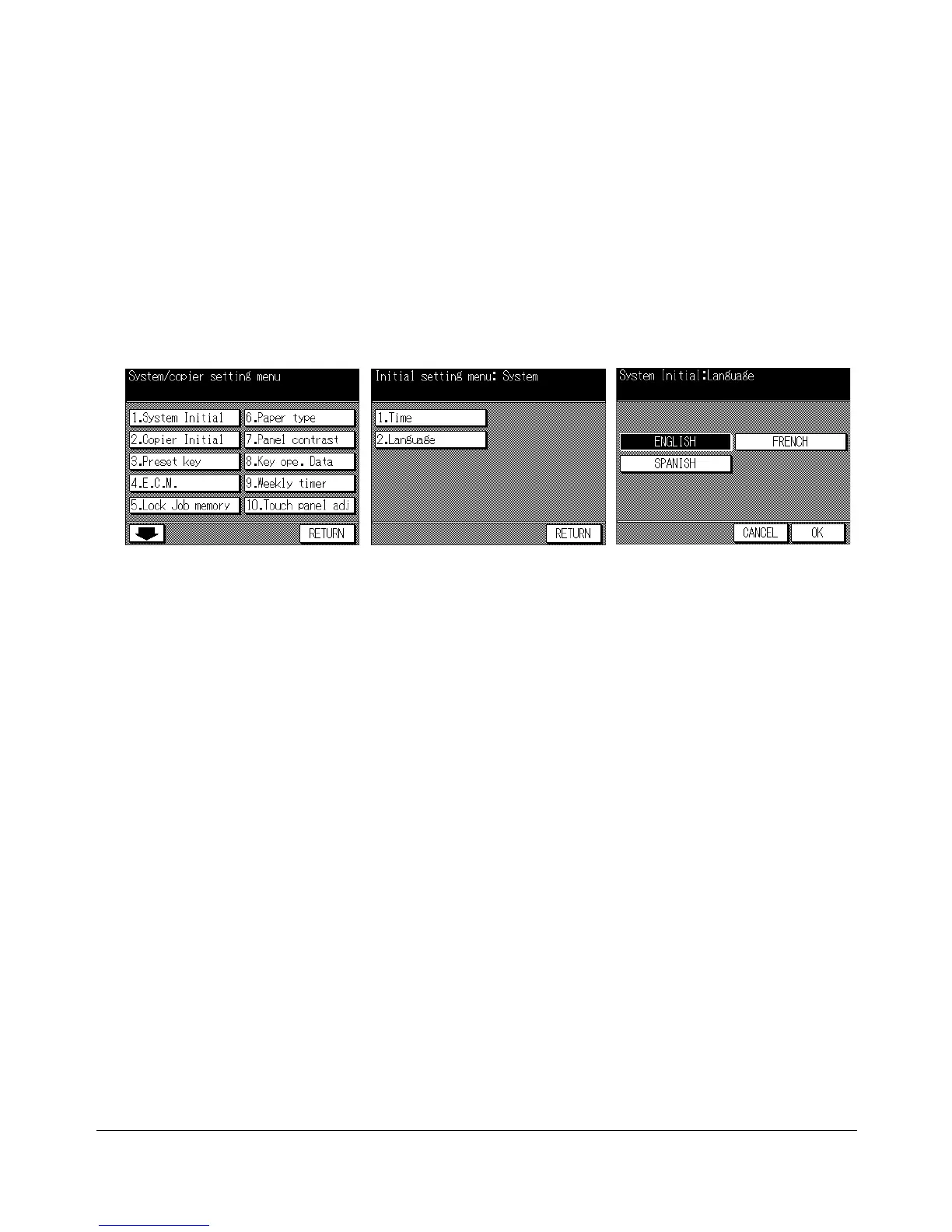
Select the language used in the LCD.
❒ Default setting: English
Key Operator Mode Screen
System Initial Setting Menu Screen
Language Selection Screen
1 Press [HELP] to display the Help Screen, then touch Key-Ope mode.
Enter a 4-digit key operator password, then touch OK to display the Key Operator
Mode Screen.
NOTE: If an invalid Key operator password is entered, continue by entering the valid 4-digit password.
2 Touch 1. System Initial to display the System Initial Setting Menu Screen, then touch
2. Language to display the Language Selection Screen.
3 Touch ENGLISH, FRENCH, or SPANISH.
4 Touch OK to complete the setting and return to the System Initial Setting Menu
Screen. If the other system initial setting change is required, touch the key.
5 Touch RETURN to restore the Key Operator Mode Screen. If other key operator
settings are required, touch the desired key.
6 If no further changes are required, touch RETURN to restore the Basic Screen to
perform copying operations.










 To Next Page