Basic Operations 6-15
Basic Operations
Copy Size
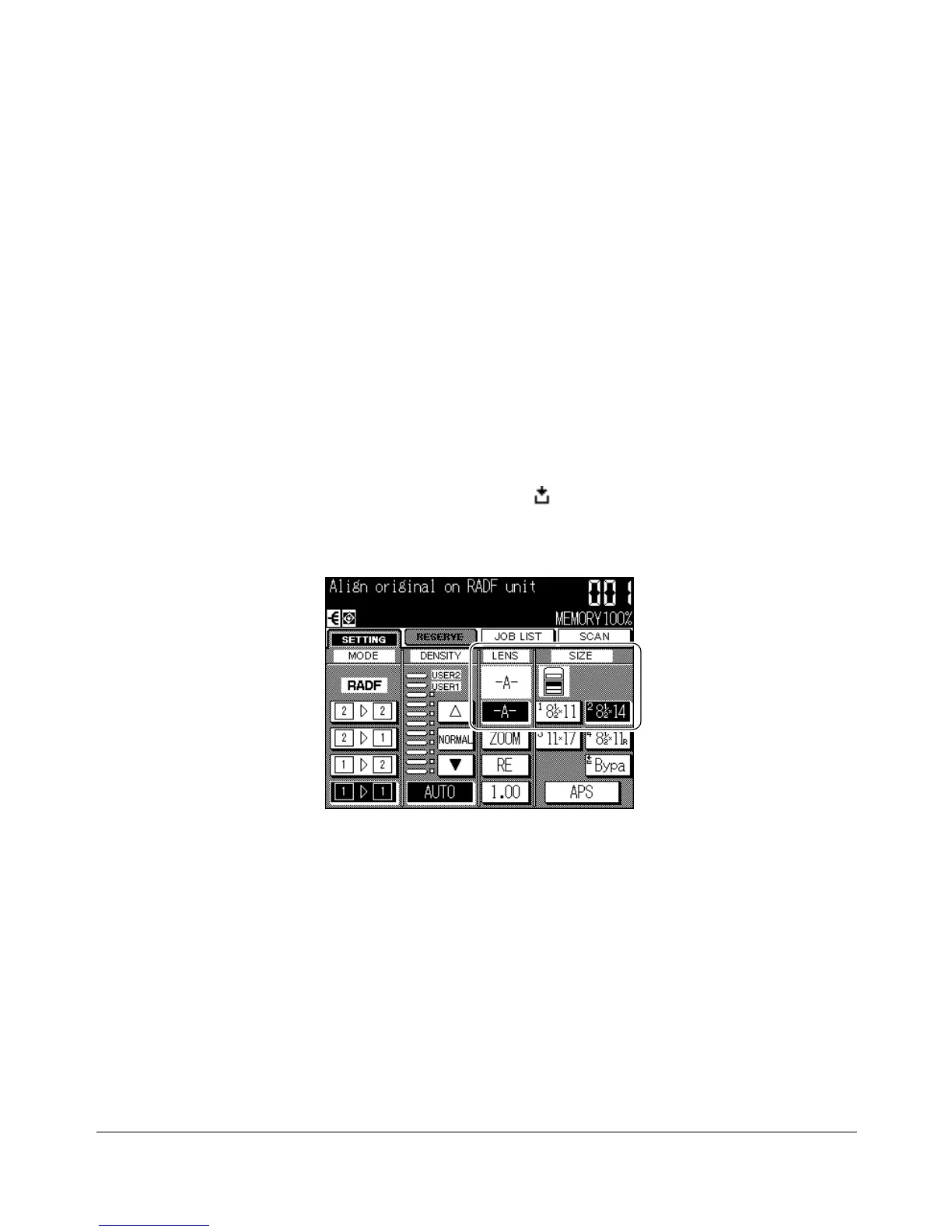
The tray selection keys below SIZE are used to select a specific paper tray. When a
specific tray is selected, the APS key will be deselected and the AMS key will be
highlighted. The copy size may require a ratio adjustment. When using the RADF with
Initial settings, a ratio will be selected automatically.
Selecting Copy Size
Tray locations correspond to trays 1, 2, 3, 4 and Multi-sheet bypass tray. Paper types,
such as
RECYCL, COLOR, LTRHD, SPCL., LABELS, INVOIC, LEGAL,
may be
specified on some trays by the key operator for information only.
❒ When a selected tray is empty, an out-of-paper icon ( ) will flash on the tray key, along with a
message to load paper in the empty tray.
1 Touch the desired tray key to highlight it.
2 APS will be deselected, and the AMS key (-A-) will be highlighted on the Basic
Screen.
To restore the APS mode, touch APS. The AMS key (-A-) will be deselected, and
APS will be highlighted.
Basic Screen
NOTE: See p. 6-9 for details in AMS function.










 To Next Page