Basic Operations 6-33
Basic Operations
Help Mode
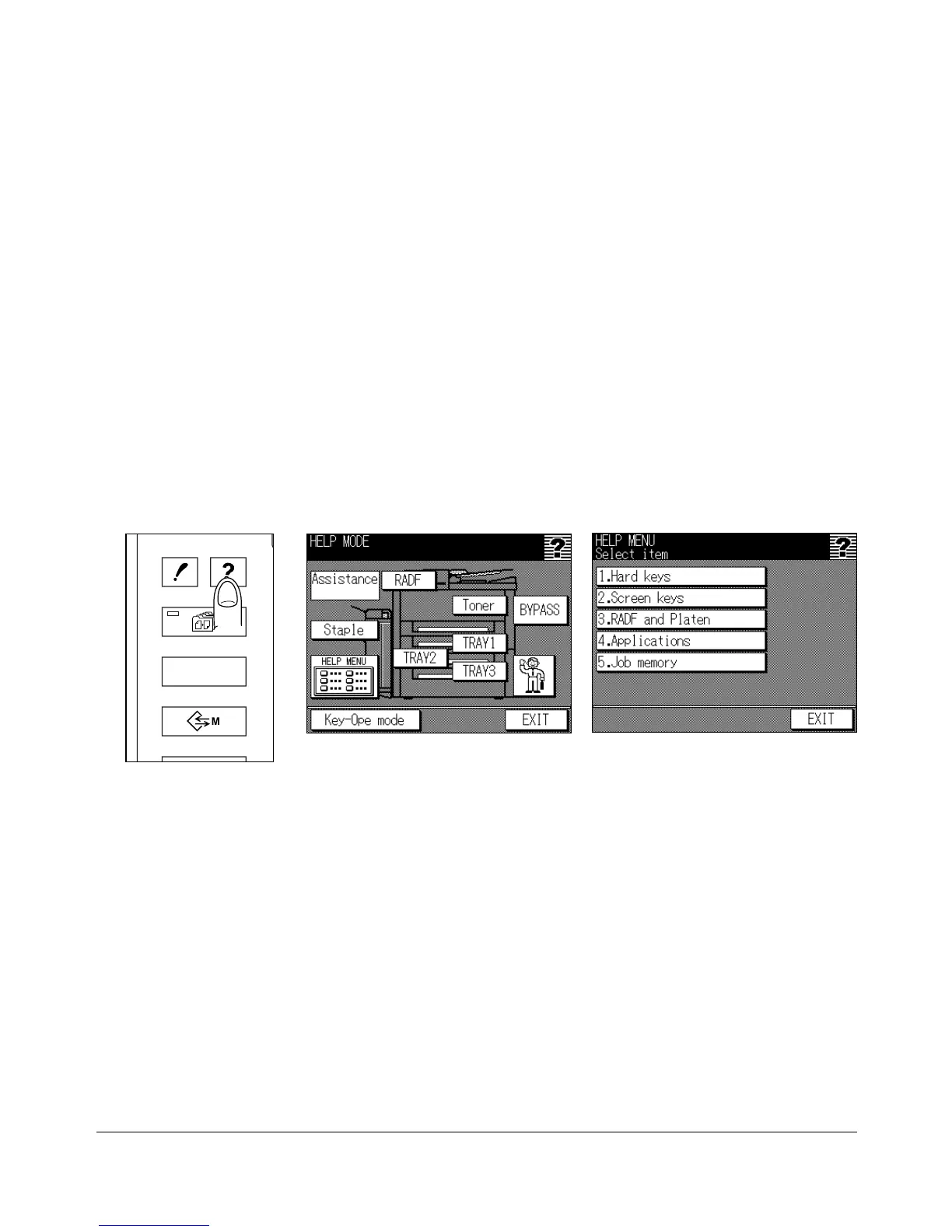
Use the [HELP] key to access information about the current screen mode and to learn
about setting procedures. The [HELP] key can be pressed from any screen except Job
Memory and Key Operator Screens.
The Help Mode Screen also includes the Help menu icon in the lower left of the Help
Screen. When touched, the Help Menu Screen displays a list of all of the copier
functions. When a function item is touched, the Help Screen displays information specific
to that topic.
The Key-Ope mode key is also provided in the lower left corner of the Help Screen.
When touched, the Key Operator Password Entry Screen wll be displayed to access the
Key operator mode. See p. 11-2.
1 While in any screen, press [HELP] to display the Help Screen.
2 Touch Toner, TRAYs, BYPASS, RADF, Staple, or the Service call icon to display
specific Help information.
3 For help on operations, touch HELP MENU in the lower left area of the screen. The
Help Menu Screen will be displayed. Select one of the 5 Help menu items.
4 Touch EXIT to return to the screen that was displayed before pressing [HELP].
Help Screen
Help Menu Screen
Control Panel
OUTPUT
APPLICATION
CHECK
JOB MEMORY
HELP










 To Next Page