Maintenance & Supplies
Maintenance 12-7
Adding Toner
CAUTION
Keep toner cartridge away from children. Although the toner is non-toxic, do not inhale it or allow it to
enter your eyes. In case the toner comes in contact with eyes, please consult your physician.
• When toner supply is low, “Please add toner” message displays on the touch screen.
• Before adding toner, read directions on the toner cartridge label.
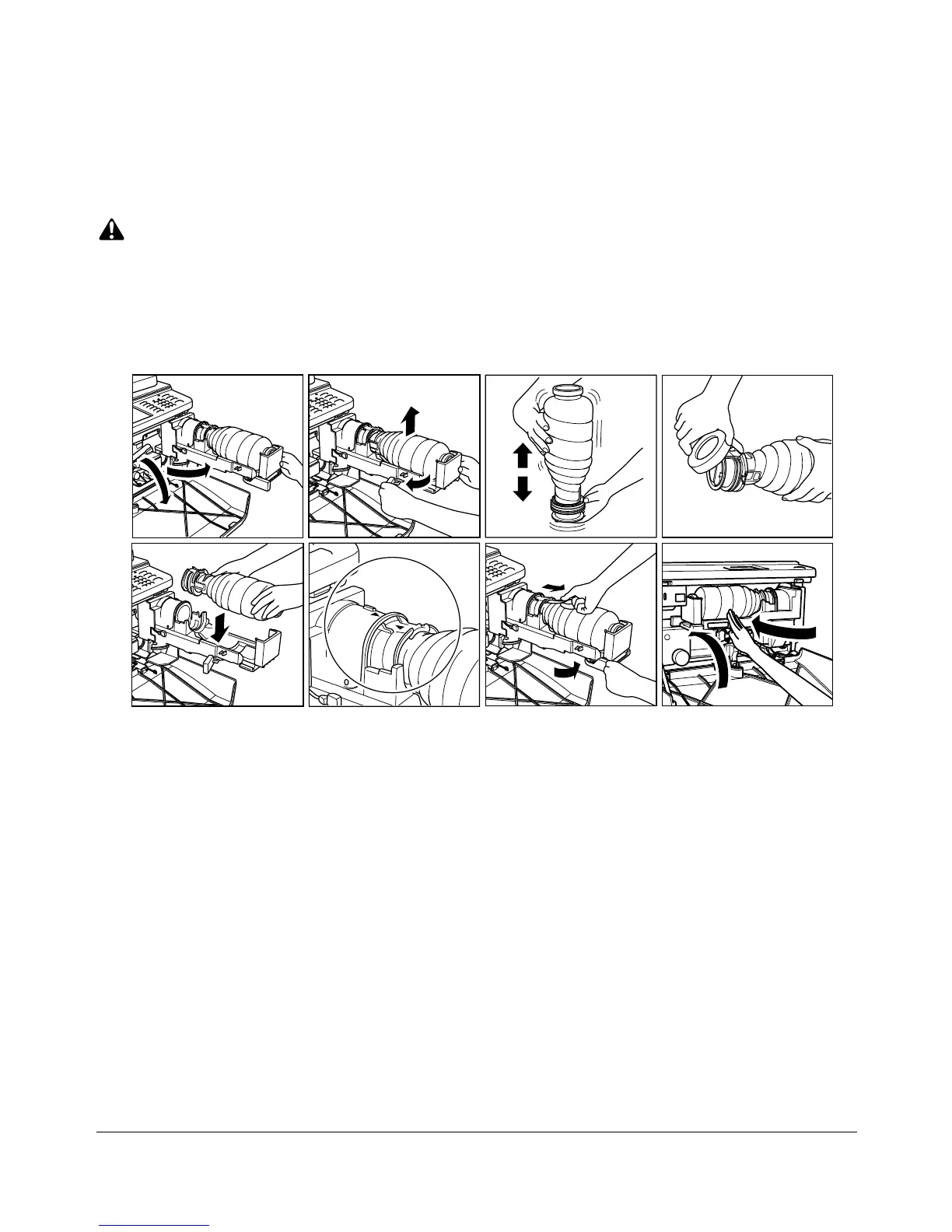
1 Open the machine front door. Pull the toner unit 90° to the right.
2 Push and release the cartridge lock lever to the right until it stops.
3 Remove the empty toner cartridge.
4 Shake the toner cartridge several times to loosen toner.
5 Remove the toner cartridge cap.
6 Set the new toner cartridge into the toner unit.
NOTE: Align the ▲ mark on the toner cartridge with ▼ mark on the toner unit as illustrated above.
7 Return and lock the cartridge lock lever to the left until it stops.
The lock tape will be pushed out.
8 Remove the lock tape.
9 Return the toner unit to its original position, then close the machine front door
securely.










 To Next Page