Quick Start
Laborie NXT Pro Owner’s Manual LBL-00146 [C], MAN2010 20
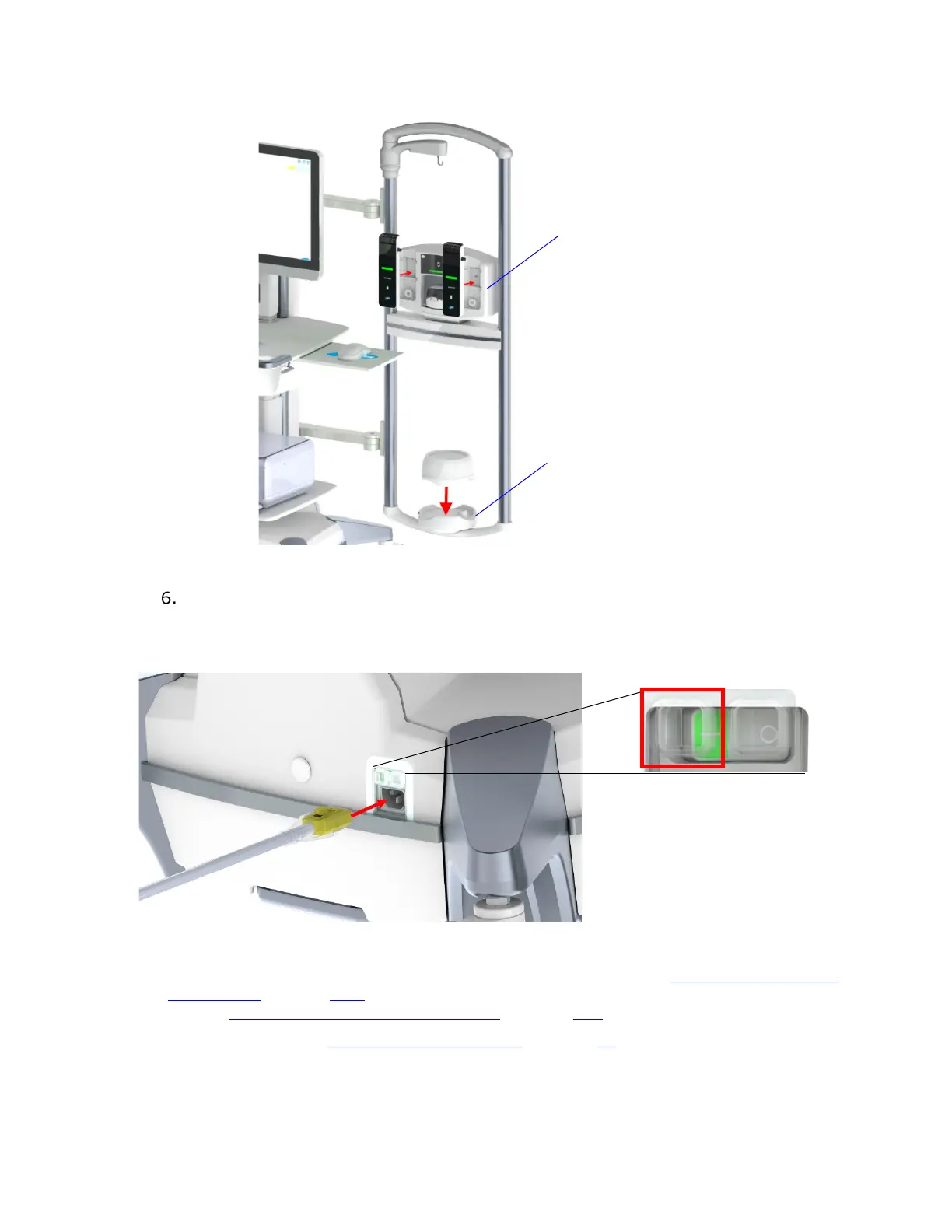
Figure 3: Roam NXT and Urocap NXT inserted in NXT Docking Station
The NXT Pro cart’s power cable plugs in at base of the NXT system. Connect the
NXT system power cord to the NXT Pro cart, as shown in
Figure 4, and then plug
the NXT cart’s power cable to an external power source. After the NXT system is
connected, press the ON button, as indicated in Figure 4.
Figure 4: Connecting the NXT Pro Cart to Supply Mains
For information on charging the Roam NXT, refer to the section Roam NXT—Charging
the Battery on page 109. For information on charging the Urocap NXT, refer to the
section Urocap NXT—Charging the Battery on page 111.
Refer to the section Maintenance and Service on page 80 for information on cleaning
and maintaining the modules, including all system check intervals and procedures for
verifying the integrity of the system.
Charging Hub



 To Next Page