Synergy Software
Laborie NXT Pro Owner’s Manual LBL-00146 [C], MAN2010 77
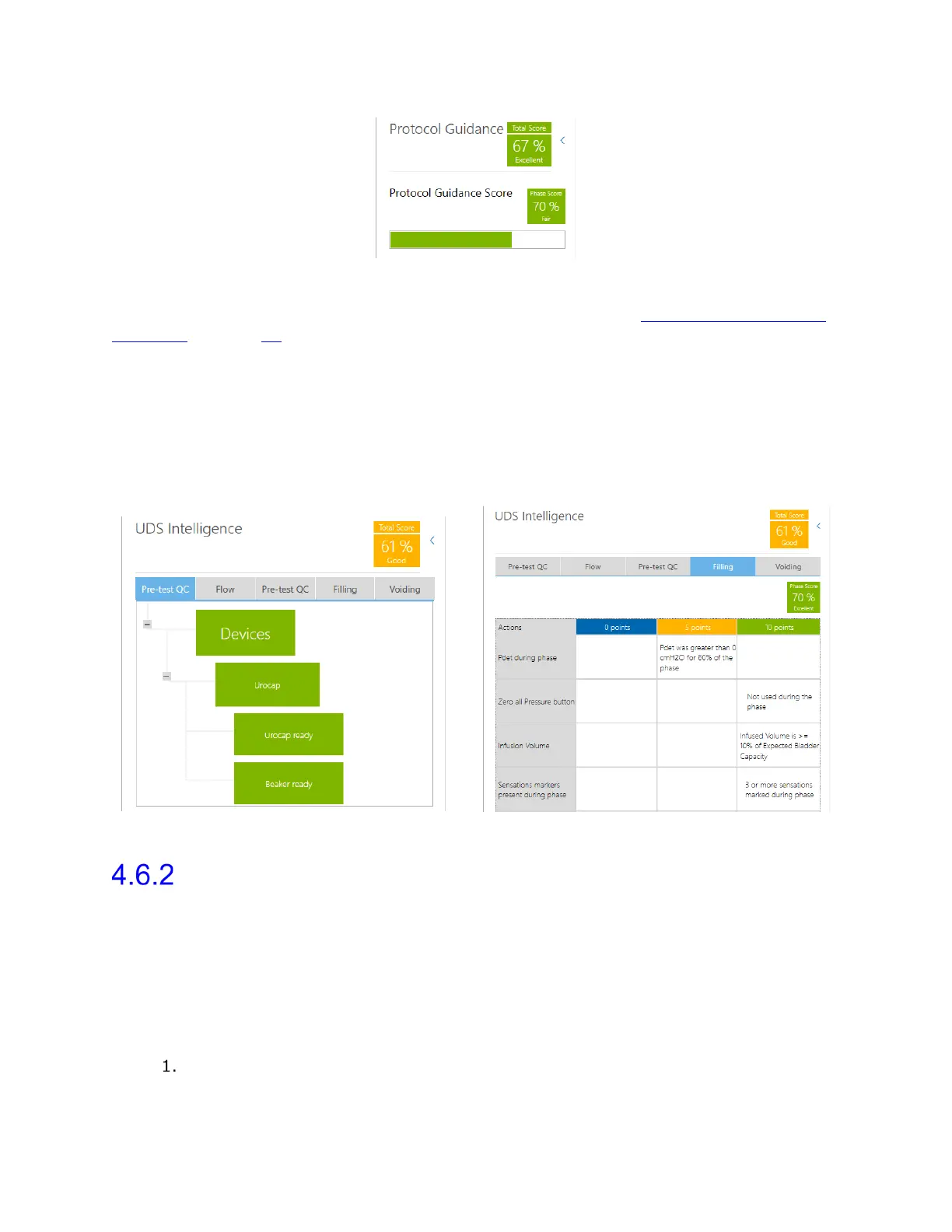
Figure 67: Protocol Guidance—Total Score and Phase Score
For an overview of how QC Score is calculated, refer to the section QC Score and QC Score
Summary on page 77.
4.6.1.3 UDS Intelligence in the Review Workflow Step
Compiled features of UDS Intelligence can be referenced in the Review workflow step.
From the Slide Sidebar, select the Quality Control icon. From this window, you can
review the Protocol Guidance, Pre-test Quality Control, and QC Score for each phase
of the study, such as Flow, Filling, and Voiding. Navigate the window by selecting the tab
corresponding with the phase that you want to review (Figure 68).
Figure 68: Protocol Guidance and QC Score in the Review Phase
QC Score and QC Score Summary
The QC Score is an aggregated estimate of the quality of the workflow tasks performed
while conducting a study.
You can view the QC Score in a summary at the end of study Report or from the Quality
Control icon in the Slide Sidebar. By default, the QC Score Summary option checkbox is
not selected in the Configuration Settings panel of the report (Figure 68).
To enable the QC Score Summary option in the report, do the following:
Create a new report copy or select a previously created report copy from the
Configuration list box.



 To Next Page