Synergy Software
Laborie NXT Pro Owner’s Manual LBL-00146 [C], MAN2010 46
IMPORTANT: Do not leave the computer unattended after you have logged in. Laborie
recommends that you manually lock the computer if you expect to be away from it for an
extended time.
Creating User Accounts
Synergy facilitates four basic account structures: Local Admin, Local User, Domain Admin,
and Domain User. Local accounts are managed within Synergy by Local Admins. Domain
accounts are intended to link to the Active Directory of the user institution; if you’re
creating domain accounts, ensure that all roles within Synergy align with the Active
Directory User Group roles of the user institution.
4.1.2.1 User Account Setup and Password Reset
To create a new account in Synergy, the user must have a Local Admin or Domain Admin
account. To create new user accounts, perform the following steps:
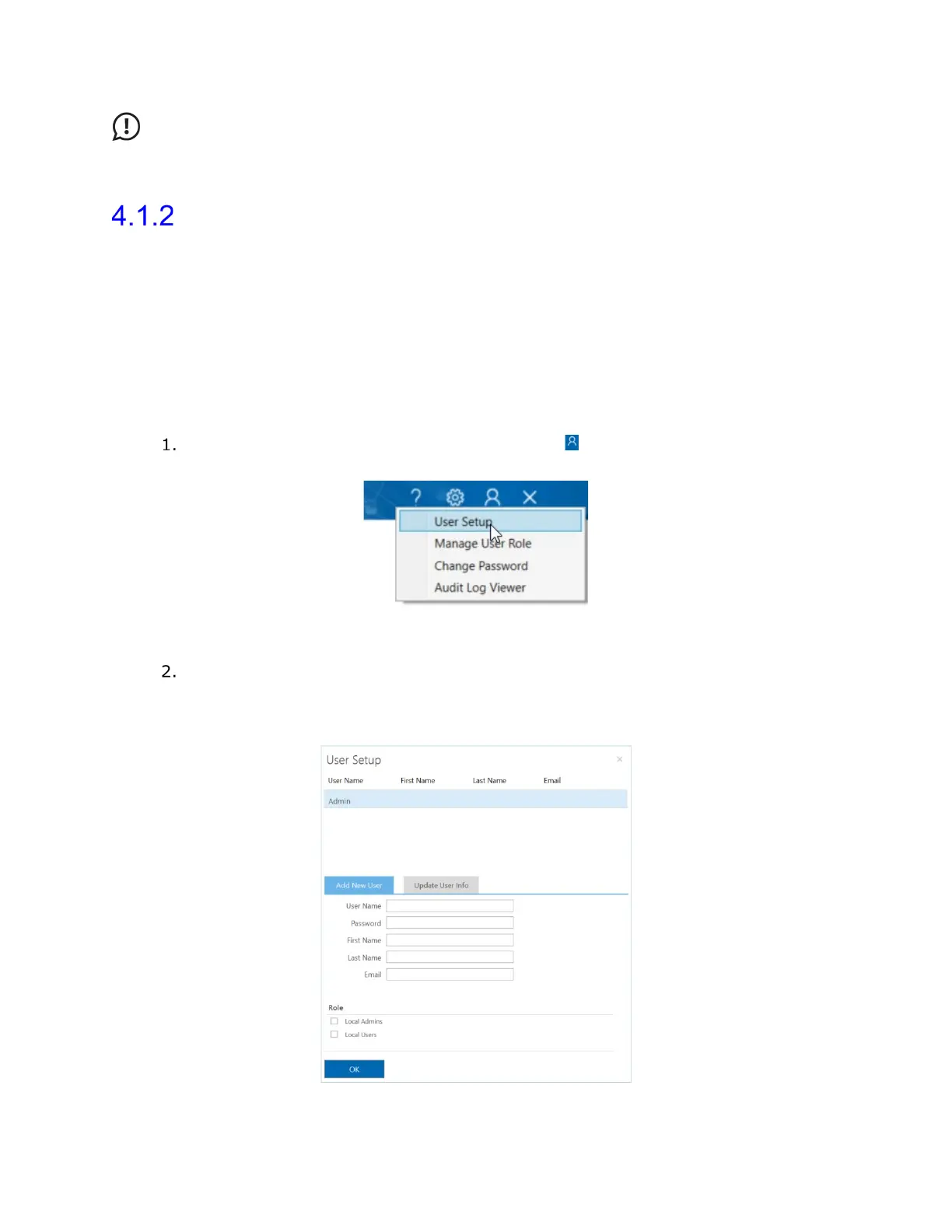
On the Synergy title bar, click the Admin icon ( ) and then select User Setup
(
Figure 30).
Figure 30: Accessing User Setup Application
In the User Setup dialog box that opens (Figure 31), type the Username,
Password, First Name, Last Name, and Email where indicated. In the Role
section, select Local Admins or Local Users to set the account type. Click OK to
complete the account setup.
Figure 31: User Setup Dialog Box



 To Next Page