Maintenance and Service
Laborie NXT Pro Owner’s Manual LBL-00146, MAN2010 93
5.3.2.2 Verifying Pressure Measurement Capability
To begin verifying calibration for the PIM NXT transducers, gather one cylinder at least
25 cm tall and one NXT catheter. To complete calibration verification, do the following:
1. Fill a cylinder with 20 cm of water.
2. Coil the NXT catheter inside the cylinder so that all pressure ports touch the bottom
of the cylinder.
3. Connect the catheter to the relevant PIM NXT channel.
4. On the title bar, click the Settings ( ) icon and then click the System Settings >
Device Manager option. The Device Manager window opens.
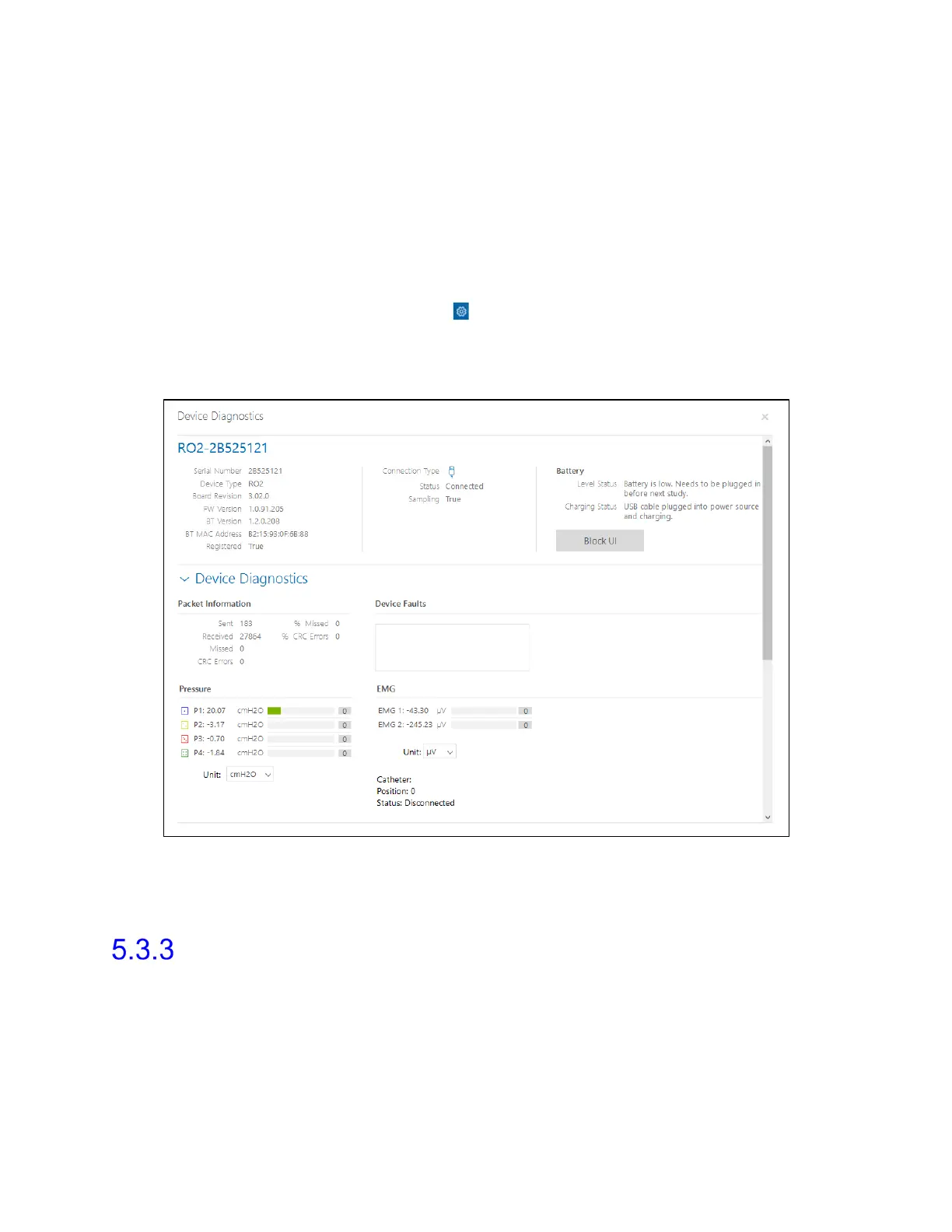
5. Click the Roam NXT option and then click the Run Diagnostics button. The Device
Diagnostics window opens (Figure 77).
Figure 77: Roam NXT—Device Diagnostics Window
6. The Pressure should be approximately 20 cm of water ±3%. Repeat for each
channel.
Infusion Pump NXT and Volume Transducer—
Verifying Calibration
To set up verification of calibration for the Infusion Pump NXT and Infusion Volume
Transducer:
1. Log in to the Synergy software.
2. Ensure that the Infusion Pump NXT is connected to the Synergy software.



 To Next Page