Maintenance and Service
Laborie NXT Pro Owner’s Manual LBL-00146, MAN2010 91
4. Click the Zero Weight button.
5. The Relative Weight for Urocap NXT should measure at 0.0 g ±2 g immediately
following zeroing. To verify calibration, check the absolute and relative weight with
water.
6. The Absolute Weight should measure 0.0 g ±1 kg.
5.3.1.2 Checking the Absolute and Relative Weight with Water
To complete calibration verification for the Urocap NXT, check the relative weight with
water:
1. Take a beaker and measure its weight (W
b
) on the Urocap NXT. Click the Zero
Weight button.
2. Add 500 ml of water to the beaker.
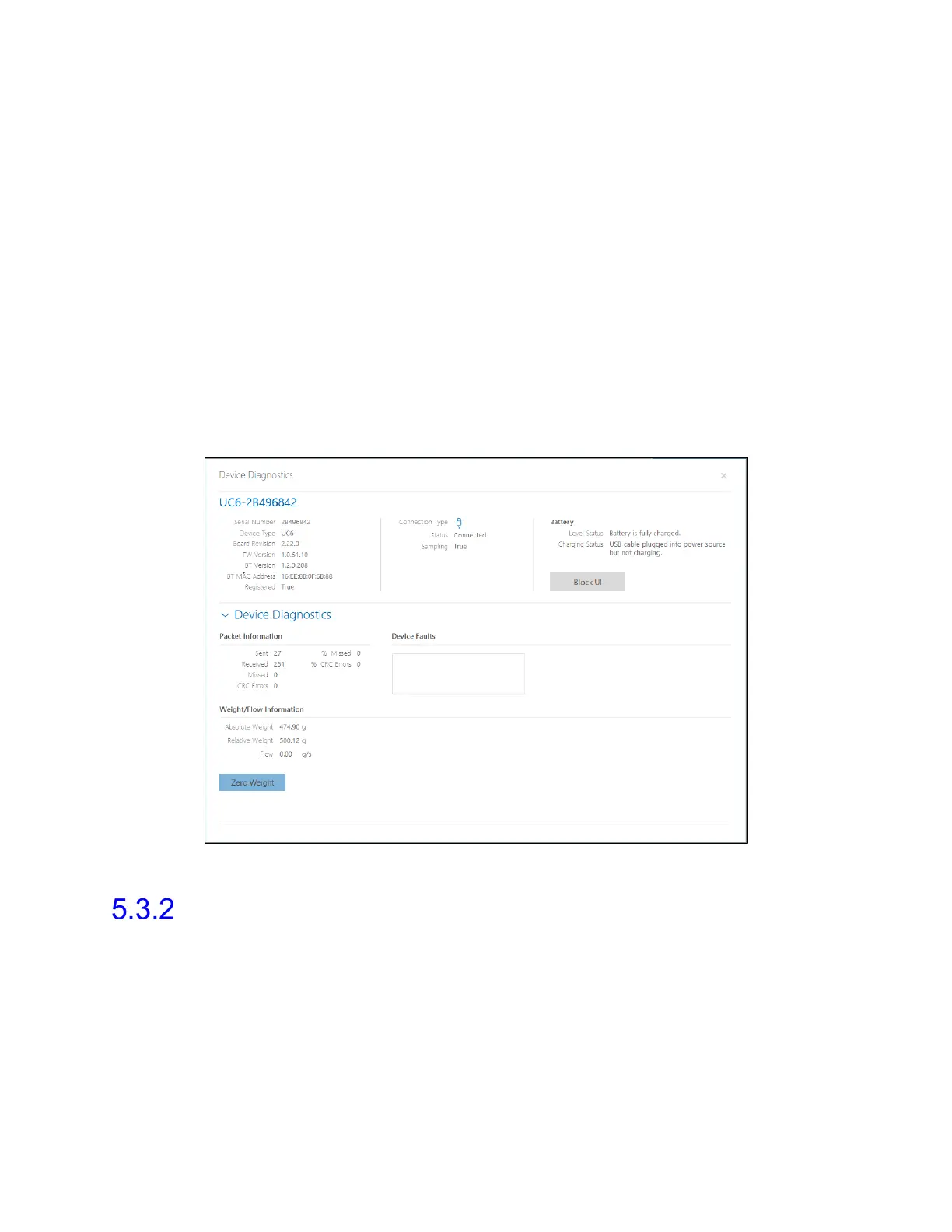
3. Verify that the Relative Weight for the Urocap NXT in the diagnostic window is
500.00 g ±3%, as illustrated in Figure 75.
Figure 75: Urocap NXT—Device Diagnostics with Water
Roam NXT—Verifying Calibration
To set up verification of calibration for the Roam NXT, perform the following steps:
1. Log in to the Synergy software.
2. Ensure that the PIM NXT is connected to the Roam NXT. Connect the PIM NXT that
corresponds with the consumable type in use.
3. Connect the Urocap NXT, Roam NXT, and the Infusion Pump NXT to the Synergy
software and set up the hardware channels.



 To Next Page