4-5. Using the driving support systems
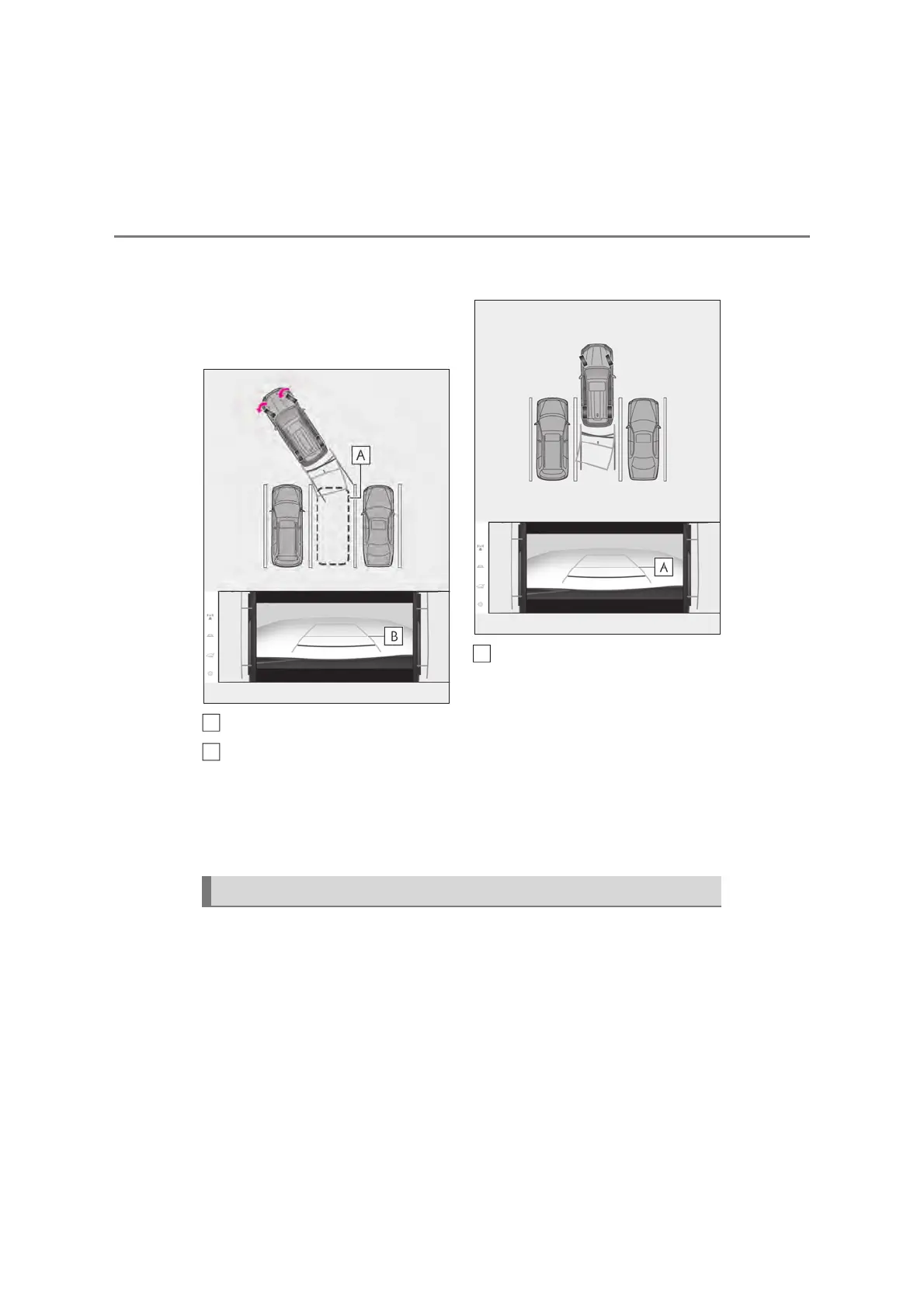
Shift the shift lever to the R position.
Turn the steering wheel so that the
estimated course lines are within
the parking space, and back up
slowly.
Parking space
Estimated course lines
When the rear position of the vehi-
cle has entered the parking space,
turn the steering wheel so that the
vehicle width guide lines are within
the left and right dividing lines of
the parking space.
Vehicle width guide line
Once the vehicle width guide lines
and the parking space lines are
parallel, straighten the steering
wheel and back up slowly until the
vehicle has completely entered the
parking space.
Stop the vehicle in an appropriate
place, and finish parking.
Lines indicating current vehicle and tire position are displayed in a composite view
on an image taken in front of the current vehicle position and assists the driver to
check conditions underneath the vehicle or determine the position of the rear tires.
To display the screen, when the shift lever is in the R position, select the under vehi-
cle terrain view (rear side) selection switch.
z It is necessary to drive a certain distance or more for the image to be displayed.
A
B
A
Under vehicle terrain view (rear side) & dual side views



 To Next Page