4
4-5. Using the driving support systems
Driving
z If the under vehicle terrain view display is selected while the screen is displayed,
the screen switches from normal to magnified display. (Selecting the display
again returns the screen to the normal display)
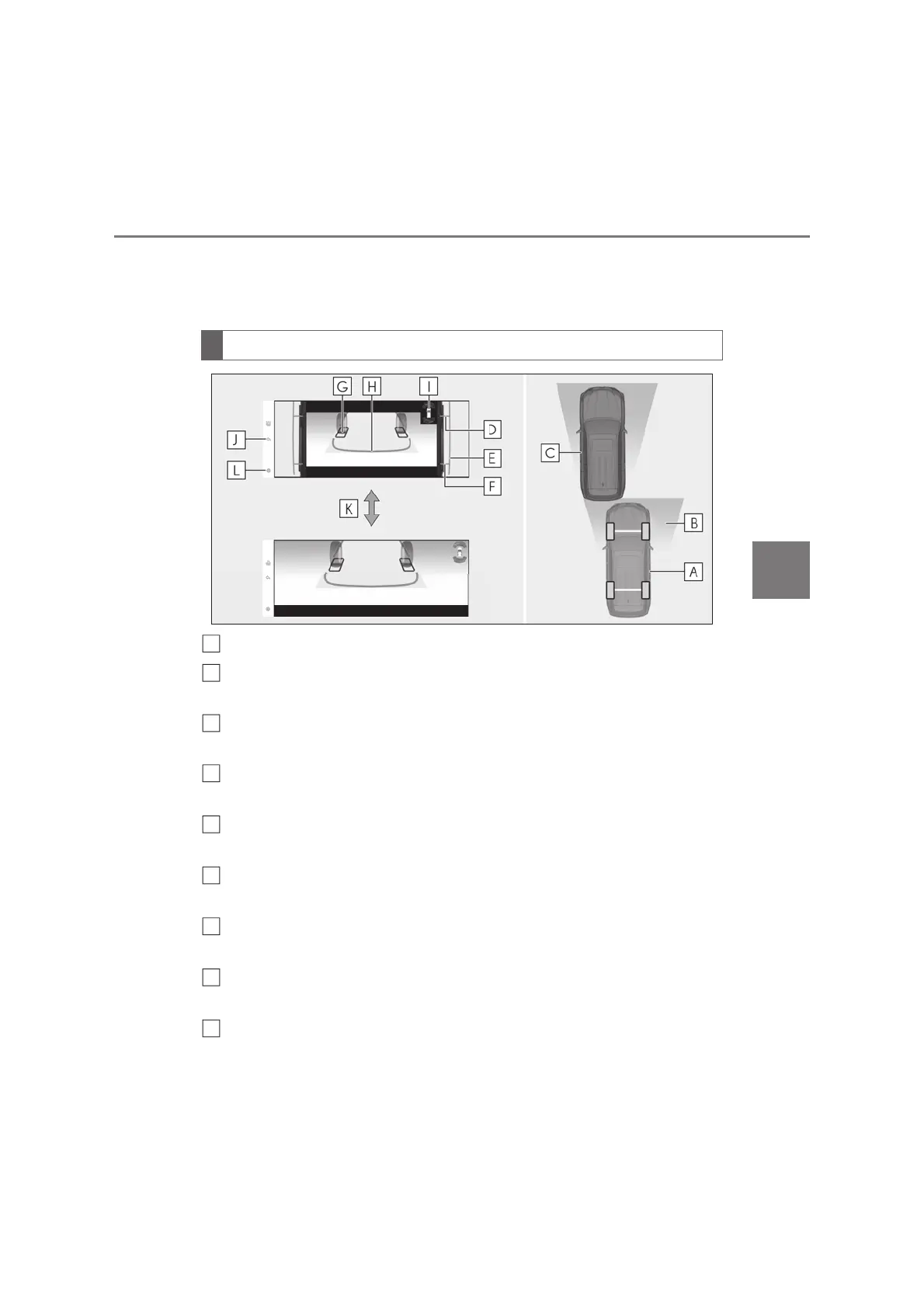
Current vehicle position
Image displayed in the under vehicle terrain view (rear side) (image taken in
front of the current vehicle position)
Vehicle position at the time the image was taken (in front of the current vehicle
position)
Front tire contact line (blue)
Indicate estimated tire positions on the image.
Vehicle width lines (blue)
Indicate the width of the vehicle including the outside rear view mirrors.
Rear tire contact line (blue)
Indicate estimated tire positions on the image.
Tire position indicator lines (black, white)
Indicates the estimated position of the rear tires.
Vehicle position indicator lines (blue)
Indicates the estimated position of the vehicle.
Lexus parking assist-sensor
Displayed if an obstacle is detected while the Lexus parking assist-sensor is turned on.
Screen display
A
B
D
E
F
G
H
I



 To Next Page