6-41
8.2.1 OUTRIGGER SETTING
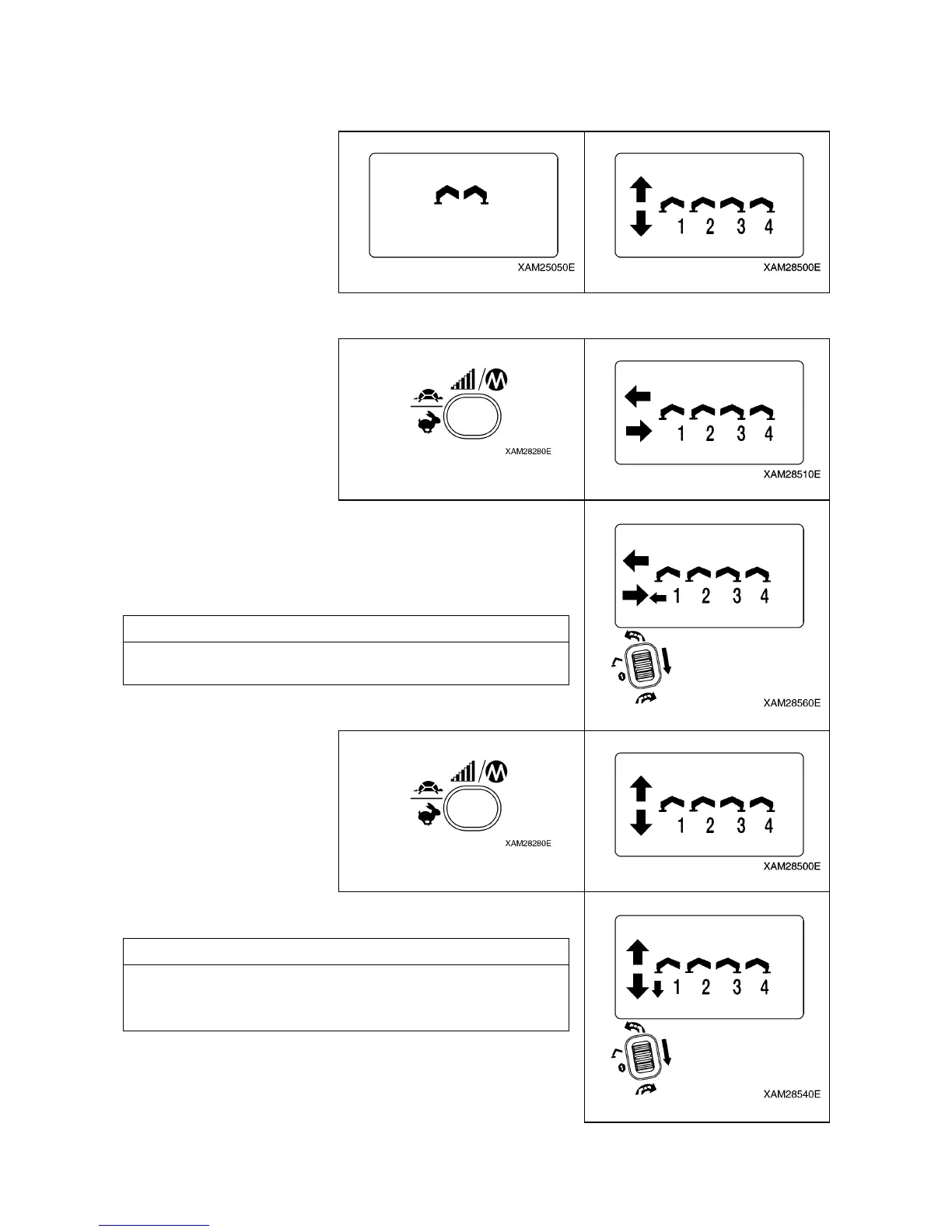
1. In accordance with “IINTERACTIVE REMOTE CONTROL 6.2 Procedure in the Operation Mode”, enter
into the “OUTRIGGER MODE”.
2. Push Speed/Mode button in the mode condition of above 1.
The operation mode is switched to “Outrigger Extension mode”.
3. Turn one of the outrigger operation levers to “Extend (lower)”
and pull the Accelerator lever slowly.
4. When the outrigger is extended to the proper position, slowly
release the accelerator lever, then release the outrigger
operation lever to return to its neutral position.
NOTES
Repeat the same process to the other three outriggers, so that
all of the four outriggers are extended to the proper postion.
5. Push Speed/Mode button in the mode condition of above 4.
The operation mode is switched to “Ground setting mode”.
6. Turn one of the outrigger operation levers to “Extend (lower)”
and pull the Accelerator lever slowly.
NOTES
Repeat the same process to the other three outriggers and lift all
the four outriggers equally and gradually, so that the Crane is
properly elevated.
7. When the Crane is elevated “approximately 50mm”, slowly
release the Accelerator lever, then release the outrigger
operation lever to return to the neutral position.



 To Next Page