6-48
[3] SETTING TO THE MICRO SPEED MODE
Setting to the Micro speed mode requires actual crane operations with the engine running.
Before starting the Micro speed mode setting, always ensure that nobody except on business is
within the working area.
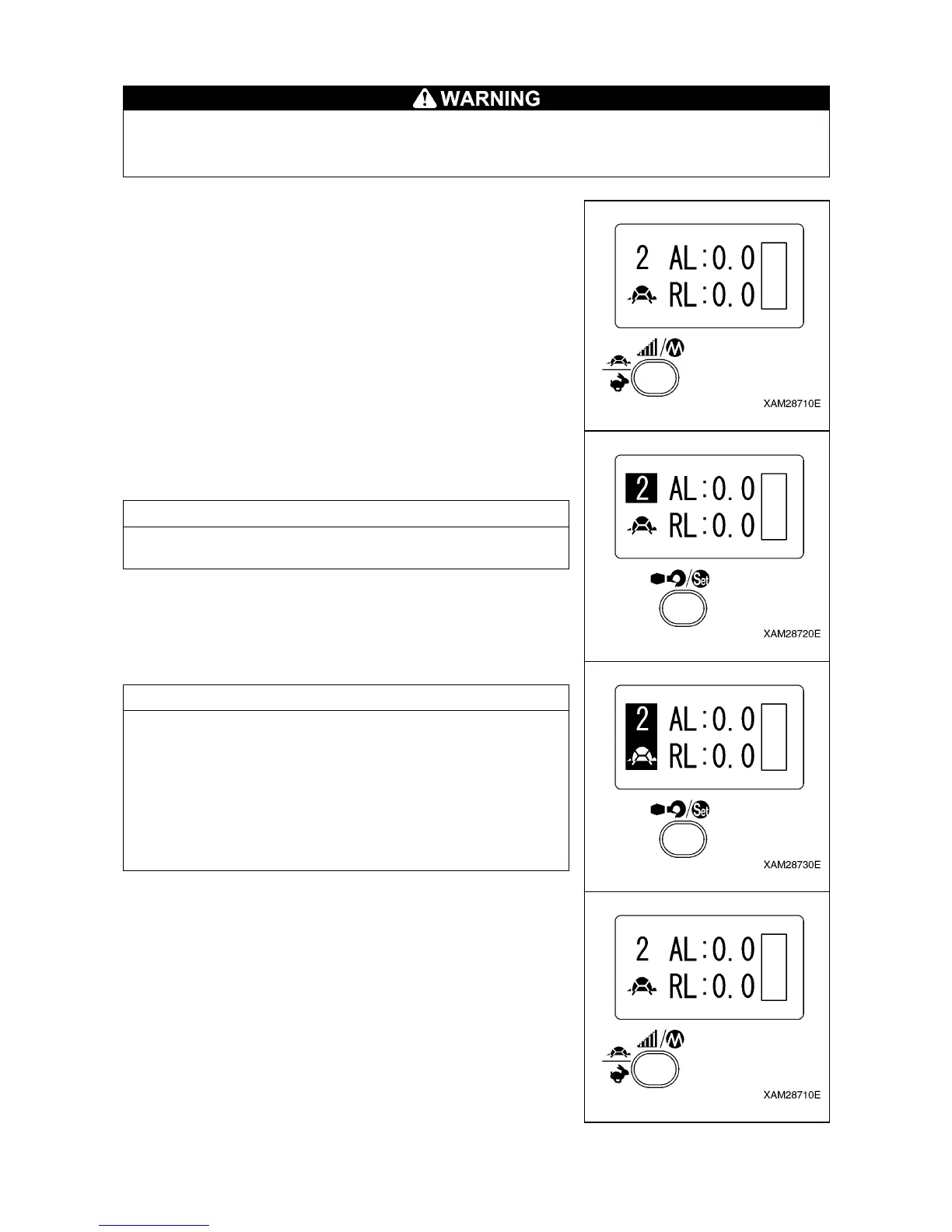
1. Push the Speed/Mode button several times so that the LCD
screen indicates the “MICRO SPEED MODE”.
2. Push the Hook stow/Setting button for at least 2 seconds.
Indication of “2” in the LCD screen is high-lighted and it enters
into the “MICRO SPEED MODE” setting screen.
NOTES
The “MICRO SPEED MODE” setting is available while the “2” in
the LCD screen is high-lighted.
3. Push the operation lever to be adjusted and pull the Accelerator
lever slowly.
When the operation speed reaches the desired maximum speed,
push the Hook stow/Setting button.
NOTES
• Perform the same process to other operation levers,
respectively.
• In case that you operate two or more levers at the same time for
this setting, note that the Micro speed rate is established to the
ratio of the fastest operation of all.
It is recommended that the Micro speed shall be set one by one
of each operation lever
• No operation lever provides the Micro speed unless otherwise
set to the Micro speed mode, beforehand
4. When the settings for all the required operation levers are
complete push the Speed/Mode button. Now the setting is
established and the Micro speed mode is available.



 To Next Page