Using the RFID Functions 153
_______________________________________________________________________________________________
_______________________________________________________________________________________________
MICROPLEX Operator’s Manual logiJET T4-2 /T6-2 /RFID Edition 2.2
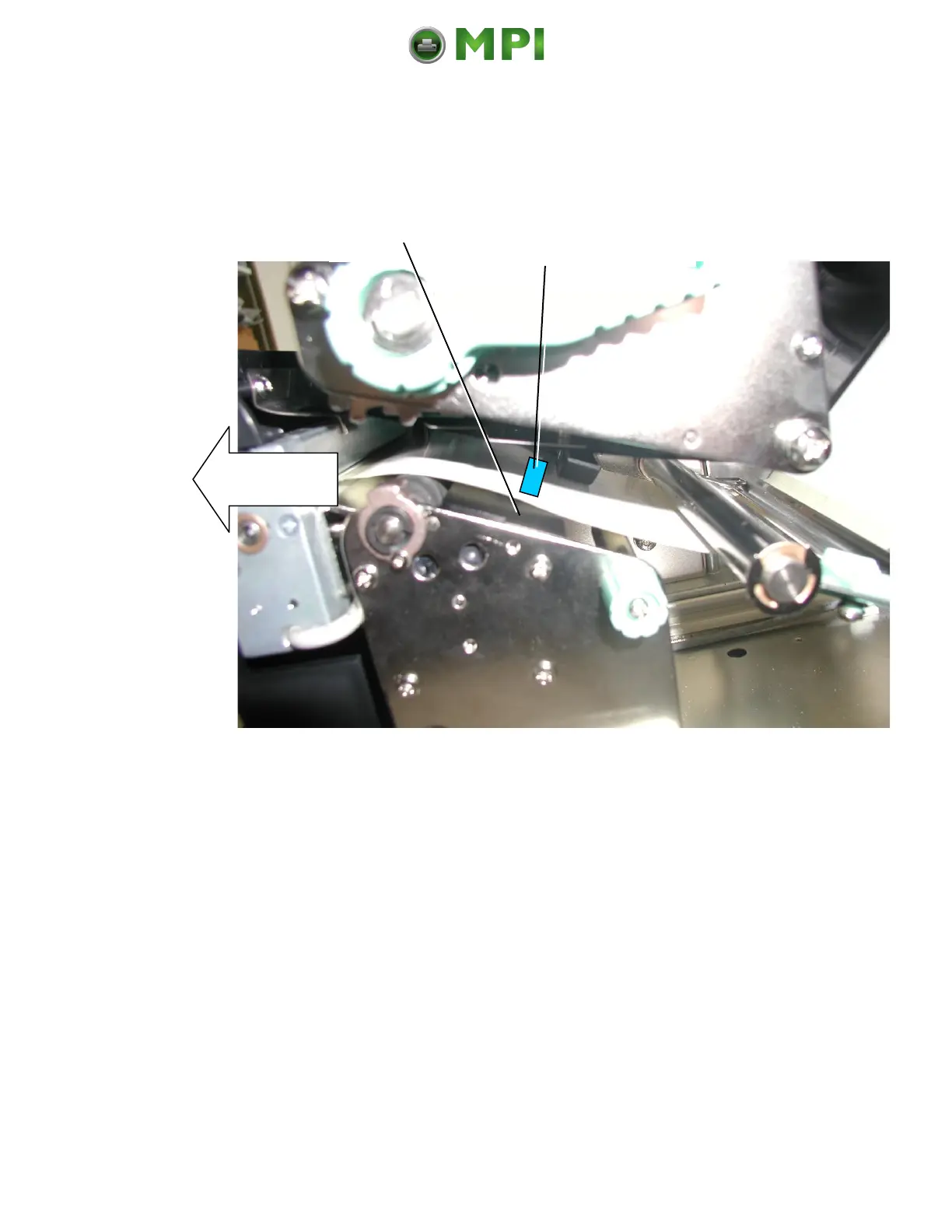
4. Open the printhead now and check the position of the RFID Inlay:
is the RFID Inlay positioned in the area of the printer antenna?
Fig. 10.2.3.b View into the printer: Check the position of the RFID Inlay above the printer antenna
5. Please ascertain, how far the label material has to be moved, until it
would be positioned in the optimal position right above the center of the
printer antenna. (Compare the figure above.)
6. Close the printhead.
7. Adjust the setting in accordance to the results of step 5:
use the [Tag position ] panel function to set the transponder position
value (offset).
(Second approximate value for the Tag Position.)
8. Repeat the steps 4 up to 7 until the RFID Inlay (Tag) is positioned
central above the printer antenna.
Mantenimiento Periféricos Informáticos C/Canteras, 15 28860 Paracuellos de Jarama (Madrid) Tel: 00 34 917481604 Web: https://mpi.com.es/



 To Next Page