52 Setting up the Printer
_________________________________________________________________________________________
_______________________________________________________________________________________________
MICROPLEX Operator’s Manual logiJET T4-2 /T6-2 /RFID Edition 2.2
6.2. Turning on the Printer
First, please notice the instructions given in chapter 5 Handling of
Consumables.
1. Plug one end of the printer power cord into the socket at the back of the
printer and the other end into a properly grounded outlet.
2. Turn on the printer. The power switch is located at the rear side of the
printer (see section 2.4 Printer Components).
As soon as the printer’s warm up phase is finished the printer goes into
the ON LINE mode. A status message and the name of the printer are
displayed.
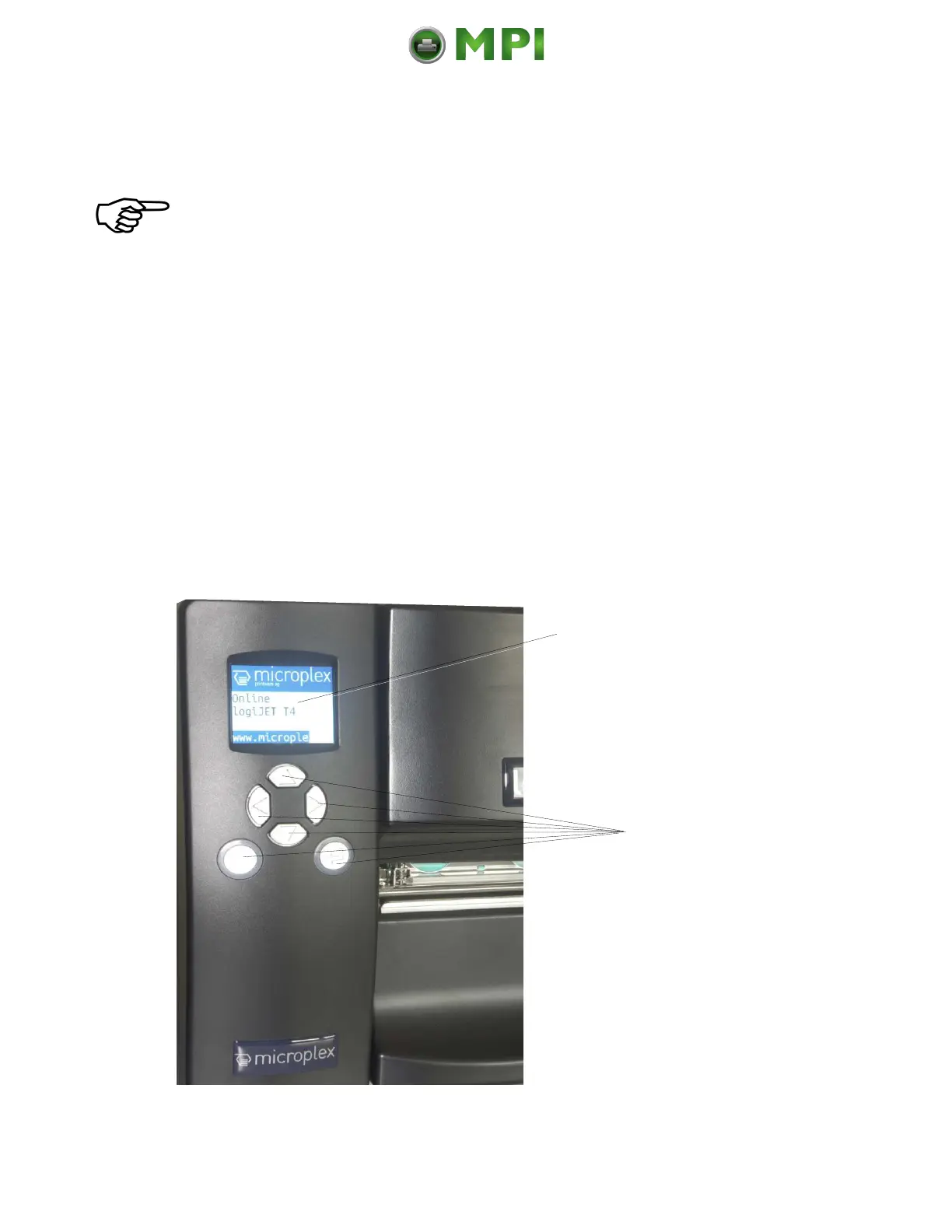
6.3. Control Panel of the Printer
Fig. 6.3.a Control Panel of the logiJET T4-2 / T6-2
Display
Here the printer‘s
status messages are
displayed
6 function keys
The bwo lower keys, the
ONLINE key and the
ENTER key both come
with a light ring.
These “indicator lights”
are used to show printer
status.
Mantenimiento Periféricos Informáticos C/Canteras, 15 28860 Paracuellos de Jarama (Madrid) Tel: 00 34 917481604 Web: https://mpi.com.es/



 To Next Page