Controlling the Printer via the integrated Website (WebPanel) 63
________________________________________________________________________________________________
_______________________________________________________________________________________________
MICROPLEX Operator’s Manual logiJET T4-2 /T6-2 /RFID Edition 2.2
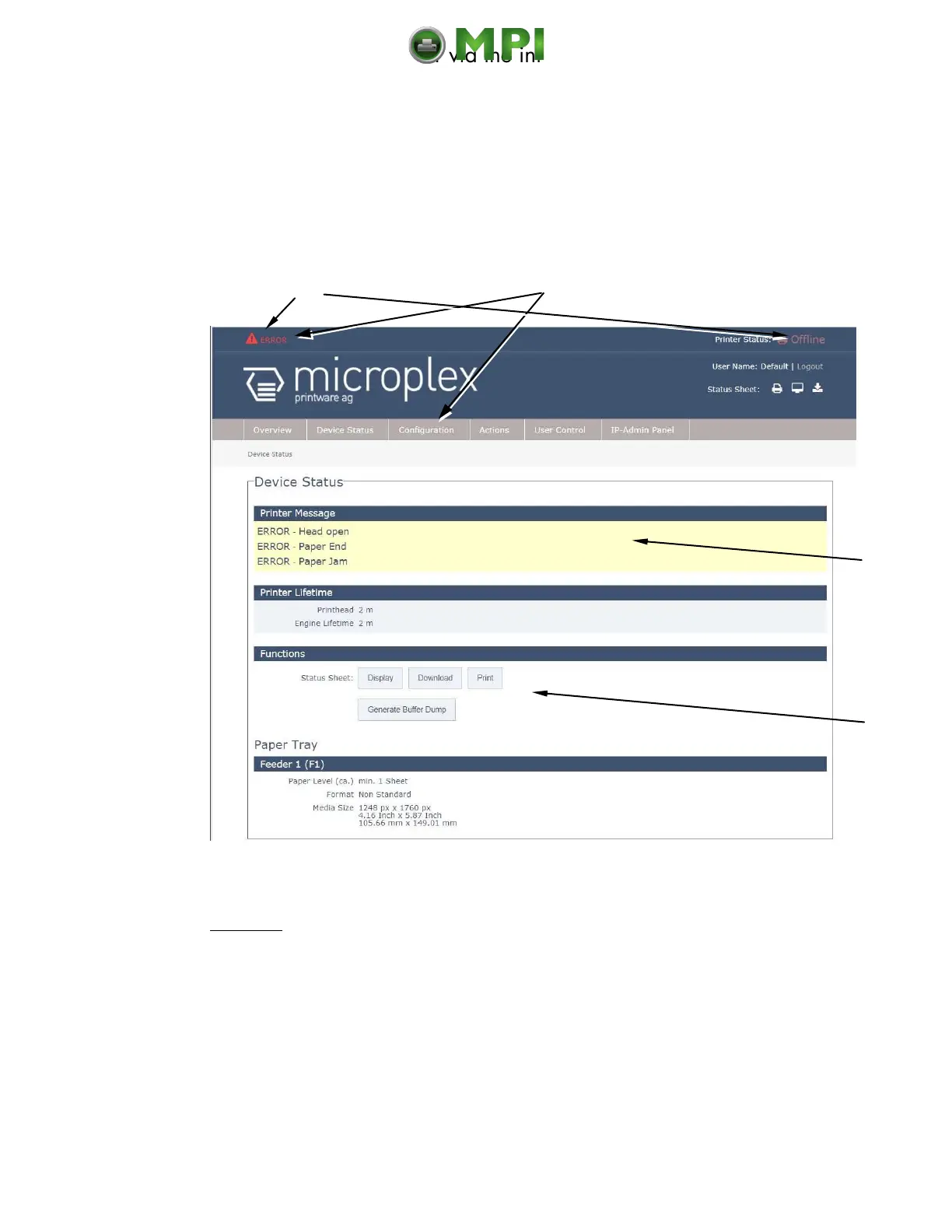
7.3.5. Device Status Page
The Device Status page is not only accessible via the menu, but also appears if you
click on the error message (in the event of a fault).
(Or you are on the Overview page of the MICROPLEX WebPanel, then you can click on the
button „Device Status“, compare Fig. 7.2.a)
Fig. 7.3.5.a logiJET T4-2 /T6-2: Device Status page of the MICROPLEX WebPanel
Abstract:
The printer status messages are displayed here (Offline/Online).
Error messages (short form) are displayed in this area, too.
The (Error)Messages of the printer are listed here.
Here you can show the printer status sheet, save it to a file, and release its
printing.
Calls up the Device Status page
Mantenimiento Periféricos Informáticos C/Canteras, 15 28860 Paracuellos de Jarama (Madrid) Tel: 00 34 917481604 Web: https://mpi.com.es/



 To Next Page